iPhoneAddict Apps
  • Actualités
  • Accueil Apps
  • iPhone
  • iPad
  • Universelles
  • Mac
  • Apple TV
KG KultureGeek
App
iPhone / iPad Télécharger iAddict v5 Mac Télécharger iAddict Mac
  • Actualités
  • Accueil Apps
  • iPhone
  • iPad
  • Universelles
  • Mac
  • Apple TV
  • Archives keynotes
  • Firmwares & iTunes
  • Contactez-nous
  • Comparateur de prix
  • KultureGeek
Accueil » Liste des Apps » Apps iPhone » Utilitaires » Quick Password Safe
1.9 iOS €Gratuit MIFUMI YOSHIDA 0 0 Manage Your Password More Easily And More Securely. This app safely keeps the password as a safe(cashbox). Recently, many accidents that are unauthorized access to accounts by the recycling of password have occurred. With the increase in IT service,...
Quick Password Safe

Quick Password Safe

iPhone / Utilitaires

Gratuit
Obtenir sur l'App Store
Facebook X E-mail

Manage Your Password More Easily And More Securely.

This app safely keeps the password as a safe(cashbox). Recently, many accidents that are unauthorized access to accounts by the recycling of password have occurred.
With the increase in IT service, in order not to disturb the daily life, we want to avoid that the account is stolen.
However, to perform it, it becomes necessary to set a different password in each.
That means, it is impossible to remember passwords with one's head.
If you use this application, the app will remember your passwords, instead of you.

FEATURES

- It does not clearly display suddenly when viewing the password.
(You can fine-tune the brightness of the character using the slider.)
- It will return to its original position when you release your finger from the slider, it is suitable to browse secretly.
- ID and password can also be used to copy. (Not recommended)
- You can protect the app itself with a passcode.

USAGE

A. SETTING THE PROTECTION PASSCODE
(1)If this is the first time, set the (any 4-digit) passcode to protect the app.
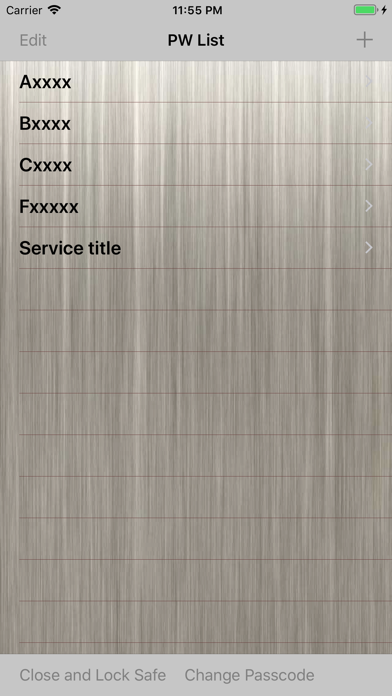
(2)If you press [Change Passcode] button at the bottom of the [PW List] screen, the screen to change the passcode you set opens.
(3)Set the passcode in the same way as the first.
(4)When you stop using it, press the [Close And Lock] button to protect the app.
(5)Enter the passcode in the startup screen when you use again.

B. PASSWORD REGISTRATION
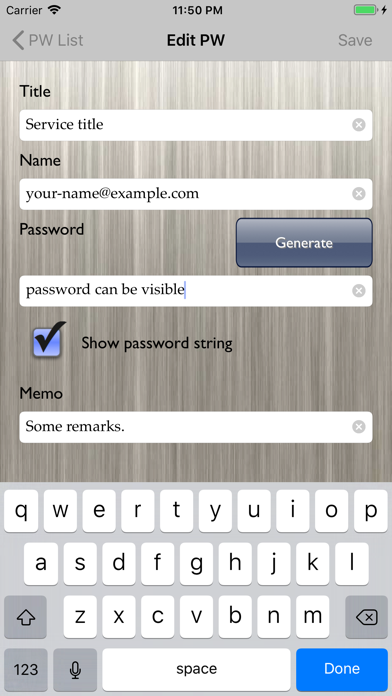
(1)Press the [+] button in the [PW List] screen To open the create screen.
(2)Fill PW information(such as a password, user ID), and press the [Save] button.
(3)If you want to change the PW information, open the [Edit PW] screen by pressing the [Edit] button at the [PW Detail] screen.

C. SEE PASSWORD
(1)Tap the title of information you want to see in the [PW List] screen.
(2)[PW Detail] screen is displayed, but the password is hidden.
(3)Make sure the safety of your surroundings, and slide the slider to the right. Then password will gradually appear.

D. PASSWORD DELETION
(1)Press the [Edit] button on the [PW List] screen.
(2)Tap the [-]icon of the PW that you want to delete, and then press the [Delete] button.
(3)Press the [Done] button at the end.

En voir plus...

Quoi de neuf dans la dernière version ?

- Adapted to iOS 18.
  • Screenshot #1 pour Quick Password Safe
  • Screenshot #2 pour Quick Password Safe
  • Screenshot #3 pour Quick Password Safe
Développeur

D'autres applications du développeur

Quick Password MakerQuick Password MakeriPhoneHimekuri CalendarHimekuri CalendariPhone

Note

(0 note)

Détails sur l'application

Version
1.9
Taille
5.8 Mo
Version minimum d'iOS
15.6
Dernière mise à jour
29/12/2024
Publié par
MIFUMI YOSHIDA

Newsletter App Store

Recevez chaque jour les meilleures promos

Actualité Apple

Image Apple franchit 1,5 milliard d’abonnements avec ses services
Apple franchit 1,5 milliard d’abonnements avec ses services
Image Fortnite revient sur iPhone au Brésil avec l’arrivée de l’Epic Games Store
Fortnite revient sur iPhone au Brésil avec l’arrivée de l’Epic Games Store
Image Tim Cook partage un message pour ses derniers résultats financiers d’Apple
Tim Cook partage un message pour ses derniers résultats financiers d’Apple
Image Davantage de fournisseurs de RAM = baisse de prix chez Apple ? Pas forcément, dit Tim Cook
Davantage de fournisseurs de RAM = baisse de prix chez Apple ? Pas forcément, dit Tim Cook
iPhoneAddict Apps

Le catalogue iPhoneAddict pour suivre les nouveautés, mises à jour et baisses de prix de l’App Store.

Apps

Toutes les apps iOS iPhone iPad Universelles Mac Apple TV

iPhoneAddict

Actualité Apple Archives keynotes Contact À propos KultureGeek

Suivez-nous

©2009-2026 i2CMedia. Tous droits réservés.