Paper Calc Office Lite
iPhone / Utilitaires
Paper Calc Office Lite -
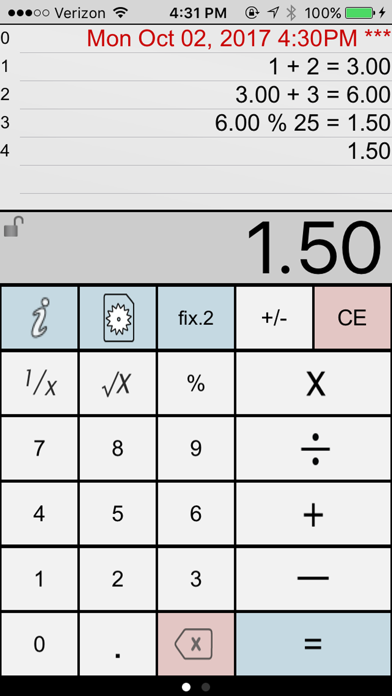
Paper Calc Office is an easy to use, large key, 4-function calculator tailored for the office environment. Use the powerful paper tape to review numbers you've entered, email, timestamp, put comments on any line, or bring a number from higher in the paper tape down into the current calculation.
=================
Selected by MagicSolver for Free App Magic of the day!
Selected by AppTurbo for Free "App of the Day" !
=================
Make the keys larger by sliding the LCD display up, or show more paper tape by moving the LCD display down. Two keyboards are included, or, make & save up to three of your own.
This is a fully functional version of Paper Calc Office, but with the following reduced features:
- 6 lines of paper tape (the full version has 250)
PaperCalc Office Lite Features:
CALCULATOR MODE
=================
> Great general purpose office calculator
> Oversized +, -, x, /, = keys
> 3 display formats
---> fixed Point from 2-8 places
---> float
---> eng (power to the x3)
PAPER TAPE HISTORY
==================
> 6 lines of virtual paper tape (250 in the full version)
> Full-screen view of the paper tape on the right-side scroll page.
> Copy numbers or lines to anthe Apple device clipboard
> Grab numbers from the tape to use in your current calculation
> Add comments to any line
PRINT & EMAIL
=============
> Print (requires iOS4.2 & an AirPrint printer)
> Email an exact copy of the paper tape
EXTRAS
=======
> Move the calculator LCD display to resize the keyboard.
> Create and save custom keyboard layouts to suit your personal needs.
> Key click sound (on/off)
> Options are easy-to-access in the scroll-to-left view window.
Q & A:
=====
Q1. How does 'Office' differ from the other PaperCalc calculators?
A1. Office has been designed specifically as an easy to use chain calculator with basic math function. The emphasis is on ease-of-use and an easy-to-follow paper trail of calculations performed.
Q2. How do I bring a number from the paper tape into my current calculation?
A2. Touch any line of the paper tape and select the number from the menu.
Q3. How can I quickly clear the paper tape?
A3. Make sure the option to 'Double Tap the LCD to Clear' is ON (see the right-side scroll page). Then just double-tap the LCD display to clear the paper tape (Office Full version only)
Q4. How do I use the '%' key?
A4. There are two ways to use the % key:
1. Obtain the % of a number:
- Press '200 % 5 ='
- Answer will be '10'
- PaperCalc took 5% of 200.
2. The % of a number is used in the operation on the number:
- Press: '200 - 5 % ='
- Answer will be '190'
- PaperCalc subtracted 5% of 200 from 200
Q5. How do I customize the keyboard layout?
A5. Press the large "i" (info) key. Select "Edit Keyboard Layout". Then touch and move keys to change locations. Tap keys to change sizes. Save custom keyboard layouts and rename them for later use.
PURCHASE DETAILS
. This is an evaluation version with a limited number of paper tape history lines.
. Use the links in this version to be directed to the full version of Paper Calc Office in the App Store.
TERMS AND CONDITIONS
Your use of this application is governed by Interlocken Technology's Terms of Use (http://s354819480.onlinehome.us/InterlockenPrivacyPolicy/Interlocken%20Technology%20Privacy%20Policy.pdf) and Privacy Policy (http://s354819480.onlinehome.us/InterlockenPrivacyPolicy/InterlockenTechnologyTermsOfUse.pdf)
Quoi de neuf dans la dernière version ?
v4.02.01
Support for latest IOS
v4.01.01
Newly updated for iOS 10. Modern color scheme. Faster operation.