LCD Clock - Clock & Calendar
iPhone / Utilitaires
LCD Clock — Simple Clock & Calendar
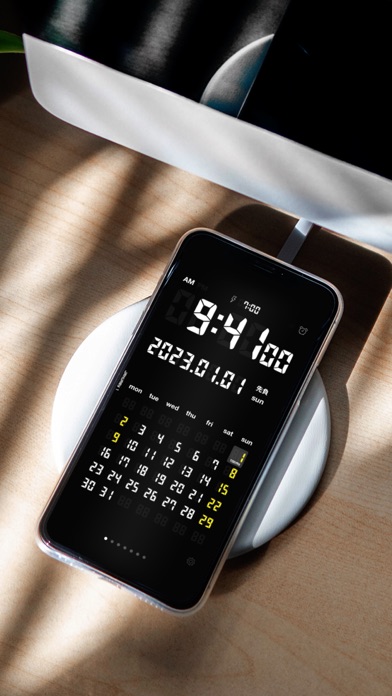
LCD Clock combines a digital clock and a calendar into one beautifully retro LCD-style desk clock.
Just place your iPhone on a charging dock, and your desk instantly gets a clean, easy-to-read clock and calendar.
Perfect for your office desk, living room, or bedside table — adding convenience and clarity wherever you are.
Key Features
- Large, easy-to-read digital clock (12/24-hour format)
- Monthly calendar (view up to 7 months)
- Public holidays for countries worldwide, automatically fetched and highlighted
- Weather forecast for your chosen location (current location supported)
- Japanese era (Reiwa) and rokuyō display
- Customizable first day of the week
- 8 color themes plus a random theme
- Adjustable screen brightness, shake-to-light backlight
- Full-screen landscape clock mode
A True Alarm Clock (iOS 26 and later)
Powered by Apple's latest alarm technology (AlarmKit), the alarm has been dramatically upgraded.
- Rings with a full-screen alarm even when the app is closed or your iPhone is locked
- Breaks through Silent Mode and Focus — and keeps ringing until you stop it
- Quick STOP / SNOOZE (5 min) buttons
- Adjustable alarm volume in the app. Set it to mute for a silent, screen-only alert (with vibration while the app is open)
Notes
- Weather requires location access; holiday display requires calendar access
- On iOS 25 and earlier, alarms are delivered as notifications (no sound in Silent Mode, and the notification sound stops automatically after a short time)
- Please refrain from making complaints regarding malfunctioning alarms.
Quoi de neuf dans la dernière version ?
• Added new color themes. Support development to unlock even more themes to enjoy.
• Made the weather location setting clearer, with easier on/off control for your current location.
• Refined the purchase flow, share screen, and various other details.
Thank you for using LCD Clock!