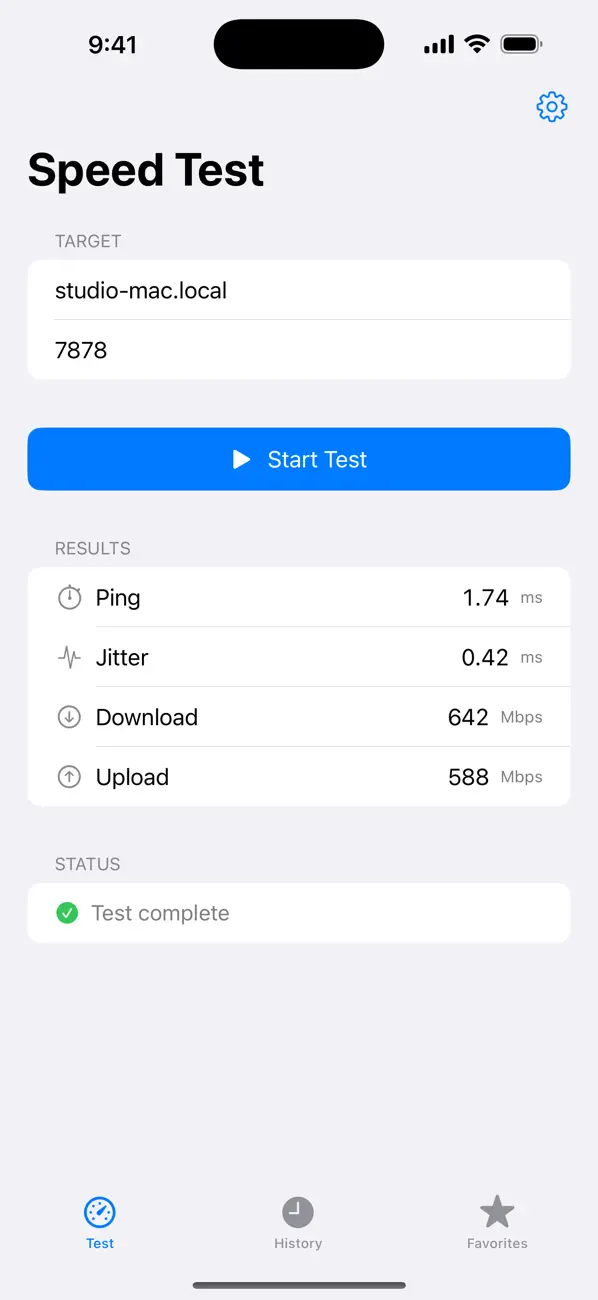
Jitter Box: Speed Test
iPhone / Utilitaires
Jitter Box for iPhone measures the real speed of the link between your phone and another device on your network — a Mac, a PC, a NAS, a Linux box, anything running a Jitter Box receiver. Run a test and find out exactly what your Wi-Fi, your router, or that far corner of the house is actually capable of. No third-party servers, no telemetry, no sign-up.
A COMPANION APP
Jitter Box for iPhone is the client end of a peer-to-peer speed test: it runs the test, but the other end has to be listening. The easiest pairing is the Jitter Box app for Mac, which acts as the receiver with a single switch. There's also a free command-line receiver for Linux, macOS, and Windows if you'd rather test against a server, NAS, or home lab box. Most people use it alongside the Mac app.
• Get Jitter Box for Mac: https://apps.apple.com/app/id6771647762
• Get the free command-line receiver: https://jitterbox.app/cli/
USE IT TO
• Find the Wi-Fi dead spot in your house ("is it the bedroom, or my router?")
• Sanity-check a new mesh node, access point, or cable before you blame the ISP
• Compare two rooms — or two phones — on the same Wi-Fi to spot a flaky radio
• See what your phone really gets from the network, room by room
WHAT IT MEASURES
• Median ping over 20 samples — robust to a single hiccup
• Jitter, the mean variation between consecutive round-trips
• Download throughput, across 4 parallel TCP streams, with a warm-up window discarded so you see the steady-state number
• Upload throughput, same methodology in the other direction
• A local history of every test, plus saved favorites for the peers you test most
WHY PEER-TO-PEER
Most speed-test apps shake hands with a server in a data centre and report the whole path between you and that server. That's useful for "is my ISP delivering what I pay for" — but useless for "is my home Wi-Fi OK". Jitter Box only ever talks to a device you choose on your own network, so the numbers reflect exactly the link you care about.
PRIVACY
No analytics. No telemetry. No third-party SDKs. Your test history lives entirely on your iPhone and never leaves your device.
REQUIREMENTS
• A receiver on the same local network: the Jitter Box Mac app, or the free command-line tool (Linux / macOS / Windows)
• iOS 17 or later
• An iPhone (the app is iPhone-only)
Quoi de neuf dans la dernière version ?
Refined wording: the free command-line receiver is now described as the "Linux CLI" (previously "Raspberry Pi") in Settings and on the App Store. No functional changes.