Hindi Keyboard, Type in Hindi
iOS Universel / Utilitaires
◉ Best Hindi Keyboard Ever
◉ Type in Hindi, Anywhere Everywhere
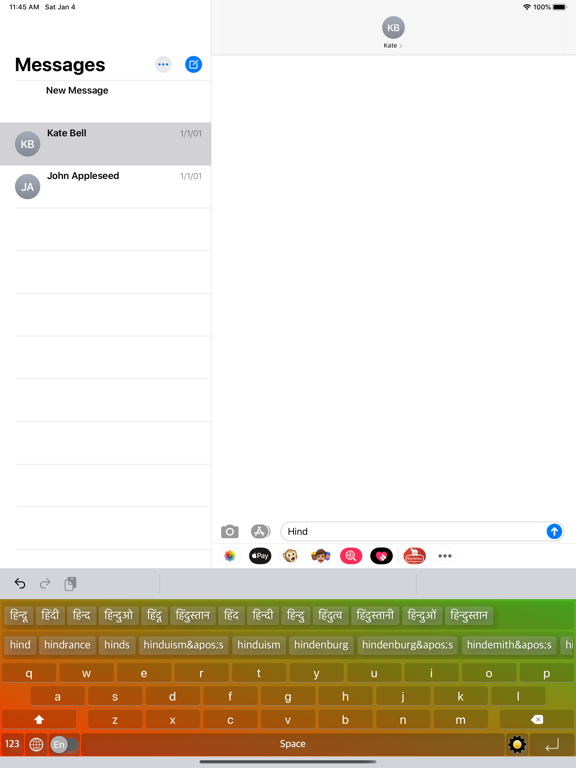
◉ Type the English word, Get the Hindi Meaning Instantly Offline
◉ Easy Letter Suggestions - Offline
◉ 50% More Faster than normal keyboards
◉ Easily differentiate the Letters
◉ Get suggestions for the letters
◉ Help Grow Hindi Community
◉ Please Support Development By sharing with others
----------------------------------------------
HOW TO INSTALL Hinglish Vinglish KEYBOARD
----------------------------------------------
Once you downloaded the app from Appstore.
Step 1: Go to iPhone settings.
Step 2: Find General And Click on it.
Step 3:Scroll Down to bottom and see Keyboard option, Click on it.
Step 4: Click on the Keyboards Row.
Step 5: Scroll Down bottom of the screen and find "Add New Keyboard" Option and tap on it.
Step 6: Scroll down and find the Hinglish Vinglish Hindi Keys Option And tap on it, Thats it you are done.
Now finally open any of the WhatsApp,Facebook,Email,Notes,Twitter, sms app, and long press the Globe icon from the default keyboard, now choose the Hinglish Vinglish Hindi Keys Keyboard Option.
And Start Typing In Hindi.
Quoi de neuf dans la dernière version ?
We've been hard at work making your keyboard experience better than ever! Here's what's new:
Smarter Word Suggestions — Improved word prediction for faster, more accurate typing
Hinglish Transliteration — Type in English, get Hindi script instantly — seamless Hinglish support is here!
Hindi Words Database — Expanded Hindi vocabulary for richer and more relevant suggestions
iOS 16 Support — Fully optimized for the latest iOS experience
Smoother Animations — Polished keyboard animations for a more fluid typing feel
General Bug Fixes — Squashed bugs across the board for improved reliability
Thank you for using Hindi Keyboard! We love hearing from you — rate us on the App Store.