Cellica Database Internet
iPhone / Utilitaires
Read and write to your MS Access, Excel, My SQL, SQL Server databases without any programming changes. Quickest and easiest way to go paperless.
Cellica Database for iPhone allows to synchronize any MS Access, Excel, My SQL, SQL Server database (Available on Windows) wirelessly (Using internet through Wi-Fi/3G) with iPhone.
See Cellica Database in action at: http://tinyurl.com/CellicaDB (YouTube link)
Cellica Database is also available separately for only Wi-Fi(Using local network) version.
Sync MS Access, MS SQL Server, My SQL, Oracle, MS Excel databases on iPhone.
Cellica Database is the powerful and easy app so you can select your MS Access, Excel, My SQL, SQL Server Tables, Views, Queries, Stored Procedure and added feature is that you can design the forms for it and sync from iPhone.
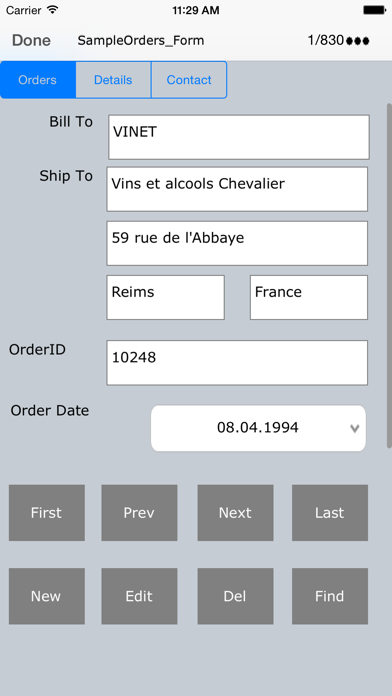
Design form on desktop with Label, Text Field, Buttons, Checkbox, Combo box, Tab control.
Changes on iPhone can synchronize wirelessly and instantly to desktop database. Also, any modifications to the desktop database can send wirelessly and instantly to iPhone, so you will always have the most current information on your iPhone.
You will just need our Desktop software. The Desktop can be connected to internet via your Wi-Fi router in another room, or desktop can be in your office few miles away connected to the internet, and your iPhone is connected to your home or any other Wi-Fi router.
Again, even if your iPhone is not connected to Wi-Fi router, our iPhone app will use your cellular data network (3G, Wi-Fi) to send data to/from your iPhone from/to your Desktop.
Features:
•Supported Databases: Microsoft Access 97/2000/2003/2007/2010,Microsoft Excel 97/2000/2003/2007/2010, Oracle, SQL Server, DB2, MySQL, PostgreSQL, FoxPro, dBase, R:BASE, Sybase and any ODBC Compliant Database.
•Work Offline when network is not available on iPhone and synchronize data when network will be available.
•Write data on the iPhone, which will reflect to database on your PC or Server.
•Unicode support for the database to synchronize data in Japanese, Chinese, Korean, German, Russian etc.
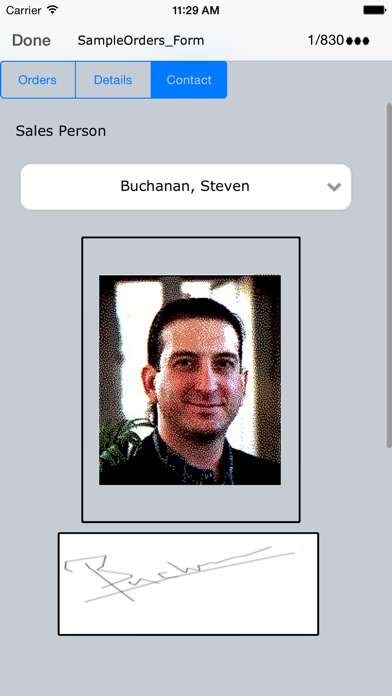
•Supported Forms on iPhone.
•Design form on desktop with Label, Text Field, Buttons, Checkbox, Combo box, Page, control.
•Supports Sub forms, Design a master/detail form, or a parent/child form using sub form.
•Send single record data on form as a .PDF by Email.
•Image control on form, Select image on device for each record.
•Create form in Portrait/ Landscape mode.
•Import/Export form design.
•Work Offline when network is not available and submit data when network will available
•Use Ready made forms provided in desktop application for various purposes such Business, Personal, Education.
To transfer your desktop side database to iPhone, you need to install Desktop software on your Windows PC. Visit the product website for more information,
If you have any problem with the software, please contact us on support@cellica.com.
Quoi de neuf dans la dernière version ?
Added support for iOS 12.