Namma Kannada Keyboard
iOS Universel / Utilitaires
***************************
Kannada balasi, Kannada ulisi
***************************
◉ Best Kannada Keyboard Ever for Kannadigas
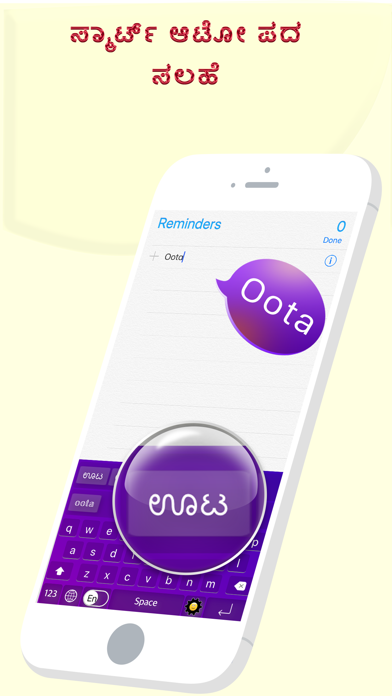
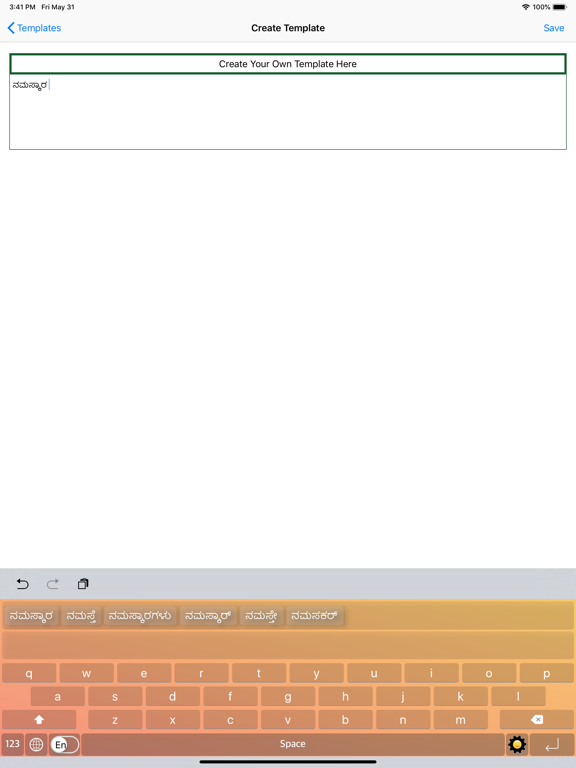
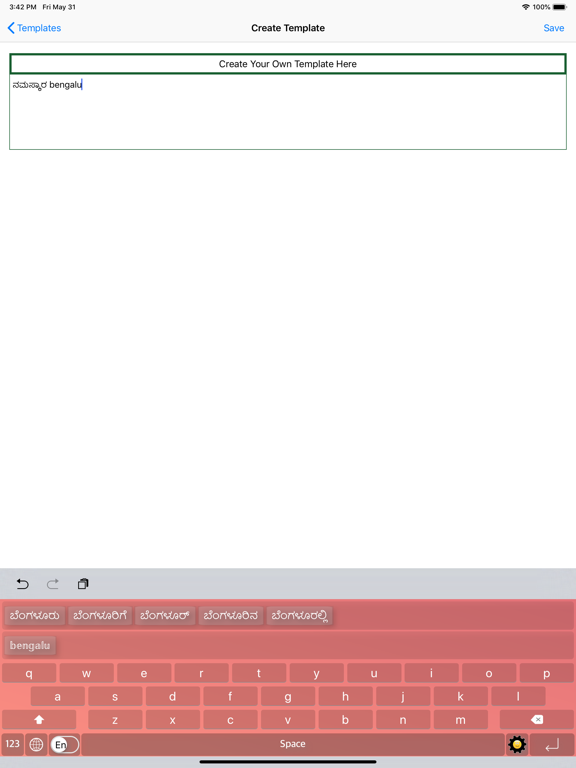
◉ Type the English word, Get the Kannada Meaning Instantly Offline
◉ Easy Letter Suggestions - Offline
◉ 50% More Faster than normal keyboards
◉ Easily differentiate the Letters On Keyboard
◉ Get suggestions for the letters Typed on Keyboard
◉ Help Grow Our Kannada Community
◉ Please Support Development By sharing with others
◉ Whatever you type from this is keyboard is safe and secure, you don't have to give "Allow full access" on settings to use this App
-------------------------------------
HOW TO INSTALL KANNADA KEYBOARD
-------------------------------------
Once you downloaded the app from Appstore.
Step 1: Go to iPhone settings.
Step 2: Find General And Click on it.
Step 3:Scroll Down to bottom and see Keyboard option, Click on it.
Step 4: Click on the Keyboards Row.
Step 5: Scroll Down bottom of the screen and find "Add New Keyboard" Option and tap on it.
Step 6: Scroll down and find the Namma Kannada Keyboard Option And tap on it, Thats it you are done.
Now finally open any of the WhatsApp,Facebook,Email,Notes,Twitter, sms app, and long press the Globe icon from the default keyboard, now choose the Namma Kannada Keyboard Option.
And Start Typing In Kannada.
**************************
ಕನ್ನಡ Keyboard — The #1 Kanglish Typing App for iPhone & iPad
Type Kannada the way you speak it — just type in English (Roman) letters and instantly get beautiful Kannada script. No learning. No stickers. No switching. Just type.
◆ WHY 1 MILLION+ INDIAN LANGUAGE USERS CHOOSE US
Stop struggling with complex Kannada keyboards. With our smart Kanglish-to-Kannada transliteration engine, you just type "namma" and get ನಮ್ಮ. Type "kannada" and get ಕನ್ನಡ. It's that simple.
◆ KEY FEATURES
→ Kanglish Transliteration — Type in English, get Kannada instantly. Zero learning curve for Kannada speakers worldwide.
→ Massive Word Database — 650,000+ Kannada words with smart autocomplete. The largest Kannada word suggestion library on the App Store.
→ Next Word Prediction — Our AI-powered bigram engine predicts your next word so you type faster than ever.
→ Lightning Fast — Optimized for iOS. Zero lag, zero crashes. Engineered for iPhone 15 and all modern iPads.
→ Smart Word Suggestions — 3 intelligent suggestions on every keystroke. Always finds the right Kannada word.
→ Full Emoji & Symbol Support — Express yourself with emojis alongside Kannada text seamlessly.
→ Switch Modes Instantly — Flip between Kannada, English, and Numbers with one tap.
→ 100% Privacy — We never read, store, or share anything you type. Ever. No internet required for typing.
→ Works Everywhere — WhatsApp, Instagram, iMessage, Gmail, Twitter/X, Snapchat, Notes — every app on your iPhone.
◆ PERFECT FOR
→ Kannadigas living abroad who want to message in ಕನ್ನಡ
→ Students learning Kannada script
→ Professionals writing Kannada emails and documents
→ Anyone who thinks in Kannada but types in English
◆ HOW KANGLISH WORKS
You type: namaskara → You get: ನಮಸ್ಕಾರ
You type: bengaluru → You get: ಬೆಂಗಳೂರು
You type: kannada → You get: ಕನ್ನಡ
You type: hudugaru → You get: ಹುಡುಗರು
No memorizing Unicode. No copy-pasting from websites. Just type naturally.
◆ LOVED BY THE KANNADA COMMUNITY
From Bengaluru to Toronto, from Mysuru to Sydney — Kannadigas around the world use this keyboard to stay connected to their language and culture.
Quoi de neuf dans la dernière version ?
Kannada typing just got smarter — 650,000+ word database with Kanglish autocomplete for faster, more accurate suggestions.
Next word prediction now anticipates what you'll type before you type it.
Improved emoji and symbol handling so your expressions flow naturally with Kannada text.
Performance upgrades across all iPhone and iPad models for a smoother, lag-free experience.