iPhoneAddict Apps
  • Actualités
  • Accueil Apps
  • iPhone
  • iPad
  • Universelles
  • Mac
  • Apple TV
KG KultureGeek
App
iPhone / iPad Télécharger iAddict v5 Mac Télécharger iAddict Mac
  • Actualités
  • Accueil Apps
  • iPhone
  • iPad
  • Universelles
  • Mac
  • Apple TV
  • Archives keynotes
  • Firmwares & iTunes
  • Contactez-nous
  • Comparateur de prix
  • KultureGeek
Accueil » Liste des Apps » Apps iPhone » Sports » SurfTideWatch (Tide graph)
1.0.12 iOS €Gratuit Mitsuhiro Shirai 0 0 "SurfTideWatch" is an app that show a tide graph on Apple Watch. It can be able to select the places to use from about 10,000 tide points around the world on iPhone and synchronize with Apple Watch. You can select from the map a tide place. Also you...
SurfTideWatch (Tide graph)

SurfTideWatch (Tide graph)

iPhone / Sports

Gratuit
Obtenir sur l'App Store
Facebook X E-mail

"SurfTideWatch" is an app that show a tide graph on Apple Watch.
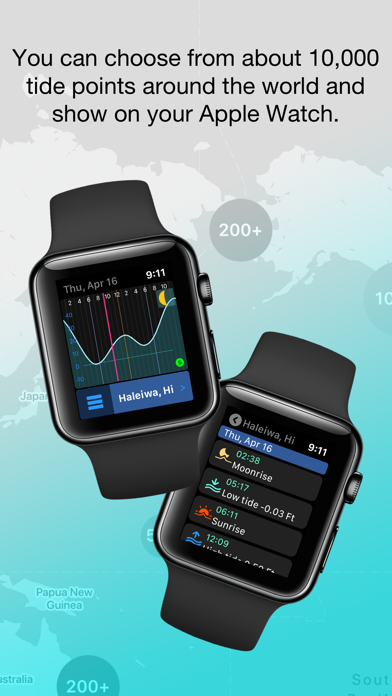
It can be able to select the places to use from about 10,000 tide points around the world on iPhone and synchronize with Apple Watch.
You can select from the map a tide place. Also you can change the place name to make it easier to understand.

It can store up to 5 places on Apple Watch.
It can be saved is for 2 weeks of tide data, but it can be updated from your iPhone at any time.
It can be shown graphically and you can check astronomical events such as sunrise, sunset, high tide, low tide and more infomation.

It also supports watch's complications. Some complications can display the next tide event information.

The following is a simple method for creating tide data on your iPhone.
For details, check to "Help & Support" from "Settings" in the app.

-----

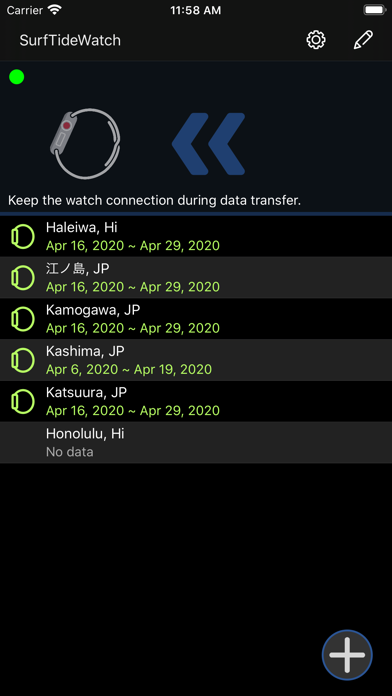
1, Tap the "+" button at the bottom right of the main screen

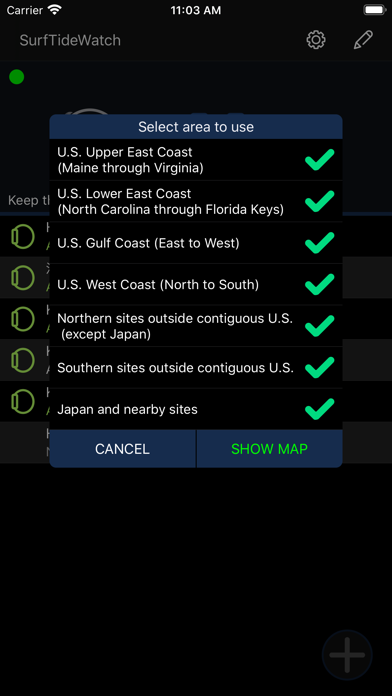
2, Select which area tide places will be shown on the map
You can choose from the following 7 areas.

- U.S. Upper East Coast (Maine through Virginia)
- U.S. Lower East Coast (North Carolina through Florida Keys)
- U.S. Gulf Coast (East to West)
- U.S. West Coast (North to South)
- Northern sites outside contiguous U.S. (except Japan)
- Southern sites outside contiguous U.S.
- Japan and nearby sites

When the selection is over, it will be the map screen
It takes some time to process the first time.

3, Tap the map pin shown on the map and select the place to register
Places that are close together are clustered.
Clustering is released when you zoom the map.
You can select multiple places.

4, Tap the "+" navigation button at the top right of the map screen and to return to the main screen

5, Tap "Update All" on the right side of the screen to get tide data
This takes a little time.

The operation up to this point , the preparation of tide data is complete.

Finally, send the tide data to your Apple Watch.
If Apple Watch is connected to iPhone, tap "≪" at the top center of the screen to synchronize.
If it is not connected, tap "Save to iCloud". In this case, Apple Watch will automatically sync when it comes online.

-----

Note:

This app is an app for showing a tide information on Apple Watch. It cannot show tide data on the iPhone alone.

This app can be used for marine sports such as surfing and fishing, but please do not use it for nautical purposes.

To use iCloud, you must be signed in to iCloud on your iPhone.

En voir plus...

Quoi de neuf dans la dernière version ?

Reduced the load on the weather information server.
  • Screenshot #1 pour SurfTideWatch (Tide graph)
  • Screenshot #2 pour SurfTideWatch (Tide graph)
  • Screenshot #3 pour SurfTideWatch (Tide graph)
Développeur

D'autres applications du développeur

SimpleTide for marine sportsSimpleTide for marine sportsiPhoneFind JP zip code - ZipNoFinderFind JP zip code - ZipNoFinderiPhoneTide and Weather - SurfTide7Tide and Weather - SurfTide7iPhoneMTSAT informatio Himawari-kunMTSAT informatio Himawari-kuniPhoneSurfing record - SurfLog7Surfing record - SurfLog7iPhoneRS Station (michi-no-eki map)RS Station (michi-no-eki map)iPhoneVoir toutes les apps

Note

(0 note)

Détails sur l'application

Version
1.0.12
Taille
28.5 Mo
Version minimum d'iOS
13.2
Dernière mise à jour
24/09/2024
Publié par
Mitsuhiro Shirai

Newsletter App Store

Recevez chaque jour les meilleures promos

Actualité Apple

Image Fortnite revient sur iPhone au Brésil avec l’arrivée de l’Epic Games Store
Fortnite revient sur iPhone au Brésil avec l’arrivée de l’Epic Games Store
Image Tim Cook partage un message pour ses derniers résultats financiers d’Apple
Tim Cook partage un message pour ses derniers résultats financiers d’Apple
Image Davantage de fournisseurs de RAM = baisse de prix chez Apple ? Pas forcément, dit Tim Cook
Davantage de fournisseurs de RAM = baisse de prix chez Apple ? Pas forcément, dit Tim Cook
Image Siri AI en Europe : Apple travaille avec la Commision, dit Tim Cook
Siri AI en Europe : Apple travaille avec la Commision, dit Tim Cook
iPhoneAddict Apps

Le catalogue iPhoneAddict pour suivre les nouveautés, mises à jour et baisses de prix de l’App Store.

Apps

Toutes les apps iOS iPhone iPad Universelles Mac Apple TV

iPhoneAddict

Actualité Apple Archives keynotes Contact À propos KultureGeek

Suivez-nous

©2009-2026 i2CMedia. Tous droits réservés.