iPhoneAddict Apps
  • Actualités
  • Accueil Apps
  • iPhone
  • iPad
  • Universelles
  • Mac
  • Apple TV
KG KultureGeek
App
iPhone / iPad Télécharger iAddict v5 Mac Télécharger iAddict Mac
  • Actualités
  • Accueil Apps
  • iPhone
  • iPad
  • Universelles
  • Mac
  • Apple TV
  • Archives keynotes
  • Firmwares & iTunes
  • Contactez-nous
  • Comparateur de prix
  • KultureGeek
Accueil » Liste des Apps » Apps iPhone » Sports » RallyOdoTimer
L'application n'est plus disponible sur l'App Store français
1.1.1 iOS €Gratuit Clarence Westberg 0 0 A GPS based rally odometer with Halda Twinmaster-like functions. Upper counter is for main mileage. Lower counter is for auxiliary and interval mileage. Start button starts GPS monitoring. When started the text is green. Stop button stops GPS...
RallyOdoTimer

RallyOdoTimer

iPhone / Sports

Gratuit
Obtenir sur l'App Store
Facebook X E-mail

A GPS based rally odometer with Halda Twinmaster-like functions.
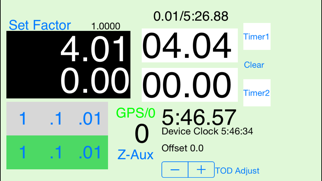
Upper counter is for main mileage.
Lower counter is for auxiliary and interval mileage.

Start button starts GPS monitoring. When started the text is green.
Stop button stops GPS monitoring.

Upper Counter mileage can be changed by 1, .1 and .01 buttons.
Z-Aux sets the trip meter to zero.
Split OM displays mileage when button was pressed and also resets trip.

Factor field when pressed brings up a numeric entry field to edit the factor.
Set Factor sets the factor to the value in the factor field and closes numeric entry.
Chevrons set direction of mileage
GPS Accuracy displays a count of how many GPS readings since last zero or start. Also displays the horizontal accuracy of the new and old GPS readings.

The reverse buttons and stop buttons are activated by swiping rather than pushing in order to prevent inadvertent actions.

Mileage is updated about once a second.

Two interval timers.
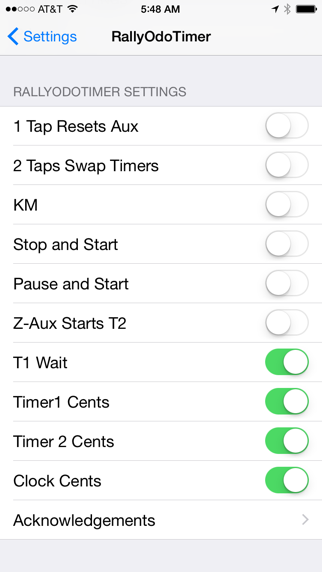
Functions can be set in settings
KM/Miles
Each timer/clock can be set to run in seconds or cents.
Z-Aux zeros lower counter
GPS/0 starts GPS and zeros both counters.

Each timer/clock can be set to read in seconds or cents.

Timer functions
Timers are self resetting interval timers.
Clear set;s them both to 0.00 and stops them.
T1 wait delays the start of timer 1 until the top of the minute.
Stop and start stops current timer and starts other timer at 0.00
Pause and start stops timer 1 and stars timer2. Pressing pause again starts timer 1 where it left off.Useful for pauses.

Continued use of GPS running in the background can dramatically decrease battery life. If you plan to use for extended periods of time run with the charger connected.

En voir plus...

Quoi de neuf dans la dernière version ?

This app has been updated by Apple to display the Apple Watch app icon.

Updated to fix erroneous mileage bugs app had in iOS 9.
Fixed labeling issue in iPhone 6.
  • Screenshot #1 pour RallyOdoTimer
  • Screenshot #2 pour RallyOdoTimer

Note

(0 note)

Détails sur l'application

Version
1.1.1
Taille
5.1 Mo
Version minimum d'iOS
8.3
Dernière mise à jour
13/11/2015
Publié par
Clarence Westberg

Newsletter App Store

Recevez chaque jour les meilleures promos

Actualité Apple

Image iPhone 18 Pro/Ultra : les performances de la puce A20 Pro se dévoilent
iPhone 18 Pro/Ultra : les performances de la puce A20 Pro se dévoilent
Image iOS 26.6.1 bouche 29 failles de sécurité, contre 122 pour iOS 18.7.10 et 28 pour macOS 26.6.2
iOS 26.6.1 bouche 29 failles de sécurité, contre 122 pour iOS 18.7.10 et 28 pour macOS 26.6.2
Image iOS 26.6.1 est disponible, avec iOS 18.7.10, macOS 26.6.2 et visionOS 26.6.1
iOS 26.6.1 est disponible, avec iOS 18.7.10, macOS 26.6.2 et visionOS 26.6.1
Image Bêta 6 pour iOS 27, macOS 27 Golden State, watchOS 27, tvOS 27 et visionOS 27
Bêta 6 pour iOS 27, macOS 27 Golden State, watchOS 27, tvOS 27 et visionOS 27
iPhoneAddict Apps

Le catalogue iPhoneAddict pour suivre les nouveautés, mises à jour et baisses de prix de l’App Store.

Apps

Toutes les apps iOS iPhone iPad Universelles Mac Apple TV

iPhoneAddict

Actualité Apple Archives keynotes Contact À propos KultureGeek

Suivez-nous

©2009-2026 i2CMedia. Tous droits réservés.