iPhoneAddict Apps
  • Actualités
  • Accueil Apps
  • iPhone
  • iPad
  • Universelles
  • Mac
  • Apple TV
KG KultureGeek
App
iPhone / iPad Télécharger iAddict v5 Mac Télécharger iAddict Mac
  • Actualités
  • Accueil Apps
  • iPhone
  • iPad
  • Universelles
  • Mac
  • Apple TV
  • Archives keynotes
  • Firmwares & iTunes
  • Contactez-nous
  • Comparateur de prix
  • KultureGeek
Accueil » Liste des Apps » Apps iPad » Productivité » xDiagram 2
L'application n'est plus disponible sur l'App Store français
1.3.1 iOS €3,99€ Tien Thinh Vu 4 2 "xDiagram 2" for iPad could help you make nice diagram graphic documents quickly by keeping lines connected to shapes even when they're moved. The application provides powerful graphic tools for designers, developers to draw UML activity diagram. ...
xDiagram 2

xDiagram 2

iPad / Productivité

3,99€ au lieu de 4,99€
Acheter sur l'App Store
Facebook X E-mail

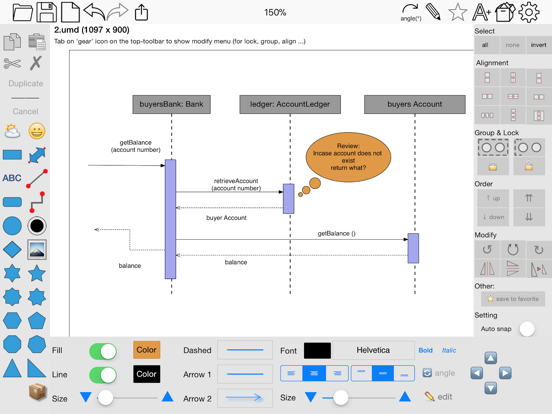
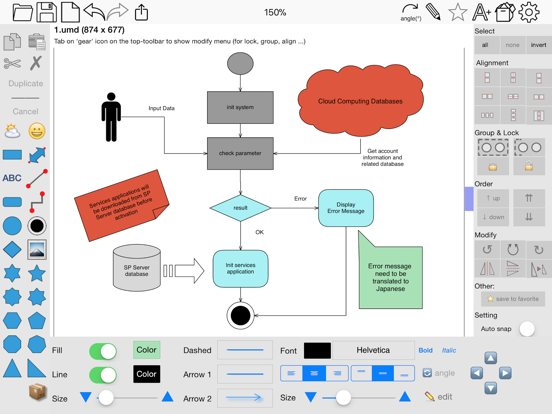
"xDiagram 2" for iPad could help you make nice diagram graphic documents quickly by keeping lines connected to shapes even when they're moved.
The application provides powerful graphic tools for designers, developers to draw UML activity diagram.


Functions of the application:

- SMART LINE / CONNECTOR:
Smart Line if attached to a shape will automatically change position every time when the main shape is moved, resized.


- BASIC SHAPE:
There are many shapes to add to your diagram. You could add/change text to display inside the shape.
Drawing UML activity diagram will be easier using these shapes.


- OVER 1000 BEAUTIFUL SYMBOLS:
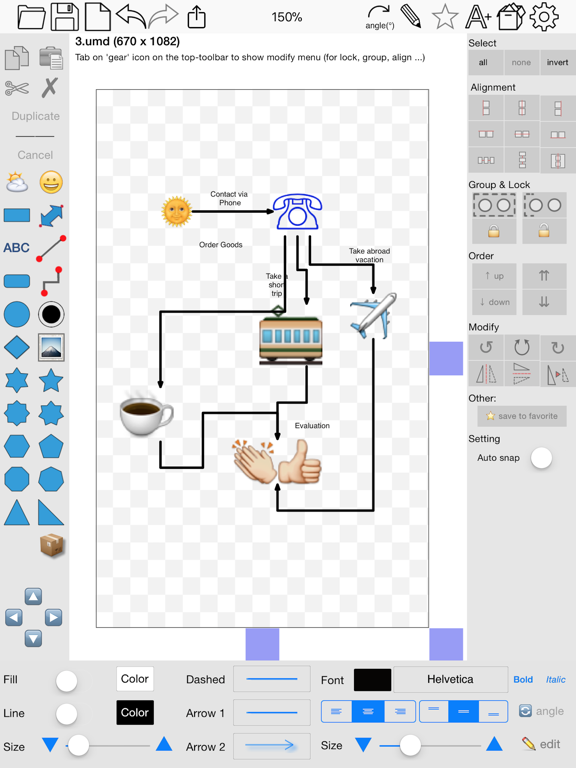
More than that, there are over 2000 beautiful symbols for you to add to the diagram.
Please press the “Smile” button on the left to add and select any symbol to the diagram.


- ADD IMAGE:
You could add any image file to display as an item inside the application.


- GROUP / UNGROUP ITEMS (new):
Group items for easy control of multi objects.


- COPY / PASTE:
The application supports copy/paste function for shapes.
You could copy shapes/lines from current diagram window then paste them to another diagram window.


- CUSTOMIZABLE COLOR / FONT / SIZE / LINE TYPE:
Font color, font type, text size, line width, line color, line dash type, arrow type, background color of shapes could be changed easily by using toolbar controls.


- UNDO/REDO:
You can perform unlimited undo and redo of your actions when edit a diagram.

- ALIGN MULTIPLE ITEMS:
Select many items then do right-click mouse to select alignment options as following:
(also allow to auto-align with another objects)
- Left
- Right
- Top
- Bottom
- Center (Horizontal or Vertical)
- Horizontal center in View
- Vertical center in View


- CHANGE DISPLAY ORDER:
Select items then do right-click mouse to select change order settings:
- Send to back
- Bring to Front
- Bring forward 1 level
- Send backward 1 level


- OPEN/SAVE to "*.UMD" file:
UMD (*.umd) is the new file type created only for this application.


- EXPORT TO IMAGE FILE:
The application can export current diagram to an image file with format of PNG or JPEG.

_______________________

NOTE:
- One touch to select items
- 2 touches to Zoom or Move diagram view

En voir plus...

Quoi de neuf dans la dernière version ?

This app has been updated by Apple to display the Apple Watch app icon.

- Support sync to iCloud
- Fix bugs
  • Screenshot #4 pour xDiagram 2
  • Screenshot #5 pour xDiagram 2
  • Screenshot #6 pour xDiagram 2

D'autres applications du développeur

日越辞典日越辞典iOS UniverselCompareMergeCompareMergemacOSxDiagramxDiagrammacOSSourceCounterSourceCountermacOSWebCacheWebCachemacOSFloorDesignFloorDesignmacOSVoir toutes les apps

Note

(2 notes)

Détails sur l'application

Version
1.3.1
Taille
34.5 Mo
Version minimum d'iOS
10.0
Dernière mise à jour
30/12/2017
Publié par
Tien Thinh Vu

Newsletter App Store

Recevez chaque jour les meilleures promos

Actualité Apple

Image Apple Watch Series 12 : le retour du modèle céramique se confirme
Apple Watch Series 12 : le retour du modèle céramique se confirme
Image Meta AI a maintenant son application dédiée sur Mac pour l’IA
Meta AI a maintenant son application dédiée sur Mac pour l’IA
Image Beats 360, le prochain casque d’Apple, fuite avec ses caractéristiques
Beats 360, le prochain casque d’Apple, fuite avec ses caractéristiques
Image Bad Monkey saison 2 : Vince Vaughn revient sur Apple TV le 2 décembre et John Malkovich s’invite au casting
Bad Monkey saison 2 : Vince Vaughn revient sur Apple TV le 2 décembre et John Malkovich s’invite au casting
iPhoneAddict Apps

Le catalogue iPhoneAddict pour suivre les nouveautés, mises à jour et baisses de prix de l’App Store.

Apps

Toutes les apps iOS iPhone iPad Universelles Mac Apple TV

iPhoneAddict

Actualité Apple Archives keynotes Contact À propos KultureGeek

Suivez-nous

©2009-2026 i2CMedia. Tous droits réservés.