OrbitHUD
iPhone / Productivité
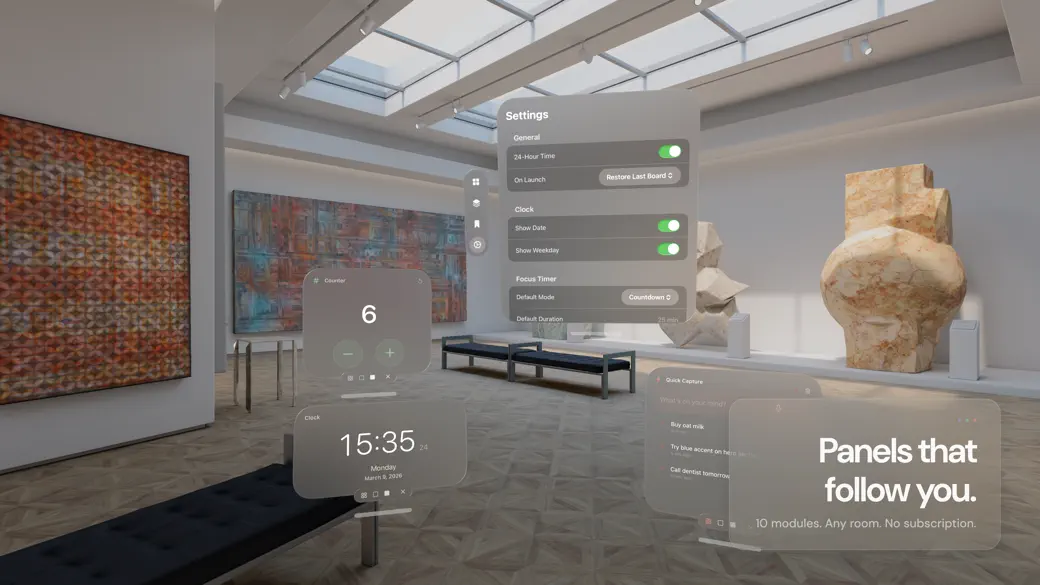
You already know what your workspace should look like. A focus timer front and center for deep work. A recipe panel and cook timer for the kitchen. A calendar and task list for weekly planning. The problem is rebuilding it every time.
OrbitHUD lets you create spatial setups for the things you actually do -- then reopen them with a word.
-- HOW IT WORKS --
A Task Space is a named arrangement of panels you design once and use repeatedly. Pick the modules you need, place them where you want them, and save. Tomorrow morning, say "Open my deep work setup" and everything appears exactly where you left it.
Five starter spaces are included to get you going: Deep Work, Kitchen, Studio, Planning, and Review. Customize them or build your own from scratch.
-- 10 MODULES, ONE PURPOSE EACH --
Each module does one thing well:
- Focus Timer: Pomodoro sessions and countdowns with a visual progress ring
- Checklist: Task lists you can check off, reorder, and clear
- Counter: A simple tally for reps, laps, inventory -- anything you count
- Clock: 12-hour or 24-hour display, always visible
- Calendar: Your schedule pulled from Apple Calendar via EventKit
- Quick Capture: Dump thoughts as text or voice before they disappear
- Reference Panel: Pin a PDF, image, or text document next to your work
- Focus Step: Step-by-step cards you advance through one at a time
- Activity: Streaks, session counts, and a 7-day chart of what you have done
- Today: Time, day progress, and a quick snapshot of your activity
Need three Reference panels with three different documents? Open three. Every module supports multiple independent instances.
-- DESIGNED FOR SPATIAL --
Panels adapt to where you place them. Set a timer on the table surface. Pin a reference document to the wall. OrbitHUD uses surface snapping so your layout feels deliberate, not scattered.
Accent themes -- amber, coral, violet, slate, teal, green -- let you color-code your spaces by purpose. Deep work in amber. Kitchen in coral. Your spaces, your system.
-- SIRI AND SHORTCUTS --
Open any saved space by voice. Start a timer, capture a thought, or advance a focus step without touching anything. OrbitHUD provides App Intents so your spaces integrate with the Shortcuts app.
-- SHARE YOUR SETUPS --
Export any Task Space as an .orbithud file. Send it to a colleague, share it online, or back it up. Import works the same way -- one tap to add someone else's setup.
-- BUILT WITH LIQUID GLASS --
OrbitHUD is built for visionOS 26 and takes full advantage of Liquid Glass. Every panel, every control, every transition is designed to feel native to the platform.
-- PRIVACY BY DESIGN --
OrbitHUD stores everything on your device. There is no account to create, no server to connect to, no data leaving your Vision Pro. Your spaces, your tasks, your captures -- all local, all yours.
Calendar access requires your permission via EventKit. Voice capture uses on-device speech recognition. Nothing is transmitted.
-- ONE PRICE. THAT IS IT. --
$9.99 unlocks the full app forever. No subscription. No in-app purchases. No feature gates. Every module, every theme, every future update -- included.
You paid for the hardware. Your software should respect that.
Quoi de neuf dans la dernière version ?
Welcome to OrbitHUD.
Build spatial setups for deep work, cooking, studio sessions, planning, and review -- then reopen them instantly by voice.
10 modules. 5 starter spaces. Accent themes. Surface snapping. Siri integration. Export and import. Local-only privacy.
All yours for one price.