iPhoneAddict Apps
  • Actualités
  • Accueil Apps
  • iPhone
  • iPad
  • Universelles
  • Mac
  • Apple TV
KG KultureGeek
App
iPhone / iPad Télécharger iAddict v5 Mac Télécharger iAddict Mac
  • Actualités
  • Accueil Apps
  • iPhone
  • iPad
  • Universelles
  • Mac
  • Apple TV
  • Archives keynotes
  • Firmwares & iTunes
  • Contactez-nous
  • Comparateur de prix
  • KultureGeek
Accueil » Liste des Apps » Apps iPhone » Productivité » Manually Snap Tracker
1.7 iOS €0,99€ Mirko Paschke 3 2 Track your matches of Marvel Snap manually via this app. Build your stats for your decks. Analyze your playing. Features: - Create your own decks with optional image. - Insert your match results manually but quick and precise. - Watch your stats...
Manually Snap Tracker

Manually Snap Tracker

iPhone / Productivité

0,99€
Acheter sur l'App Store
Facebook X E-mail

Track your matches of Marvel Snap manually via this app.
Build your stats for your decks.
Analyze your playing.

Features:

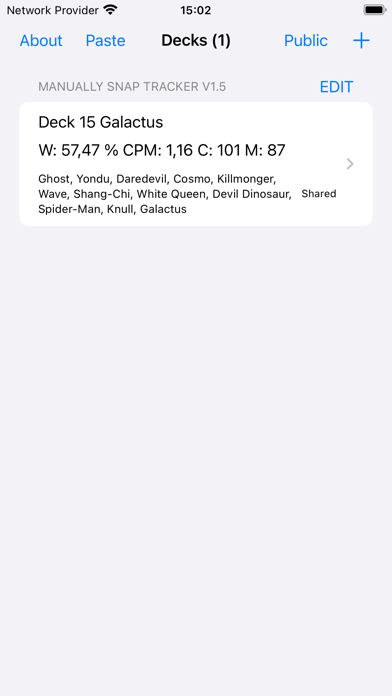
- Create your own decks with optional image.
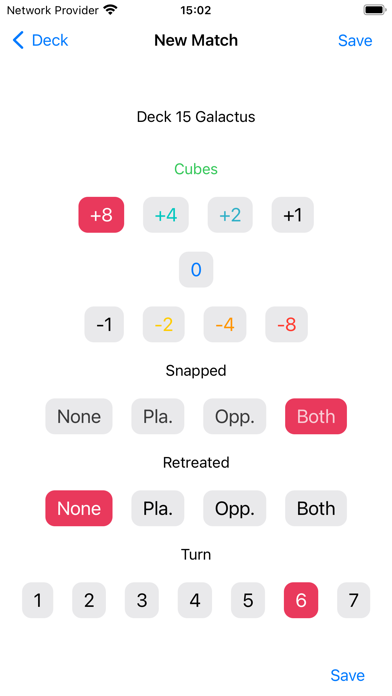
- Insert your match results manually but quick and precise.
- Watch your stats growing.
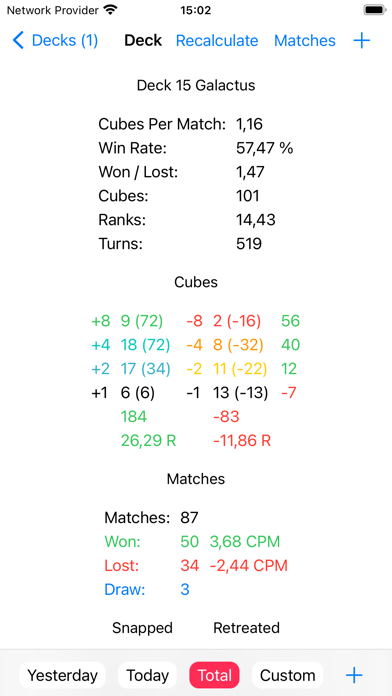
- Stats: Win Rate, Won / Lost, Matches Played (All, Won, Lost, Draw), Cubes (+8, +4, +2, +1, -1, -2, -4, -8), Cubes Per Match, Ranks, Snapped (None, Player, Opponent, Both), Retreated (None, Player, Opponent, Both), Turns (Total, 7, 6, 5, 4, 3, 2, 1)
- Stats periods: Total, Today, Yesterday, Custom (Start, End)
- Share decks
- Export decks
- Import decks
- Paste deck from Snap
- Dark mode
- To be continued ...

Please remember, if you have problems with the app or if you have a feature request, send this information to the support email address: Mirko.Paschke@gmx.de

Story
Unfortunately, it is not possible to automatically track Marvel Snap data on iOS. So I started by putting my deck stats into the notes app. But it lacked most stats data. I had only total cubes and matches count. But I wanted more. This is why I created this app. Now I can enter my deck stats fast and precise and I must not even calculate. I leave the tracker app open in the background, with the deck opened that I use in Snap. After the match I just swipe to the right on the bottom of the screen, to switch to the tracker app, just press the plus button, make a few taps and save. I love it. And I hope you will enjoy it too.

Attributions:

- App icon base symbol designed by Freepik (target_4499787).

En voir plus...

Quoi de neuf dans la dernière version ?

- iOS 18 required.
- Fixed caching problem when updating cards data.
  • Screenshot #1 pour Manually Snap Tracker
  • Screenshot #2 pour Manually Snap Tracker
  • Screenshot #3 pour Manually Snap Tracker

D'autres applications du développeur

Balance Your Life AppBalance Your Life AppiOS UniverselMusic PickerMusic PickeriOS UniverselAvnasAvnasiOS UniverselRowCounterRowCounteriOS UniverselReise zwischen Herz & VerstandReise zwischen Herz & VerstandiOS UniverselSocken GrößentabellenSocken GrößentabelleniOS UniverselVoir toutes les apps

Note

(2 notes)

Détails sur l'application

Version
1.7
Taille
1.1 Mo
Version minimum d'iOS
18.0
Dernière mise à jour
14/11/2024
Publié par
Mirko Paschke

Newsletter App Store

Recevez chaque jour les meilleures promos

Actualité Apple

Image iPhone Ultra pliable : les deux coloris se dévoilent en images
iPhone Ultra pliable : les deux coloris se dévoilent en images
Image Apple ajoute 43 appareils auditifs compatibles Made for iPhone (MFi)
Apple ajoute 43 appareils auditifs compatibles Made for iPhone (MFi)
Image Le prix de l’iPhone 17 augmenterait dans quelques jours
Le prix de l’iPhone 17 augmenterait dans quelques jours
Image Dopamine 3, le jailbreak pour iOS 26 sur iPhone, est disponible
Dopamine 3, le jailbreak pour iOS 26 sur iPhone, est disponible
iPhoneAddict Apps

Le catalogue iPhoneAddict pour suivre les nouveautés, mises à jour et baisses de prix de l’App Store.

Apps

Toutes les apps iOS iPhone iPad Universelles Mac Apple TV

iPhoneAddict

Actualité Apple Archives keynotes Contact À propos KultureGeek

Suivez-nous

©2009-2026 i2CMedia. Tous droits réservés.