Keysight BenchVue Mobile
iOS Universel / Productivité
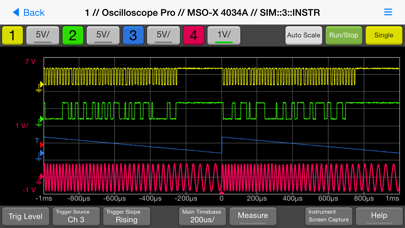
This app from Keysight Technologies lets you view and control a broad range of Keysight and Agilent oscilloscopes, digital multimeters, spectrum analyzers, function generators and power supplies. Perfect for monitoring long running tests or when instrument access is inconvenient, BenchVue Mobile gets you connected to your bench. Measurement visualization, screen and data capture, and instrument control are possible for Keysight instruments from your iPad or iPhone.
Key Features
Data logging controls
Set instrument parameters
Start and stop measurements
Mobile access to your LAN, GPIB, USB or RS232 connected instruments
Collaborate by having multiple mobile devices connect simultaneously
BenchVue Mobile is a companion app for Keysight's BenchVue software and requires installation of Keysight BenchVue software on your Windows PC to communicate with your instruments. If you haven't already installed BenchVue, it is available at no cost here:
http://keysight.com/find/BenchVue
Supported Instruments (The instruments listed below are sold by Keysight and in most cases were formerly sold by Agilent)
Digital Multimeters
34401A, 34405A, 34410A, 34411A, 34450A, 34460A, 34461A
Oscilloscopes (MSO & DSO)
InfiniiVision 2000 X-Series, 3000 X-Series,4000 X-Series, 6000 Series, 6000 X-Series, and 7000A/B X-Series. Infiniium 9000A Series and S Series.
Spectrum Analyzers
N9030A PXA, N9020A MXA, N9010A EXA, N9000A CXA,N9320B, N9322C,E4440A, E4443A, E4444A, E4445A, E4446A, E4447A, E4448A,E4402B, E4404B, E4405B, E4407B, E4403B, E4411B, E4408B
Function Generators
33210A, 33220A, 33250A, 33521A, 33522A, 33509B, 33510B, 33511B, 33512B, 33519B, 33520B, 33521B, 33522B, 3611A, 33612A, 33621A, 33622A
DC Power Supplies
E3631A, E3632A, E3633A, E3634A, E3640A, E3641A, E3642A, E3643A, E3644A, E3645A, E3646A, E3647A, E3648A, E3649A, N6700A/B, N6701A, N6702A, N6705B, N6950A, N6951A, N6952A, N6953A, N6954A, N6970A, N6971A, N6972A, N6973A, N6974A, N6976A, N6977A, N7950A, N7951A, N7952A, N7953A, N7954A, N7970A, N7971A, N7972A, N7973A, N7974A, N7976A, N7977A
How to use this App
1. Install Keysight BenchVue on your Windows PC.
2. Start BenchVue on your PC and connect to your instruments.
3. Enable mobile access in BenchVue.
. a) First, enable mobile access in the main settings and set a mobile password.
. b) Then, enable mobile access for each instrument that you want to access.
4. Start this app and tap “Connect to BenchVue on PC”
5. Connect to BenchVue by doing one of the following:
. a) Enter the IP Address or hostname of your PC and your password then tap "Connect”, or
. b) Display the BenchVue QR code on your PC, then tap the Scan button in BenchVue Mobile to scan it, or
. c) Use BenchVue to send an email to your mobile device with a link to connect.
6. Tap an instrument to view and control it.
Note if your PC is behind a firewall, you may need to use a VPN to access it when your iPhone/iPad is outside the firewall.
Quoi de neuf dans la dernière version ?
1. Added support for upgrade to latest iOS 12.0
2. Fixed an issue for app crash on Scan button for users on iOS 10.0 or later.