DoNext: GTD Liste de Tâches
iOS Universel / Productivité
Get things done with DoNext – your focused todo list for stress-free productivity.
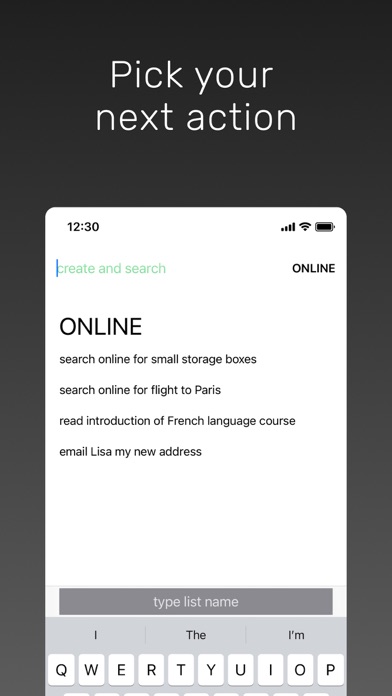
FOCUS ON WHAT TO DO NEXT
• Decide your next action: Break down goals into actionable first steps, like "search flights to Paris" instead of vague tasks like "plan vacation"
• Quick switch between contexts: Jump instantly to any task list by typing its initials (e.g., "o" for "online") in the search
• See only what matters: View actionable tasks relevant to your current context, eliminating overwhelm
KEY FEATURES
• One-tap completion: Mark next-actions done with a single tap
• Stay fresh: Tasks automatically shuffle so older items don't get ignored
• Lightning-fast navigation: Type list initials or press tab to switch between contexts instantly
• Prevent duplicates: See similar tasks while entering new ones to keep your lists clean
• Automatic cleanup: Completed tasks disappear the next day – no manual maintenance required
• Inbox for quick capture: Jot down thoughts on the go and process them later
• Long-press actions: Edit, delete, or open links in any task
• Siri Shortcuts & Spotlight: Quickly access lists or capture ideas system-wide
HOW DONEXT FITS YOUR WORKFLOW
DoNext works perfectly alongside your existing productivity system:
**Capture Everything**: Add ideas to the DoNext inbox throughout the day
**Process Your Inbox**: Transform each item into a clear, actionable next-action you can do right now
**Make Tasks Actionable**: Replace vague tasks like "organize project" with concrete first steps like "email Sarah for project files"
**Choose the Right Context**: Organize tasks by location (@home), situation (@team-meeting), or person (@partner)
**Use Other Apps for Planning**: Track complex multi-step projects in dedicated project management apps, then add next-actions to DoNext as they become relevant
**Calendar for Deadlines**: Schedule time-specific tasks with due dates in your calendar; use DoNext for everything you want to do ASAP
**Work from Your Lists**: Let DoNext handle sorting and cleanup automatically – no manual reordering or "today view" needed
**Keep It Simple**: Use DoNext exclusively for next-actions; use other apps for notes, reminders, checklists, and long-term planning
**Pro Tip**: Use the "Capture thought" Shortcut to send text to your inbox from any app and Siri
Learn the complete methodology in the Discovery tab.
BUILT FOR GETTING THINGS DONE
"Your mind is for having ideas, not holding them" – David Allen
Get everything out of your head and into DoNext as your trusted system. DoNext is designed specifically for the "next actions in context lists" component of Getting Things Done (GTD) – the proven self-management methodology for stress-free productivity.
GTD® and Getting Things Done® are registered trademarks of the David Allen Company. DoNext is not affiliated with the David Allen Company.
SUPPORT
Questions or feedback? Tap "Give Feedback" in the Discover tab – we'd love to hear from you!
UPGRADE TO PRO
• Sync across all your devices – iPhone, iPad, and Mac (Apple Silicon)
• Create, edit, and export unlimited lists
• Review everything with the all-tasks list
• Support ongoing development
Subscription details: Payment charged to iTunes account. Billed monthly. Auto-renewal can be disabled in Apple ID Account Settings anytime. Account charged for renewal within 24 hours before current period ends.
Terms of use: https://donext.app/terms/
Quoi de neuf dans la dernière version ?
• Add tasks with Siri and Shortcuts. Add a task to any list, complete or duplicate a task, move something to your inbox, and jump straight into a list, all hands-free with your voice or in the Shortcuts app.
• Find your tasks in Spotlight. Search your tasks and lists right from your iPhone's home screen and tap to open them instantly.
• Powerful multi-select. Select several tasks at once to complete, move, delete, or share them together, instead of one at a time.
• Bulk-edit task text. Add a prefix or suffix to many tasks at once, or find-and-replace text across your selection, great for cleaning up or re-labeling in seconds.
• Merge and split lists. Combine lists together, or peel a group of selected tasks off into a brand-new list.
• Paste to create many tasks at once. Paste multiple lines of text and each line becomes its own task automatically.
• Share lists with a tap. Copy a shareable link to any list and send it along; opening the link jumps right to that list.
• Made for iPad. A new sidebar for quick navigation, full keyboard shortcut support, and the ability to open multiple windows side by side for true multitasking.
• A warmer welcome. A redesigned onboarding flow helps new users get set up and discover what the app can do from the very first launch.
• Smoother, more satisfying. Refined animations for completing tasks and lists, plus polish throughout.
• Widgets allow you to see your lists on the iOS home screen and lock screen.
Like DoNext? A review or rating makes my day!
If you have questions, feedback or ideas for DoNext, let me know using the feedback form in the app.
Fabian