choclift: Workflow Sweetener
iPhone / Productivité
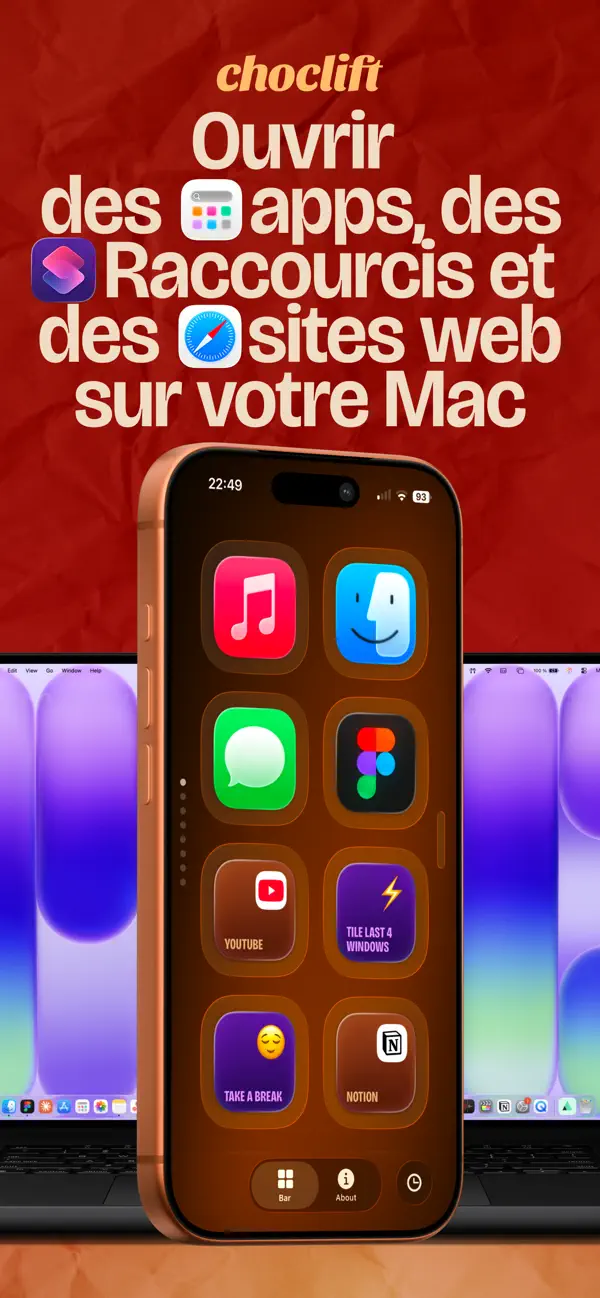
Access apps, Apple Shortcuts, websites and Emojis on your Mac using your iPhone.
You know how the mouse, keyboard and trackpad define how we interact with Mac? Turns out there’s a fourth interface. Introducing choclift, the sweeter way to work with Mac.
Deliciously easy: Install choclift on your iPhone and Mac, make sure both devices are on the same Wi-Fi network, and connect once. That’s it.
Your taste, your layout: Choose the Mac apps, Shortcuts and websites your workflow can’t get enough of and arrange them in a layout that fits your needs. With the optional “Added Sugar” subscription or one-time purchase, you can unlock additional pages for your setup.
Introducing Emoji Bar: Add emojis to any text on your Mac with a simple tap on your iPhone, and customize up to eight slides of your favorite emojis.
Apple Shortcuts Support: Create simple to advanced Shortcuts with the Apple Shortcuts app, add them to your choclift bar, and top them with custom emojis.
Add Website Bookmarks: Your favorite URLs are just one tap away.
Finger Gestures: Minimize and maximize windows with two fingers or trigger actions like copy and paste in a fast and intuitive way. Gestures are executed locally through the companion Mac app.
App Time Travel: Scroll through a timeline of your recently opened Mac apps and pin your favorites to quickly jump between workflows. Available with the optional “Added Sugar” upgrade. Pricing is shown in-app.
Drag & Drop, sweetly upgraded: Use your mouse to drag files on your Mac and choclift on your iPhone to quickly access the target app, no matter which desktop it’s on.
Portrait or landscape: Use choclift the way you like. Rotate your iPhone and place it wherever it fits best into your setup.
Every workflow is different, so we hope many people will discover new ways to lift their productivity to new heights with our little tasty treat.
Important: choclift requires the companion Mac app to function. All actions are executed locally on your Mac through the companion app. The iPhone app acts as a touch interface for your Mac and does not open or control iPhone apps.
To unlock the full choclift experience, choclift offers an optional auto-renewing subscription or a one-time lifetime purchase.
Added Sugar (choclift Premium)
Monthly Subscription
Price: $2.99/month
Free Trial: 7 days
Start with a 7-day free trial. After the trial ends, your subscription will automatically renew unless canceled at least 24 hours before the end of the trial period.
Lifetime Purchase
Price: $29.99 (one-time)
It includes:
• Multiple pages for your choclift Bar (up to 8)
• App Time Travel
• 8 Customizable slides in your Emoji Bar to pick from up to 64 Emojis
• Future premium features as they are released
Payment will be charged to your Apple ID account at confirmation of purchase. Subscriptions renew automatically unless canceled at least 24 hours before the end of the current period. You can manage or cancel your subscription anytime in your App Store account settings.
The lifetime purchase is a one-time payment that unlocks Premium permanently and does not renew.
Privacy Policy: https://www.choclift.com/privacy-policy
Terms of Use (EULA): https://www.apple.com/legal/internet-services/itunes/dev/stdeula/
Quoi de neuf dans la dernière version ?
Haptic feedback for the new Emoji Bar, plus a few small but sweet UI tweaks.