• KultureGeek
  • Comparateur de prix
       
iPhoneAddict
 iAddictv5Notre Application iPhone/iPad
  • Accueil Apps
  • Actualité Apple
  • Keynote Apple
  • Firmwares & iTunes
  • Contactez-nous
Accueil » Liste des Apps » Apps iPad » Productivité » Brain;Notes - Sticky Scrapbook
1.15 iOS €Gratuit Kouichi Abe 0 0 "Brain;Notes" is a scrapbook-like sticky note that uses sticky notes to efficiently organize your ideas and information. You can freely write down not only text but also maps, photos, URLs, and other notes on your workspace. It can be used in a...
Brain;Notes - Sticky Scrapbook

Brain;Notes - Sticky Scrapbook

iPad / Productivité

Gratuit
Obtenir sur l'App Store

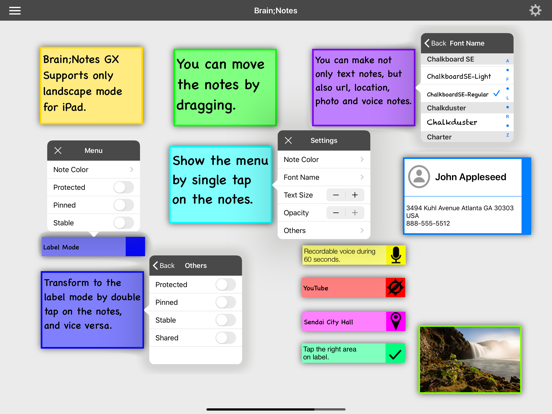
"Brain;Notes" is a scrapbook-like sticky note that uses sticky notes to efficiently organize your ideas and information. You can freely write down not only text but also maps, photos, URLs, and other notes on your workspace. It can be used in a variety of ways depending on your ideas and thoughts, such as mind mapping.

Main Features
・Simple menu-driven user interface.
・Available note types: text, photo, location, URL, and voice.
・Voice notes can be recorded for 60 seconds.
・Multiple workspaces are available for managing notes.
・Each workspace can have its own wallpaper.
・Each note can be locked by biometric authentication.
・Notes can be created as events in Calendar.app.
・Notes can be registered in Reminder.app.
・Workspaces can be exported as PDF files.
・AirDrop is supported.
・App supports for Sharing. (Notes can be created by "Share" from other apps. Notes can be created by dragging from other apps.)

Unique Features:
・When a note is set to "Stable" mode, it will appear in all workspaces. If you create a new workspace, the note will still appear automatically.
・When a note is set to "Shared" mode, it will only appear in the workspace you select.

Attentions:
・There is no ability to delete a workspace. However, you can delete all notes on a workspace with a three-finger tap gesture. Please be careful not to create too many workspaces.
・If there are less than 10 notes left, the app will automatically refill notes to 10 at midnight.


Gesture Operations:

Workspace (gray area):
・Single Tap: shows menu.
・Double Tap: creates new note.
・Two Finger Tap: reset wallpaper.
・Three Finger Tap: deletes all notes on the workspace.

Sticky notes:
・Single Tap: shows menu.
・Double Tap: transforms appearance.
・Long Press: shows context menu.

En voir plus...

Quoi de neuf dans la dernière version ?

・Optimized for iOS 18.
・Improved the drag operation at creating Location Notes.

  • Screenshot #4 pour Brain;Notes - Sticky Scrapbook
  • Screenshot #5 pour Brain;Notes - Sticky Scrapbook
  • Screenshot #6 pour Brain;Notes - Sticky Scrapbook

D'autres applications du développeur

Calc / Calculator
Calc / Calculator
/ iOS Universel
QR Tool - Reader & Generator
/ iPhone
早押しクイズごっこキット 〜お手軽にイントロクイズもできるよ〜
/ iPhone
Koyomi (Calendar)
Koyomi (Calendar)
/ iOS Universel
MagiCal2 - Powerful Calendar
/ iOS Universel
xBLEtz - BLE Scan 2
xBLEtz - BLE Scan 2
/ iOS Universel
Voir toutes les apps

Note

(0 note)

Détails sur l'application

Version
1.15
Taille
9.9 Mo
Version minimum d'iOS
17.6
Dernière mise à jour
18/10/2024
Publié par
Kouichi Abe

Newsletter App Store

Recevez chaque jour les meilleures promos

Actualité Apple

Image L’iPhone Air avec carte SIM physique existe grâce à une bidouille
L’iPhone Air avec carte SIM physique existe grâce à une bidouille
Image Apple reste l’entreprise la plus admirée au monde en 2026 selon Fortune
Apple reste l’entreprise la plus admirée au monde en 2026 selon Fortune
Image Apple Cash, pour transférer de l’argent, va bientôt coûter plus cher
Apple Cash, pour transférer de l’argent, va bientôt coûter plus cher
Image Apple accusé d’avoir eu un impact négatif sur les frais bancaires au Royaume-Uni
Apple accusé d’avoir eu un impact négatif sur les frais bancaires au Royaume-Uni
Partenaires : Actualité iPhone - Culture Geek
©2009-2026 i2CMedia | A propos |