OutSmart | Field Service
iOS Universel / Productivité
Is your business Installation services? Maybe Construction? Transportation perhaps? If you have agents on the field, you need to know where they are, where are they going next, what materials are being used, agendas, reporting and more important, customer signoff that the service was done.
OutSmart will help you get grip on your organization and your field service.
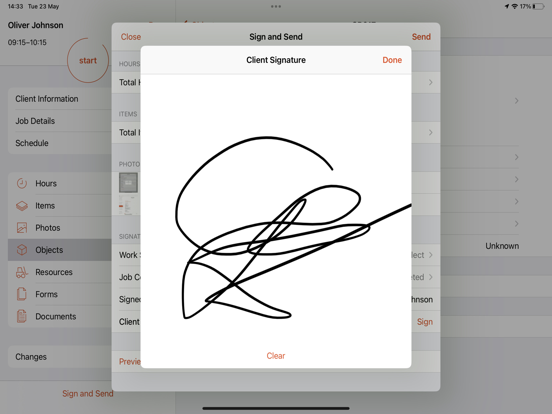
OutSmart is the digital generic solution for replacing the paper work order, for companies who wants to start with setting up a more efficient field service. On the work order you register your hours and articles. You can add photos of your work (for example before and after) and your customer will sign a digital signature below. Directly on the smartphone or tablet. We will ensure that the receipt is sent to your client as a PDF. Simple and effective.
OutSmart is field agent management software that will help you to monitor your agents, plan orders, check for daily reports, open order and see if the service has been completed, track your agents in the map or create checklist before the service is done.
OutSmart is fully cloud-based and can be easily integrated with any accounting or ERP software.
No matter what type of business, OutSmart will make your company more efficient by reducing operational costs and increase productivity.
OutSmart, makes field service easy!
How does it work?
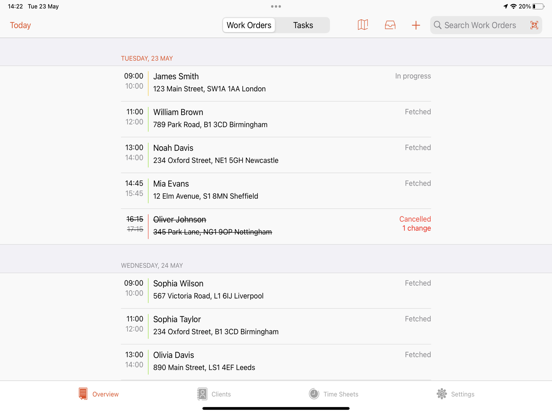
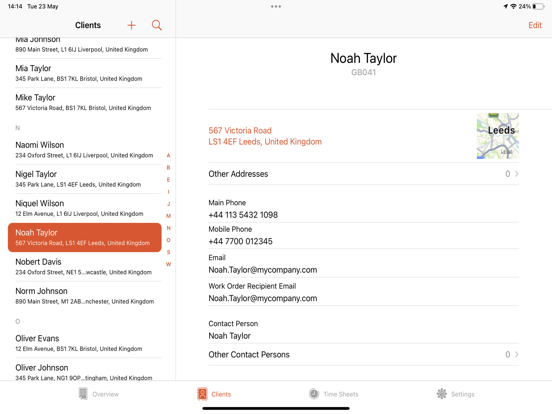
The app is divided into 2 menu items: Work order overview and App Settings. Via the Work order overview tab you can start immediately to create a work order manually. You fill in the details and complete the order for the hours and materials. You can also optionally add photos of the work done at the customer. You can have the customer sign off the order directly and the work order is sent digitally to, for example, the office staff and the customer. On the dashboard, the field employee immediately sees his day and week planning which are scheduled from the web account in the office. So you never miss an appointment again. Through Relationships tab you can view all your relations and the history of the previous visits. At the Overview tab, we save all work orders that have been created locally. This way you can easily look back on what was done at the customer last time. Under the Settings tab you can manage your own company data and the data of the employees.
Do you want to get the most out of the application? Go to our website for a company account and immediately link one or more apps. Enter your company details here and add the company logo. You can also add all contacts and materials. When the device makes contact with our servers, the data is immediately synchronized. Of course it is also possible to completely prepare work orders for the web account and send day or week plans to the tablet or smartphone. All work orders are collected on your company account. A pdf can be made of each work order with your logo on it.
The Track & Trace functionality runs in the background. Please note: continuous use of GPS running in the background can have a dramatic effect on the battery life.
For more information, please visit our Terms of Use (https://out-smart.com/terms-of-use), Privacy Policy (https://out-smart.com/en/privacypolicy/).
Quoi de neuf dans la dernière version ?
What's New in 6.3.0
This release focuses on stability, performance, and a number of quality-of-life improvements across the app.
Performance & Speed
• App launches faster — reduced hang time during startup
• Work order search is significantly faster and no longer freezes on every keystroke
• Smoother experience when adding, editing, or viewing work order photos
• Cached formatters and optimized allocations on frequently used screens
Stability
• Fixed multiple crashes across work orders, forms, materials, photos, and timers
• Fixed crashes when opening the work order photo grid and materials list
• Fixed a crash when editing a work order object after a form was dismissed
• Fixed a crash in the work period summary on Apple Watch
• Fixed app hangs during Core Data migration at launch (up to 7 seconds)
• Fixed a crash caused by concurrent token refresh requests
• Fixed a crash when the work order menu deselected Photos after using the camera on iPad
Sync & Data Reliability
• Photo uploads are now more reliable — photos no longer get dropped or duplicated on retry
• Work order syncers no longer fire completion before syncing is finished
• Planning group members removed in the back office are now correctly removed on device
• Workflow side menu steps now correctly sync added materials
Work Orders & Timers
• Starting a timer now correctly updates the work order status to "In Progress" in the overview
• Work order colour in the overview now correctly turns orange after workflow changes
• Declining a work order no longer incorrectly deletes a running timer
• Work period form: maximum time is now enforced, DST offset fixed, blank signatures no longer saved as signed
Visual Forms
• Dynamic option lists are now available in visual forms
• Rule and calculation engine fixes: rules now evaluate correctly, thresholds no longer fail silently
• Fixed blank forms caused by expression evaluation errors
Clients & Relations
• VAT and Chamber of Commerce (COC) fields are now visible when creating or editing a client
• Inactive relations are now correctly imported and visible
General
• Job details now show the correct status code and description
• Language changes now apply immediately without restarting the app
• Home screen widget now correctly displays your work orders
• Multi-administration sync support added