10 in 24
iOS Universel / Productivité
Stay legal. Plan smarter.
10 in 24 is a flight-time and rest planning tool for FAA Part 135 charter pilots, built around 14 CFR § 135.267. Sketch out your next two consecutive duty periods and see — in real time — where you stand against every limit that matters.
WHAT IT CHECKS
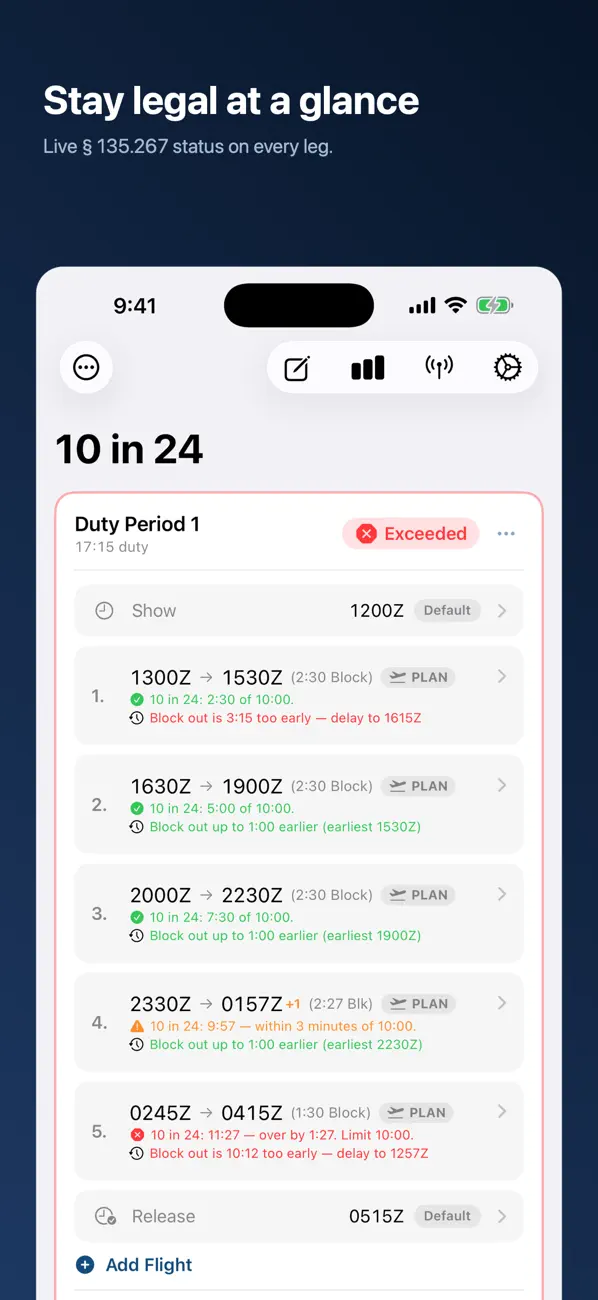
• 10 in 24 — § 135.267(b). Rolling 24-hour flight time, evaluated at every leg's block-in. 10 hours for two-pilot crews, 8 hours for single-pilot.
• Rest Look-Back — § 135.267(d). Confirms 10 consecutive hours of rest in the 24 hours before Duty 2 completes.
• Duty Length — § 135.267(c). Each duty period, from show to release, capped at 14 hours.
SEE YOUR STANDING AT A GLANCE
Every leg gets a live status indicator — green for slack, yellow approaching the line, orange in the last five minutes, red when you've gone over. The warning threshold is adjustable to your operator's culture.
EARLIEST LEGAL BLOCK-OUT, CALCULATED LIVE
Under each planned leg, see the earliest time you could push back without busting a rule — accounting for prior rest, the 14-hour duty ceiling, the previous leg, and the rolling 10-in-24 window.
SEE THE WHOLE DAY
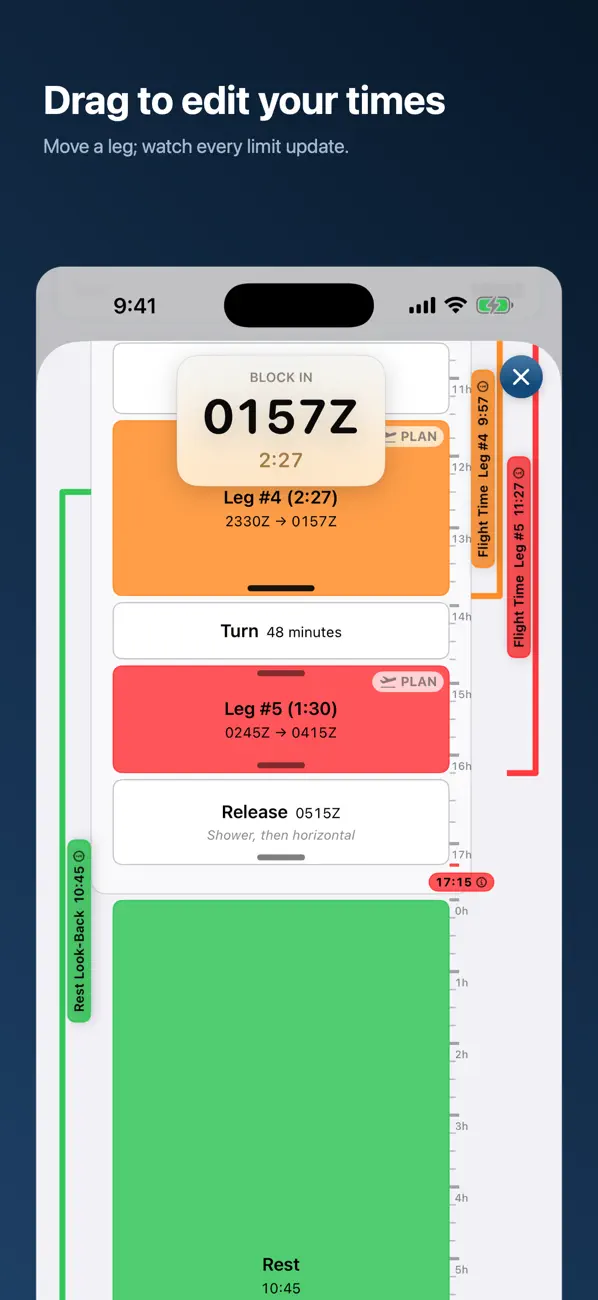
The Duty Visualization draws your entire two-duty plan as a timeline to scale: Show, every leg, every turn, Release, and the rest between duties. Long legs look long. Quick turns look quick.
• Drag a leg's edge to retime its block-out or block-in — the adjacent show, turn, and release flex to absorb it. Drag the Show or Release edge to set the duty's start and end.
• Elapsed-time rulers on each duty period and the rest gap read directly against the 14-hour duty limit and the 10-hour rest minimum — each duty's closing value colored by your compliance status.
• Each duty period's total flight time is shown right on its plate.
• Look-back brackets show which legs eat into a rolling 10-in-24 window, and the window the rest calculation measures.
• Tap any ⓘ for a plain-language explanation — what the number measures, the applicable limit, and where you stand.
• If the plan carries an exceedance, an Extended Rest chip shows the mandated rest after your final release, and why.
• Rotate to landscape for a horizontal timeline — drag-to-edit works there too, and the view keeps your place.
• On iPad, dock the timeline as a popup, side pane, or bottom pane; it updates live and remembers your arrangement.
FLY WITH A CREW? COCKPIT SYNC
Captain and FO each running 10 in 24 can link devices — even across iPhone, iPad, and Apple Silicon Mac — over a direct peer-to-peer connection. No internet, no router, no servers. Push your plan across with the other side's OK, then every edit mirrors live to the other seat. Off by default; opt in per flight with a matching pairing code.
BUILT FOR THE COCKPIT
• All times in Zulu (UTC). No time-zone math.
• Times only — enter times of day, not dates; the app keeps your two duty periods in sequence automatically.
• 24-hour clock everywhere.
• Block-out / block-in entry that auto-rolls overnight.
• Mark a leg complete to lock in actual block times — the running calculation switches to your real numbers.
• Per-duty show / release time overrides for each duty period.
• Single-pilot or two-pilot crew configuration.
• Arrange legs by dragging: reorder within a duty, or move one to the other duty period. Or clear all to start fresh.
IMPORTANT
10 in 24 is a planning aid only. A projected exceedance means the schedule isn't assignable as built — under Part 135 a duty day may not be planned to exceed a regulatory limit, and extended rest exists for exceedances that arise in actual operations. Final responsibility for compliance with § 135.267 rests with the certificate holder and the pilot in command. Always verify against your operator's official records.
Privacy Policy: https://kilolimallc.github.io/legal/10-in-24/privacy.html
Terms of Use (EULA): https://kilolimallc.github.io/legal/10-in-24/terms.html
Disclaimer: https://kilolimallc.github.io/legal/10-in-24/disclaimer.html
Quoi de neuf dans la dernière version ?
v2.4.3 — Rearrange your legs by dragging.
ARRANGE LEGS
• Open Arrange Legs from a duty period to see your whole plan in one list — Show, every leg, Release, the Rest, and the second duty period.
• Drag a leg's handle up or down to set the order it's flown; the other legs slide aside to make room.
• Drag a leg across the boundary to move it to the other duty period — it lands exactly where you drop it.
• Near the top or bottom edge, the list auto-scrolls, so you can place a leg anywhere — even off-screen.
ALSO
• Support & Feedback moved to its own menu — and you can now attach screenshots to a report, so we can see exactly what you're seeing.
• Fixed a case where moving legs between duty periods could strand a custom Show or Release time a day out, stretching a duty by a phantom ~24 hours. A show or release time that no longer fits your legs now reverts to the automatic one.
RECENTLY
• 2.4.2 — Total flight time per duty period, and a simpler, dateless plan.
• 2.4 — Reorder your legs, and drag-to-edit to the exact minute.