QuickBlur - Blur Photo Background Editor
iPhone / Photo et vidéo
QuickBlur aims to help you blur photo background automatically with so many beautiful blur effects.
SMART BLUR
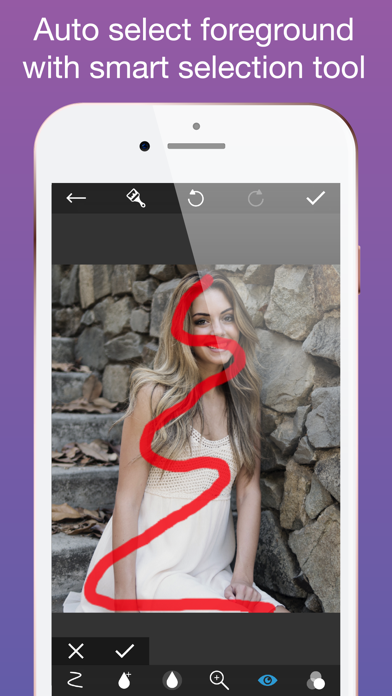
With smart selection tool, you just need to select some part of the main object, the app will auto-detect foreground and background, then make the background blurry.
EASY REFINE TOOL
The brush is placed on top of your finger to help you easily see which part you're refining.
SO MANY BLUR EFFECTS
With over 15 blur effects, you can now choose the best blur effect to fit your need. Some of them are blur, motion, zoom, pixelate, Hexa pixelate, polar pixelate, glass, crystal, point, halftone, fun house, bloom, dot, hatch,...
And you can refine the effect's intensity to have the best result.
We'll keep adding more and more effects in the next version.
EASY AND USEFUL EDITOR
We try to find the best way to help you edit your photo as quickly as possible:
- change brush size, opacity, softness & position to fill mask easier
- zoom mode: zoom-in/zoom out the photo to fill its detail
- invert the selection to blur the object and focus on the background
- preview in mask view or result view for better refining
- undo and redo
and more...
PREMIUM SUBSCRIPTION
- You can subscribe for unlimited access to all 15 premium filters and enjoy the Ads-Free experience.
- Subscriptions are billed weekly, monthly or annually at the rate selected depending on the subscription plan. Alternatively, a one-time payment plan is available, effect bundles which unlock part of or all effects are available (they are not a subscription).
– Subscription automatically renews at the cost of the chosen package, unless auto-renew is turned off at least 24-hours before the end of the current period. The subscription fee will be charged to your iTunes Account at confirmation of purchase. You may manage your subscription and turned off auto-renewal by going to your Account Settings after purchase. You will be charged for renewal within 24-hours prior to the end of the current period at the cost of the chosen package. Per Apple policy, no cancellation of the current subscription is allowed during active subscription period. Once purchased, refunds will not be provided for any unused portion of the term. Any unused portion of a free trial period, if offered, will be forfeited when you purchase a subscription to that publication, where applicable.
- Terms of use: https://pisoft.slowme.co/term/termsofuse.pdf
- Privacy policy: https://pisoft.slowme.co/term/privacypolicy.html
Let try it now!
Quoi de neuf dans la dernière version ?
This update from Apple will improve the functionality of this app. No new features are included.