Splyce Premium DJ mixer
iPhone / Musique
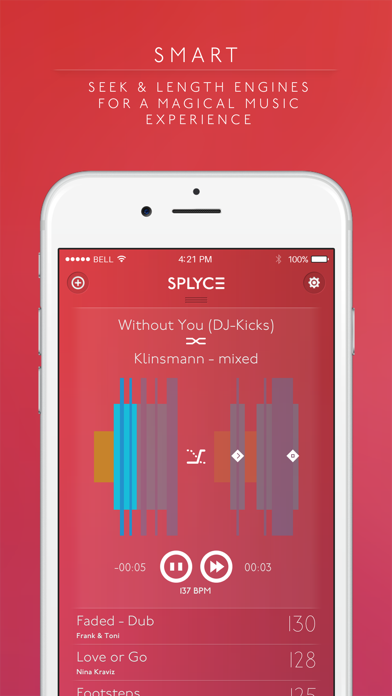
Feel the power of music with Splyce! Over 40 human curated music charts for the best music player with auto-mix on the App Store!
For a mind blowing experience with your iPhone’s music, just select your favorite songs, order them (we’ll help you with BPM’s and visual clues) and click play! It’s really that simple! But Splyce has a lot more to offer: it will mix (for real) your music, you can select the mix mode and the mixing time, and turn on light and visual effects that will allow you to throw the best parties in town. It’s like having your own DJ always with you!
Take the most out of Splyce with the Splycelists: save your playlists and mixing settings and enhance your playlists. Work with more than one and feel the power of the smart length and seek engine. Feel a whole different experience around your favorite music and be the life & soul of the party with Splyce!
Connect Splyce to Philips(R) Hue lights, and experience how music and light effects can work together to make your experience even greater. Intensity and color will vary depending on the song BPM’s, synchronizing music & lights automagically.
Splyce will change your music experience:
◆ As your everyday music player: enjoy your favorite music in a better way
◆ Partying: take your parties to the next level with Splyce!
◆ Sports training: follow the rhythm of the music while training hard
◆ Liven up your business: from a shop to a restaurant or a gym, anyone can enjoy Splyce!
--------
FEATURE HIGHLIGHTS:
√ All music Player features
√ Automatic mixing
√ BPM calculation of tracks
√ Playlist creation
√ Swipe right to auto order and left to delete a playlist song
√ Hold to order manually
√ Automatic order & music search by BPM
√ Profiles based on BPM
√ 3 mixing modes
√ 5 transition modes between songs
√ Default track duration
√ Set mixing duration
√ 8 different color themes
√ Beat synchronized light effects
√ Flash torch
√ Airplay integration
√ Purchase music on iTunes
FANCIER IN-APP UPGRADE:
√ Song artwork in lock screen
√ 3 new color themes
√ Philips(R) Hue lights support (bulbs sold separately)
PRO IN-APP UPGRADE:
√ Audio FX (echo, flanger, phaser and filter)
√ 4 new transitions between songs
√ BPM ordering of your music library
PREMIUM IN-APP UPGRADE:
√ Splycelists
√ Smart length engine
FULL EXPERIENCE UPGRADE:
√ Live the Splyce experience to the max and save some money with the full pack!
--------
√ iTunes Match tip:
If you want to play a song stored in iCloud, please make sure you download it first by clicking the iCloud download button placed next to the track in the Music app. You can also download entire playlists.
√ DRM Protected songs tip
Splyce supports nearly all audio files: MP3, M4A, AAC, WAV, AIF, etc. including all songs available on the iTunes Store. But if you have purchased from the iTunes Store before 2009, you may notice that those songs are protected with DRM technology and cannot be played with Splyce. If you have any of these old files, you can upgrade them to DRM free (iTunes Plus) via iTunes.
***Due to the DRM protection in iTunes Music tracks, it is not possible to use iTunes Music within Splyce***
--------
TIPS:
◆ When selecting songs, you can select all tracks by dragging down the screen to access the “I want it all” button
◆ Click on the Splyce button on the main screen to access all features
◆ While playing your music, if you want to delete one track of your playlist just swipe left. If you swipe right you will auto-order that track.
◆ Shake to shuffle your playlist (enable the shake function on settings)
◆ Follow us on Instagram, Twitter & Facebook to get more useful tips!
--------
Missing a feature? We're already preparing a new version, let us know at support.splyce@inqbarna.com.
Visit us:
www.twitter.com/splyceapp
www.facebook.com/splyceapp
www.instagram.com/splyceapp
Quoi de neuf dans la dernière version ?
This update from Apple will improve the functionality of this app. No new features are included.
It has been long since the last time we updated...sorry for that!
We've listened to all your requests and comments and we have fixed most of the things that bothered you. We have also added iPhone X and iOS 11 support so you can enjoy your Splyce experience to the max.
As usual, if you have any comments, please let us know at support.splyce@inqbarna.com