One Man Band Live
iOS Universel / Musique
Change your digital piano or synthesizer into an arranger keyboard with realtime auto-accompaniment. Or use your iOS device on its own as a realtime arranger and be creative while traveling
Connect your iPad, iPhone or iPod to your keyboard instrument with the camera connection kit and an USB AB cable or a MIDI interface cable (depending on what your keyboard uses for MIDI). Then start One Man Band and select the Settings button. Choose the MIDI In and MIDI Out port to your keyboard and press Done. Now select the red Presets button and choose one of the style/voice combinations.
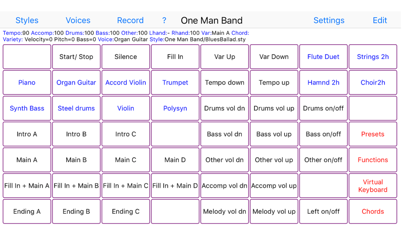
When you play a chord on the leftside of your keyboard instrument, the accompaniment will start to play. You can play the melody on the right side of the keyboard, it will have harmonies and instrument layers depending on the chosen voice. Select different style variations (Main, Fill, Intro, Ending) while you play. Switch to different accompaniment styles and melody voices with the buttons on top. Press Record and set the switch on to record MIDI files.
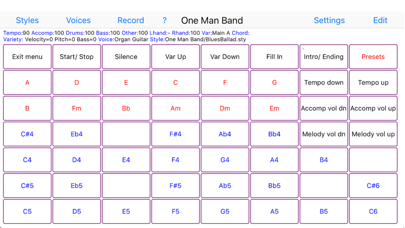
When you don't have a keyboard instrument (yet) or can't make the connection at the moment, then there are options to use the iPad/iPhone/iPod as an accompaniment instrument on its own. Select the soundfont player at Settings/Ports/MidiOut and use the virtual keyboard to play chords and melody.
One Man Band utilises standard style files compatible with the styles used in Yamaha PSR, DGX and Tyros arranger keyboards. There are thousands of these styles available on the internet. When you copy a zip-file with styles to OMB (download, email, icloud), the styles will be placed in a new style folder with the same name as the zip-file.
The panel with 56 buttons is customisable. You can assign a function, voice, preset, chord or note to each of the buttons (except for the button top left) and create submenus with again 56 buttons each. Create your own voices with harmonies and instrument layering.
There is also a free version (One Man Band Lite) in the App Store.
Quoi de neuf dans la dernière version ?
This update from Apple will improve the functionality of this app. No new features are included.
New transposition functions.
Fix for handling MIDI file recordings.