iPhoneAddict Apps
  • Actualités
  • Accueil Apps
  • iPhone
  • iPad
  • Universelles
  • Mac
  • Apple TV
KG KultureGeek
App
iPhone / iPad Télécharger iAddict v5 Mac Télécharger iAddict Mac
  • Actualités
  • Accueil Apps
  • iPhone
  • iPad
  • Universelles
  • Mac
  • Apple TV
  • Archives keynotes
  • Firmwares & iTunes
  • Contactez-nous
  • Comparateur de prix
  • KultureGeek
Accueil » Liste des Apps » Apps Universelles » Musique » Midiflow Limiter (Audiobus)
1.0.6 iOS €1,99€ Johannes Doerr 0 0 This MIDI effect app for Audiobus 3 is a filter and remapper for note velocities. Filter out notes that are too loud or too quiet, or remap them to different values. Use multiple instances to create velocity layers, which trigger different sounds...
Midiflow Limiter (Audiobus)

Midiflow Limiter (Audiobus)

iOS Universel / Musique

1,99€ au lieu de 2,49€
Acheter sur l'App Store
Facebook X E-mail

This MIDI effect app for Audiobus 3 is a filter and remapper for note velocities. Filter out notes that are too loud or too quiet, or remap them to different values. Use multiple instances to create velocity layers, which trigger different sounds based on the notes' velocity.

+ Specify a velocity range to filter out notes
+ Use a curve to remap velocities
+ Remap to a fixed velocity
+ Use multiple instances of this effect in Audiobus

NOTE: This app requires Audiobus 3. Insert it into one or more MIDI effect ports to affect the data going through the respective pipelines.

FILTER NOTES BY VELOCITY
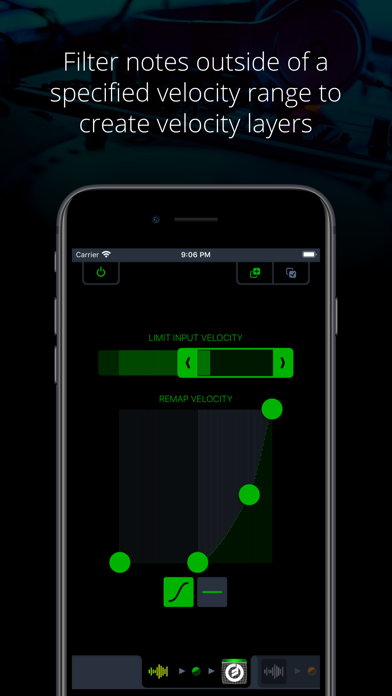
The range selector at the top allows you to specify the velocity of notes that can pass. All notes with velocities outside of that range will be filtered out. You can see in real-time what note velocities are coming in, so adjusting the range according to notes you play on a keyboard or generate with a sequencer is very easy.

CREATE VELOCITY LAYERS
Midiflow Limiter can be added multiple times to an Audiobus configuration. If you are using an external keyboard, you can build velocity layers. Just create two routes in Audiobus with the keyboard as a source and two synths as destinations. Then add Midiflow Limiter as an effect in both routes. You can then apply different velocity ranges for both synths, and only notes with a matching velocity will trigger their sounds.

REMAP NOTE VELOCITIES WITH A CURVE
The velocities of notes that have not been filtered out in the previous step can be remapped with a so-called velocity curve. The horizontal axis represents all possible values for incoming velocities. The curve determines the remapping function used to modify the velocities. Use the four handles to adjust the curve.

Velocity remapping has various applications. You can make a piano sound a lot "stronger" with a curve like above, as louder notes are triggered "earlier" in terms of force applied to the keys. A curve with the bow to the other side makes it "softer". Other curves can increase or reduce the range of velocities.

REMAP NOTE VELOCITIES TO A FIXED VALUE
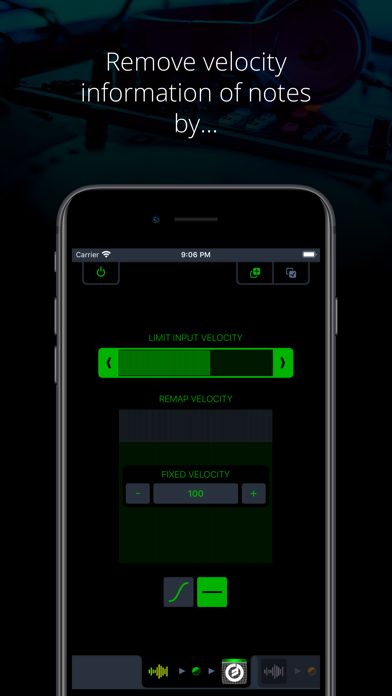
If you want to get rid of the velocity information in the notes, you can remap them to one fixed value. This corresponds to a curve that looks like a horizontal line.

En voir plus...

Quoi de neuf dans la dernière version ?

Compatibility improvements for recent iOS versions

  • Screenshot #1 pour Midiflow Limiter (Audiobus)
  • Screenshot #2 pour Midiflow Limiter (Audiobus)
  • Screenshot #3 pour Midiflow Limiter (Audiobus)

D'autres applications du développeur

iMIDIPatchbayiMIDIPatchbayiOS UniverselMidiflowMidiflowiOS UniverselEnglish is Easy – L’anglais, c’est facile!English is Easy – L’anglais, c’est facile!Apple TVMidiflow Keyboard (Audiobus)Midiflow Keyboard (Audiobus)iOS UniverselMidiflow Splitter (Audiobus)Midiflow Splitter (Audiobus)iOS UniverselMidiflow Randomizer (Audiobus)Midiflow Randomizer (Audiobus)iOS UniverselVoir toutes les apps

Note

(0 note)

Détails sur l'application

Version
1.0.6
Taille
4.9 Mo
Version minimum d'iOS
10.2
Dernière mise à jour
07/05/2024
Publié par
Johannes Doerr

Newsletter App Store

Recevez chaque jour les meilleures promos

Actualité Apple

Image L’iPhone 18 Pro se rechargera 25 % plus vite selon iOS 27
L’iPhone 18 Pro se rechargera 25 % plus vite selon iOS 27
Image iPhone 18 Pro : un opérateur dévoile des détails avant la keynote d’Apple
iPhone 18 Pro : un opérateur dévoile des détails avant la keynote d’Apple
Image L’Apple Store en ligne ferme ses portes avant la keynote des iPhone 18 Pro et de l’iPhone pliable
L’Apple Store en ligne ferme ses portes avant la keynote des iPhone 18 Pro et de l’iPhone pliable
Image Apple Watch : les livraisons bondissent de 14 % malgré le recul du marché des montres connectées
Apple Watch : les livraisons bondissent de 14 % malgré le recul du marché des montres connectées
iPhoneAddict Apps

Le catalogue iPhoneAddict pour suivre les nouveautés, mises à jour et baisses de prix de l’App Store.

Apps

Toutes les apps iOS iPhone iPad Universelles Mac Apple TV

iPhoneAddict

Actualité Apple Archives keynotes Contact À propos KultureGeek

Suivez-nous

©2009-2026 i2CMedia. Tous droits réservés.