MIDIAngloXL - Control Surface
iPad / Musique
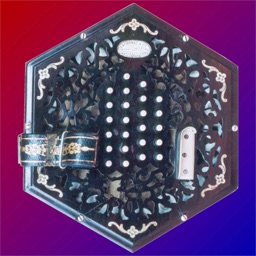
MIDIAngloXL is a 30-button Anglo Concertina MIDI control surface.
MIDIAngloXL doesn't produce any sound on its own, it is for playing hardware or software VST-style MIDI synthesizers via CoreMIDI hardware interfaces connected to the dock connector or virtual MIDI instruments running on your iPad such as my Celtic Sounds app, SampleTank by IK Multimedia or Sonosaurus ThumbJam.
Please visit the app support website to see some amazing live demo videos and for the settings you will need to enable in the synth app you are using to have it work with the control surface.
Anglo-style concertinas are commonly used for playing traditional Irish dance tunes, and is a much-favored instrument in County Clare, Ireland.
The Anglo concertina is bisonoric, meaning the instrument plays a different note for each button depending on whether you are pushing or pulling on the bellows.
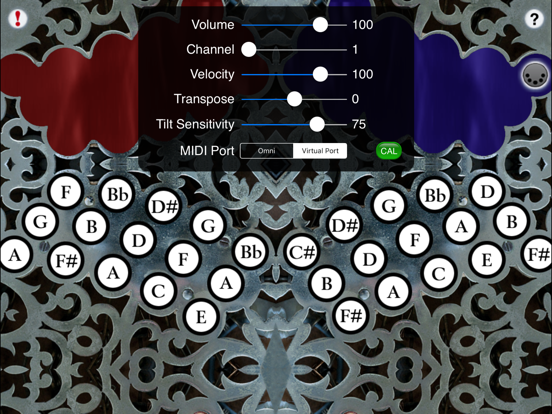
In the app, to play, simply tip the iPad to the left for a bellows push note, or to the right for a bellows pull note, and press a button. The colors on the top of the screen alternate to show the changes between push and pull. Blue on the left represents a push, blue on the right represents a pull.
You may reverse the bellows while pushing a button simply by tipping in the opposite direction.
Multiple buttons may be pressed at the same time to play chords.
Touch the diamond area at the bottom center of the screen to add vibrato effects. Touch and release in the upper half for a high vibrato, lower half for a low vibrato. The farther from the center vertically, the deeper the vibrato depth.
Touch the '?' icon to show the note names for each button.
Touch the MIDI connector icon to show the MIDI controls.
You may select the volume, MIDI channel, attack velocity, and semitone transposition (+/- 12), as well as set the push/pull tilt sensitivity.
The lower the tilt sensitivity, the farther from center you need to tilt the iPad to change bellows direction.
Use the "MIDI Port" switch to choose between "Omni" sending MIDI data to all CoreMIDI apps or "Virtual Port" sending to a named CoreMIDI virtual output port. When the "Virtual Port option is selected, MIDIAngloXL will show up as an input option in apps that support virtual ports like Sonosaurus ThumbJam. "Omni" mode is selected by default.
Touch the "Cal" button to the right of the tilt sensitivity slider to reset the home position for bellows tilting.
All MIDI settings are saved when MIDIAngloXL quits and restored the next time it is run.
Touch the '!' icon at the upper right to quiet any "stuck" notes if they occur.
The button layout is based on a 30-button modified C/G Jeffries style.
Quoi de neuf dans la dernière version ?
Bug fixes