iPhoneAddict Apps
  • Actualités
  • Accueil Apps
  • iPhone
  • iPad
  • Universelles
  • Mac
  • Apple TV
KG KultureGeek
App
iPhone / iPad Télécharger iAddict v5 Mac Télécharger iAddict Mac
  • Actualités
  • Accueil Apps
  • iPhone
  • iPad
  • Universelles
  • Mac
  • Apple TV
  • Archives keynotes
  • Firmwares & iTunes
  • Contactez-nous
  • Comparateur de prix
  • KultureGeek
Accueil » Liste des Apps » Apps Mac » Utilitaires » WebDAV Server
1.3.4 macOS €7,99€ 兰桂 吴 0 0 WebDAV Server provides a simple way to share / sync files via HTTP / WebDAV. WebDAV (Web Distributed Authoring and Versioning) allows clients to perform remote Web content authoring operations. WebDAV Server lets you run the HTTP / WebDAV service...
WebDAV Server

WebDAV Server

macOS / Utilitaires

7,99€
Acheter sur l'App Store
Facebook X E-mail

WebDAV Server provides a simple way to share / sync files via HTTP / WebDAV.

WebDAV (Web Distributed Authoring and Versioning) allows clients to perform remote Web content authoring operations.

WebDAV Server lets you run the HTTP / WebDAV service on your Mac computer and you can access the files from other computers / devices with WebDAV-capable clients such as Finder or File Explorer.
You can press Command-K in Finder, enter the HTTP URL (e.g. http://192.168.0.100:8080/) and connect to WebDAV Server.

WebDAV Server comes with built-in authentication, so you don't need to expose your computer accounts to anyone.

* Features

• Easy to use: you can simply select a folder to share (the server root) and start the WebDAV service without any additional configuration.
• Built-in authentication (basic authentication).
• Supports both HTTP and HTTPS (HTTP over SSL).
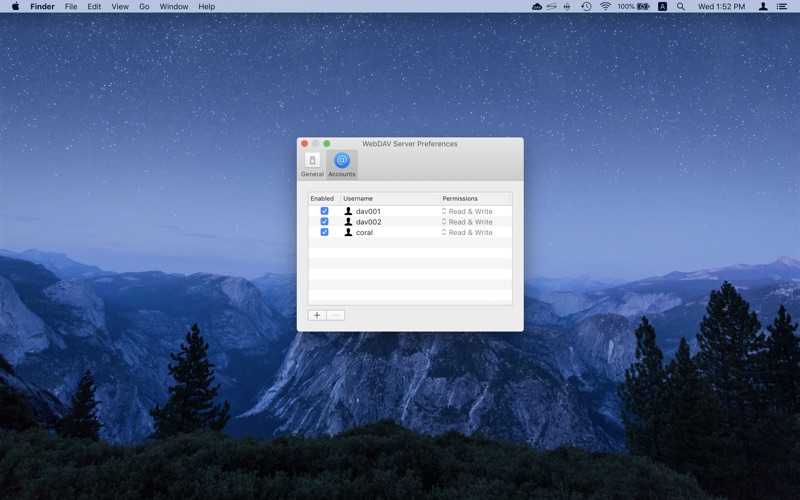
• Supports per-user home directories (must disable anonymous access).
• Supports sharing additional folders (Preferences -> Sharing).
• All kinds of regular files supported: folders, documents, photos, movies, music, apps, backups and other files.

* Please restart the WebDAV service after changing the configurations / the WebDAV accounts.

Note: the default server root points to "/Users/*username*/Library/Containers/net.langui.WebDAVServer/Data/Documents/WebDAVShare", you can press Command-G in Finder to go to the destination folder.

En voir plus...

Quoi de neuf dans la dernière version ?

• Some UI improvements
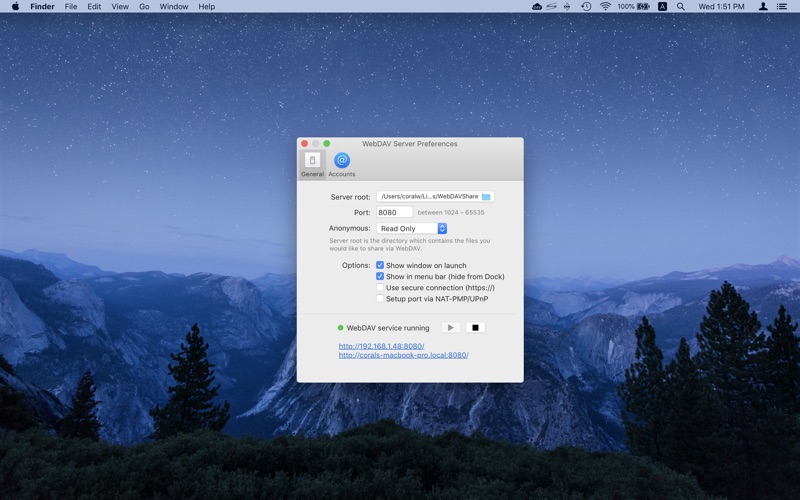
  • Screenshot #1 pour WebDAV Server
  • Screenshot #2 pour WebDAV Server

D'autres applications du développeur

ChmPlus Pro: CHM/EPUB ReaderChmPlus Pro: CHM/EPUB ReaderiOS UniverselChmPlus Lite: CHM/EPUB ReaderChmPlus Lite: CHM/EPUB ReaderiOS UniverselZipApp Pro: The UnarchiverZipApp Pro: The UnarchiveriOS UniverselZipApp Lite: The UnarchiverZipApp Lite: The UnarchiveriOS UniverselChmPlus: CHM ReaderChmPlus: CHM ReadermacOSEPUB ReaderEPUB ReadermacOSVoir toutes les apps

Note

(0 note)

Détails sur l'application

Version
1.3.4
Taille
9.1 Mo
Version minimum de macOS
10.10
Dernière mise à jour
17/01/2025
Publié par
兰桂 吴

Newsletter App Store

Recevez chaque jour les meilleures promos

Actualité Apple

Image Les États-Unis ne veulent pas qu’Apple achète de la RAM chinoise
Les États-Unis ne veulent pas qu’Apple achète de la RAM chinoise
Image Apple retire sa pub polémique avec un enfant et un iPhone en Italie
Apple retire sa pub polémique avec un enfant et un iPhone en Italie
Image L’iPhone Ultra pliable va-t-il résoudre les défauts du Galaxy Z Fold 8 ?
L’iPhone Ultra pliable va-t-il résoudre les défauts du Galaxy Z Fold 8 ?
Image Mac : des hackers exploitent la faille du partage d’écran avec un mineur de cryptomonnaie
Mac : des hackers exploitent la faille du partage d’écran avec un mineur de cryptomonnaie
iPhoneAddict Apps

Le catalogue iPhoneAddict pour suivre les nouveautés, mises à jour et baisses de prix de l’App Store.

Apps

Toutes les apps iOS iPhone iPad Universelles Mac Apple TV

iPhoneAddict

Actualité Apple Archives keynotes Contact À propos KultureGeek

Suivez-nous

©2009-2026 i2CMedia. Tous droits réservés.