
• KultureGeek
  • Comparateur de prix
       
iPhoneAddict
 iAddictv5Notre Application iPhone/iPad
  • Accueil Apps
  • Actualité Apple
  • Keynote Apple
  • Firmwares & iTunes
  • Contactez-nous
Accueil » Liste des Apps » Apps Mac » Utilitaires » SideSlides
L'application n'est plus disponible sur l'App Store français
1.0.1 macOS €1,99€ One Kerato 0 0 SideSlides is a utility to combine multiple images into one, side-by-side. Click in image slots, one at a time, to load an image from the clipboard. Then hit Command C to copy the combined image to the clipboard, or alternatively, drag it out to...
SideSlides

SideSlides

macOS / Utilitaires

1,99€ au lieu de 2,49€
Acheter sur l'App Store

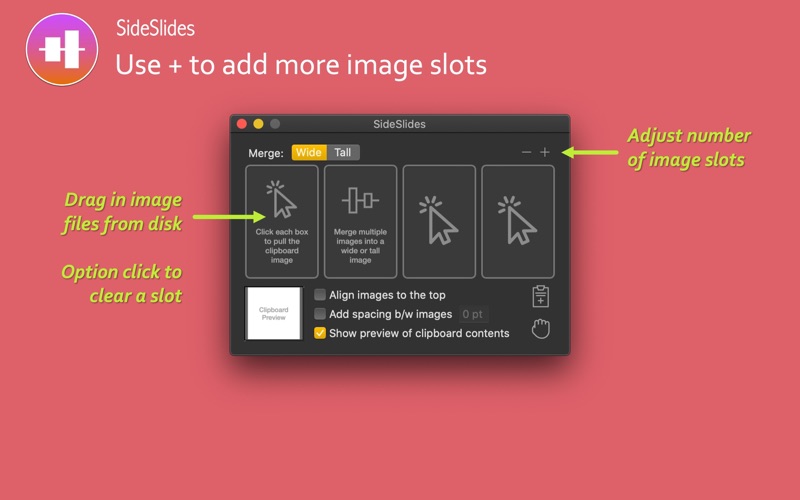
SideSlides is a utility to combine multiple images into one, side-by-side.

Click in image slots, one at a time, to load an image from the clipboard.

Then hit Command C to copy the combined image to the clipboard, or alternatively, drag it out to disk.

Add more image slots using + and remove using -

Options include:

• Insert spacing between images
• Combine images vertically or horizontally
• Option to align images to the top (when combining horizontally) or align images to the left (when combining vertically). Default behavior is to center the combined images.
• Instead of pulling images from the clipboard, drag in image files into the slots

Use cases:

• Collect screenshots and merge into one tall or wide image to create helpful instructions
• Clip interesting images side-by-side such as for before-and-after
• Merge two slides from presentations for easier comparison and analysis
• Clip multiple tweets into a tall, shareable image
• Stitch tall screenshots side-by-side such as iPhone screenshots received via AirDrop on your Mac

En voir plus...

Quoi de neuf dans la dernière version ?

Bug fix for point spacing when combining images vertically.
  • Screenshot #1 pour SideSlides
  • Screenshot #2 pour SideSlides

D'autres applications du développeur

PDFOutliner
PDFOutliner
/ macOS
PDFoo
PDFoo
/ macOS
LinkMaker
LinkMaker
/ macOS
PDFCombo
PDFCombo
/ macOS
PDFSpeech
PDFSpeech
/ macOS
PDF Trim
PDF Trim
/ macOS

Note

(0 note)

Détails sur l'application

Version
1.0.1
Taille
4.8 Mo
Version minimum de macOS
10.14
Dernière mise à jour
19/06/2020
Publié par
One Kerato

Newsletter App Store

Recevez chaque jour les meilleures promos

Actualité Apple

Image L’iPhone 17 Pro Max écrase la concurrence sur l’autonomie malgré une batterie standard
L’iPhone 17 Pro Max écrase la concurrence sur l’autonomie malgré une batterie standard
Image Les puces M5 Max et M5 Ultra d’Apple se dévoilent avec iOS 16.3
Les puces M5 Max et M5 Ultra d’Apple se dévoilent avec iOS 16.3
Image Release candidate pour iOS 26.3, macOS 26.3, watchOS 26.3, tvOS 26.3 et visionOS 26.3
Release candidate pour iOS 26.3, macOS 26.3, watchOS 26.3, tvOS 26.3 et visionOS 26.3
Image Studio Display 2 : 90 Hz et non 120 Hz pour l’écran d’Apple ?
Studio Display 2 : 90 Hz et non 120 Hz pour l’écran d’Apple ?
Partenaires : Actualité iPhone - Culture Geek
©2009-2026 i2CMedia | A propos |