• KultureGeek
  • Comparateur de prix
       
iPhoneAddict
 iAddictv5Notre Application iPhone/iPad
  • Accueil Apps
  • Actualité Apple
  • Keynote Apple
  • Firmwares & iTunes
  • Contactez-nous
Accueil » Liste des Apps » Apps Mac » Utilitaires » PlainTextMenu
1.1 macOS €0,99€ 君 许 0 0 PlainTextMenu help you coverts texts which in clipboard into plaintext. It instantly removes everything unneeded: colours, typeface size, style (for example, boldface/italics), hyper-links, images, etc. In other words, everything that isn’t plain...
PlainTextMenu

PlainTextMenu

macOS / Utilitaires

0,99€ au lieu de 1,19€
Acheter sur l'App Store

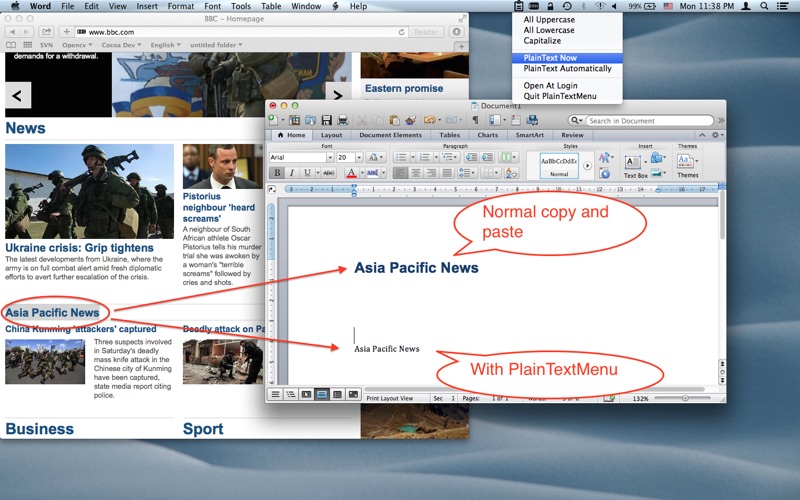
PlainTextMenu help you coverts texts which in clipboard into plaintext.

It instantly removes everything unneeded: colours, typeface size, style (for example, boldface/italics), hyper-links, images, etc. In other words, everything that isn’t plain text! Now you can put plain text in your letters and documents using the copy/paste functions, without having to clean it up manually.

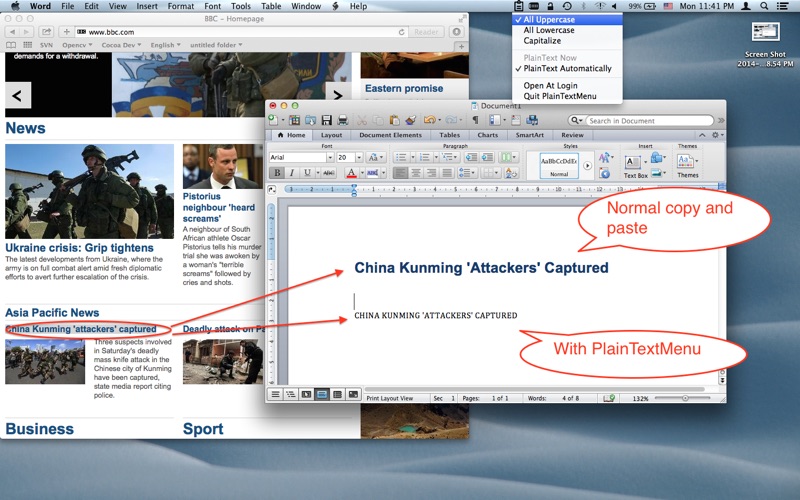
It also can change all the letters into uppercase,lowercase or make it capitalise.

If you’ve used the copy/paste functions in Mac OS before, you’ll appreciate how valuable PlainTextMenu is! We use it ourselves every day. This app will lower your stress level and save you tons of time!

Thank you for your support and feel free to contact us with any comments or suggestions (alnysoftspt@gmail.com).

How to use:
PlainText Automatically:

Check this option on, whatever you copied will be convert to plain text automatically. But not work for the text before you check this option on.

If you check All Uppercase on too, the text will be convert to uppercase plain text.
If you check All Lowercase on too, the text will be convert to lowercase plain text.
If you check All Capitalize on too, the text will be convert to capitalize plain text.

———————————————————————————————————————————————————————————————————
PlainText Now:

Check this option on, the latest text you copied will be convert to plain text.

If you check All Uppercase on too, the text will be convert to uppercase plain text.
If you check All Lowercase on too, the text will be convert to lowercase plain text.
If you check All Capitalize on too, the text will be convert to capitalize plain text.

———————————————————————————————————————————————————————————————————
Uncheck both option, Uppercase, Lowercase, Capitalize will stop work.

En voir plus...

Quoi de neuf dans la dernière version ?

Fix bug:can not uncheck some option.
  • Screenshot #1 pour PlainTextMenu
  • Screenshot #2 pour PlainTextMenu

D'autres applications du développeur

iTyper
iTyper
/ macOS
New File Free
New File Free
/ macOS
Clipboard Guru
Clipboard Guru
/ macOS
Snapshot Pro - Capture & Edit Screenshot
/ macOS
Essential Training for Photoshop CC 2017
/ macOS
Essential Training for AutoCAD 2017
/ macOS
Voir toutes les apps

Note

(0 note)

Détails sur l'application

Version
1.1
Taille
0.5 Mo
Version minimum de macOS
10.6
Dernière mise à jour
06/09/2014
Publié par
君 许

Newsletter App Store

Recevez chaque jour les meilleures promos

Actualité Apple

Image Le superbe Apple Store de Regent Street va rouvrir ses portes à Londres après un mois de travaux
Le superbe Apple Store de Regent Street va rouvrir ses portes à Londres après un mois de travaux
Image Rivian va proposer une application Apple Watch pour ses voitures
Rivian va proposer une application Apple Watch pour ses voitures
Image Apple montre comment le Mac et l’iPad aident l’équipe d’Angleterre de rugby
Apple montre comment le Mac et l’iPad aident l’équipe d’Angleterre de rugby
Image L’iPhone 17 Pro « orange Hermès » booste les ventes en Chine
L’iPhone 17 Pro « orange Hermès » booste les ventes en Chine
Partenaires : Actualité iPhone - Culture Geek
©2009-2026 i2CMedia | A propos |