Photo Exifer 3
macOS / Utilitaires
Photo Exifer 3 includes all features in Photo Exifer..
Photo Exifer 3 allows you to edit, copy and paste, import and export photo metadata from local photos, iCloud Photos and photo library. It supports finding and removing duplicate photos from Photo Library, fixing the referenced photos, merging multiple photo libraries into one photo library and keep photo library data and more. In addition, it provides more app features for the photo library.
Here are main features:
1. View, add, remove Exif, GPS, IPTC, TiFF tags and all metadata
2. Export/import all metadata to the plist file/photo to edit all metadata tags
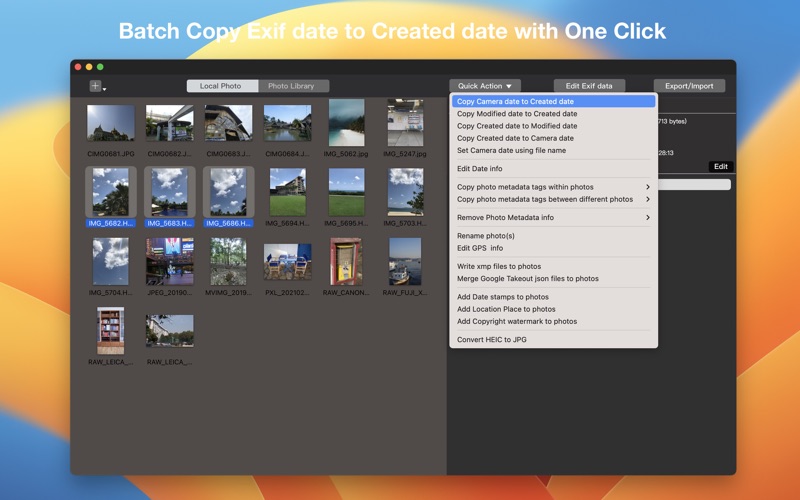
3. Quickly and easily change the camera date and creation date
4. Rename photos using photo metadata tag(s) and custom name text
5. Edit, add and remove title, caption, keywords, copyright, camera information, comments and all photo metadata tags.
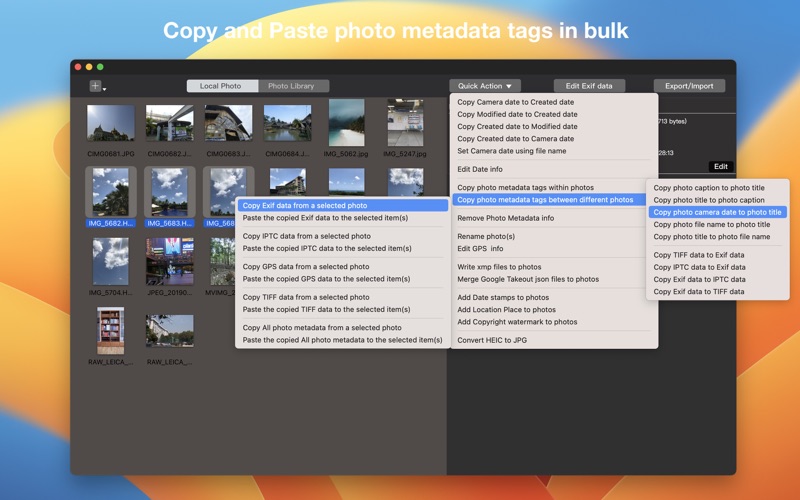
6. Copy and paste EXIF, GPS, IPTC, and other photo metadata from one photo to multiple photos.
7. Add date and timestamps, places, and copyright watermark
8. Show original photos and export original photos and edited photos from photo library
9. Show the different metadata tags between original photos and photo library database
10. Edit photo metadata tags in the Photo Library database
11. Edit all photo metadata of original photos in Photo Library
12. Replace Photo Library metadata with original photo metadata
13. Export original photos with photo metadata in the Photo Library database
14. Export Photo Library photo’s metadata tag(s) to plist file
15. Find and remove duplicate photos from Photo Library
16. Write photo metadata in xmp files to photos in batch
17. Merge Google Takeout json files to photos in batch
18. Convert HEIC photos to JPG photos
19. Reconnect missing linked reference files in photo library
20. Merge multiple photo libraries into one photo library and keep photo library data
21. Download Full-resolution iCloud Photos to a custom location.
If you have any question about the product, please feel free to contact us (support@fireebok.com), and we provide 7* 12 hours support service
Quoi de neuf dans la dernière version ?
1. Automatic Missing Link Repair: Added a feature to automatically fix missing link reference files in the photo library by matching photos in the root folder and subfolders.
2. Expanded RAW Format Support: Now supports more RAW photo formats, including NEFT, PEF, ARW, ARM, DNG, CR2, CR3, MOS, 3FR, RW2, RAW, MRW, RAF, and ORF.
3. Advanced Album Filtering and Sorting: Added a new option to filter and sort photos by album structure.
4. Metadata Copying: Introduced the ability to copy photo metadata tags within a photo or between different photos.
5. Photo Library Merging: Added the ability to merge photo libraries while preserving all library data.
6. Date Range Filtering: Enabled filtering of photos from the photo library by a specified date range.
7. Batch Date Editing: Added functionality to batch edit photo dates in the photo library.
8. Optimized Photo and Video Loading: Improved the speed and efficiency of loading photos and videos in the photo library.
9. Support iCloud photos that are not downloaded in the photo library.
10. Google Takeout Metadata Fix: support merging multiple Google Takeout photo folders
11. Duplicate Photo Detection: Improve finding duplicate photos in the photo library.
12. Photo library keywords Fix: support for keyword related features in the new version of Photos app.
13. Export Edited Photos: support exporting edited photos with photo library metadata.
14. Add Filtering Options: Support showing photos without Titles, Captions, keywords, Location data.
15. Add Batch Edit Title and Caption: Batch customize the titles and captions of local photos.
1. Automatic Missing Link Repair: Added a feature to automatically fix missing link reference files in the photo library by matching photos in the root folder and subfolders.
2. Expanded RAW Format Support: Now supports more RAW photo formats, including NEFT, PEF, ARW, ARM, DNG, CR2, CR3, MOS, 3FR, RW2, RAW, MRW, RAF, and ORF.
3. Advanced Album Filtering and Sorting: Added a new option to filter and sort photos by album structure.
4. Metadata Copying: Introduced the ability to copy photo metadata tags within a photo or between different photos.
5. Photo Library Merging: Added the ability to merge photo libraries while preserving all library data.
6. Date Range Filtering: Enabled filtering of photos from the photo library by a specified date range.
7. Batch Date Editing: Added functionality to batch edit photo dates in the photo library.
8. Optimized Photo and Video Loading: Improved the speed and efficiency of loading photos and videos in the photo library.
9. Support iCloud photos that are not downloaded in the photo library.
10. Google Takeout Metadata Fix: support merging multiple Google Takeout photo folders
11. Duplicate Photo Detection: Improve finding duplicate photos in the photo library.
12. Photo library keywords Fix: support for keyword related features in the new version of Photos app.
13. Export Edited Photos: support exporting edited photos with photo library metadata.
14. Add Filtering Options: Support showing photos without Titles, Captions, keywords, Location data.
15. Add Batch Edit Title and Caption: Batch customize photo titles and captions for local photos.
15. Improved Photo Library Sorting: Added support for sorting photos and videos after applying filter options in the photo library.
16. Fixed Photo Compression Issue: Resolved an issue where certain actions unintentionally compressed photos and reduced file size.
17. Added New Metadata Copy Tools: Copy photo keywords to captions, Copy Person Shown metadata to keywords