Screen Snapshot
macOS / Utilitaires
Screen Snapshot is an easy-to-use and powerful snipping tool. Simple and intuitive user interface makes your work easier and efficient. With built-in editor feature, you can easy to take a customizable screenshot. All screenshots are managed and you can edit and reuse them at any time.
>>>Customize your own hotkey to take screenshots
Screen Snapshot has a built-in editing hotkey function. Using this function, you can quickly apply your favorite hotkeys. You can customize four hotkeys for full-screen capture, window capture, selected area capture and delayed capture.
>>>Take full-screen screenshots quickly
Just click your hotkey and you have taken a full-screen screenshot. In full-screen capture mode, you can capture the cursor as needed.
>>>Select an area, snap it
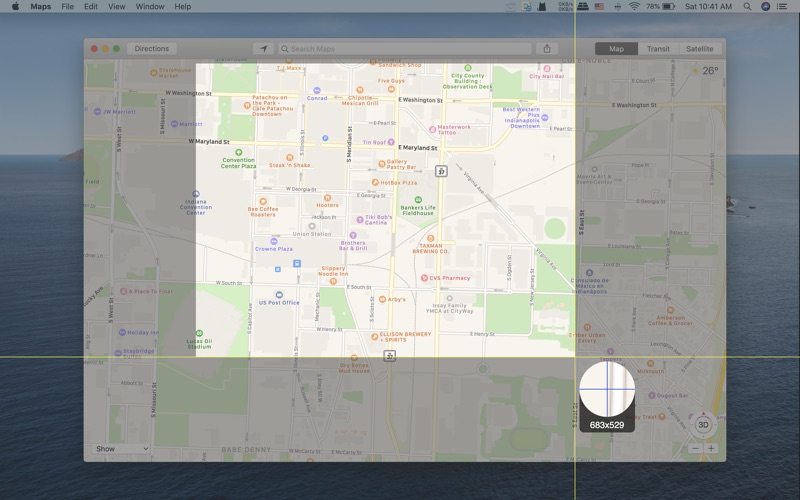
Customizing capture area is very easy to use, just drag and drop to complete. Magic zoom tool helps you make more precise selections, it enlarges the current position to pixels, while providing current size information.
>>>Capture window with shadow
Move the mouse to find the window on the desktop and click to take a snapshot. It can even take snapshots of windows behind other windows. Of course, you can take screenshots of windows without shadow.
>>>Capture pop-up menu is no longer difficult
The delayed capture feature gives you a period of time to pop up the menu. According to your needs, you can set different delay times. This feature is only validate for full-screen capture mode.
>>>Powerful editors
You can edit screenshots instantly when taking them or later using a powerful built-in editor. The editor contains many useful tools, such as text tools, mask tools, line tools, shape tools, etc. Use the text tool to add notes, labels and use the mask tool to hide some privacy areas. Line tools and shape tools help you highlight the key points. Some useful photo filters are also integrated into the editor, including Temperature and Tint. Of course, undo and redo are necessary for every editor.
>>>Snapshot manager for batch operations and reuse
Making tutorial is a complicated work, which requires large amounts of snapshots in advance. Snapshot manager will help you. It saves all screenshots which had taken in the past, you can browse, re-edit, delete and export them.
>>>A variety of output methods can meet different needs
You can save screenshots to Picture folder directly, as well as save to pasteboard. If you want to save to other formats, just click the export button and select the format you want to output. It supports JPEG2000, PNG, PDF, BMP, TIFF formats.
Note
The editor function is not free, you can buy it from the in-app store.
Quoi de neuf dans la dernière version ?
Fixed some bugs