Harmony Bridge
macOS / Utilitaires
Control your TV with HomeKit !
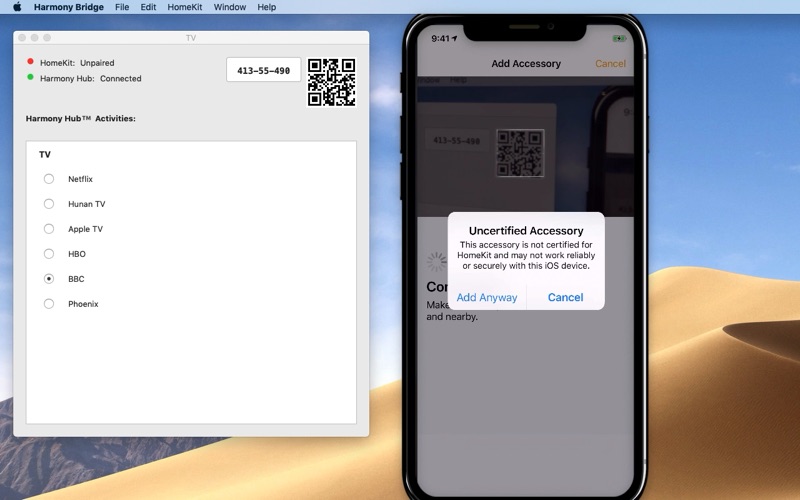
Using your iPhone, and a Logitech Harmony Hub, this app allows you to switch between AV activities configured on your Harmony Hub. For instance, switch on your TV and hi-fi, change channel, change volume, etc. Setup HomeKit scenes to switch activities on a simple command to Siri, like Watch TV, or Watch HBO.
This application provides the bridge between Logitech Harmony Hubs with Apple HomeKit.
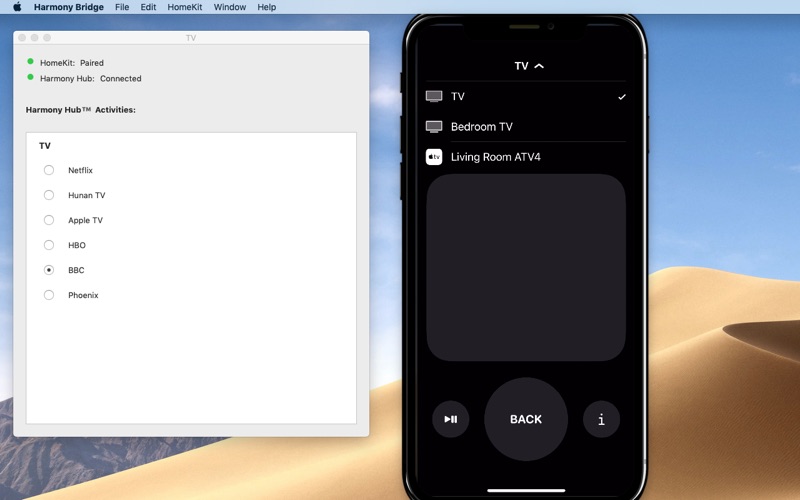
Set up your activities with the Logitech Harmony app, and Harmony Bridge will reflect those activities as separate inputs on HomeKit TV accessory. Switch inputs on the HomeKit Television to change activities. Using the iPhone control center remote control, you can change channels, change volume, and navigate around the TV interface as you would do with your Harmony remote control.
You need one or more Logitech Harmony Hubs on your home wifi network and the app needs to run day and night on a mac on the same network. Harmony Bridge takes very little processor time or resources, but it does need to be running all the time in the background. Note, that means if your mac is shutdown or goes to sleep, HomeKit will not be able to talk to your device until the Mac is woken again with Harmony Bridge up and running.
The App creator has no affiliation with Logitech, but is just an avid user. The Harmony Hub devices can be found at https://www.logitech.com/en-us/product/harmony-hub
Harmony Bridge will detect all your Hubs configured on the local network and make them available to add to HomeKit. Any "Home control" activities, such as Hue lights, configured on the Harmony Hub will appear as switches in HomeKit.
You can also add switches to power on and off individual devices independently of activities. Currently in HomeKit on iOS 12.2 or later, you can change a devices volume using the volume buttons on the side of the iPhone or iPad when in the Remote screen of control centre and the Harmony Hub device which you added to your HomeKit is selected. It is not currently possible to change a devices volume within the Home app or from iOS Shortcuts.
Open an EventLog (from Help Menu) to see the last 100 events for each Hub to observe what caused a state change.
The app has been tested with the most recent Harmony Hub firmwares from 14.15.206 to 14.15.264.
The Harmony Bridge app requires macOS 10.13 (High Sierra) or later which runs on most macs built since 2012. To control HomeKit Television accessories you need a device running iOS 12.2 or later. Please send feedback if you have any questions.
Logitech, the Logitech logo, and other Logitech marks are registered in Switzerland and other countries.
Quoi de neuf dans la dernière version ?
Fix for Harmony Hubs with only one single activity defined.