MouseBoost
macOS / Utilitaires
Unlock your Mac's full potential with MouseBoost! Add over 60 powerful tools directly to your right-click menu. Fully customizable for programmers, designers, and power users, it’s the ultimate productivity booster.
***Key Features***
- New File: Instantly create files from custom templates (e.g., .txt, .md, .docx).
- Favorite Directories & Apps: Access favorite folders and launch apps right from the context menu. Keep your desktop and Dock clean.
- Cut & Paste Files: Finally, a true Cut-and-Paste (Command+X) for Finder. Move files effortlessly.
- Open in Terminal, iTerm2, Warp, Ghostty, cmux, Kaku, Alacritty, WezTerm, Tabby, Kitty, Hyper, Rio: Right-click any folder to open it directly in your terminal.
- Custom Scripts: Automate your workflow with custom Shell and AppleScript.
- Clipboard History
Support for text, image, and color previews, paste queue, iCloud sync, and blacklist/whitelist filtering. Default shortcut ⌘⇧V.
- Batch Rename
Replace Text,Add Text,Add Numbering,Change Case,Add Date,Extract & Delete,Sanitize,Change Extension and Format All.
- Image Format Conversion
Say goodbye to clunky tools. Instantly convert images to PNG, JPEG, BMP, TIFF, GIF, and PDF formats.
Quickly generate full sets of app icons for iOS, Android, macOS, and more, and export them as standard AppIcon.icns and .iconset resources.
- Image Resizing
Stop manual calculations. From a single source image, batch-generate icons in all preset sizes—from the App Store to notifications. You can also customize and save your own size templates for one‑time setup and reuse.
- Replace Image Background
No more tedious cutouts. With built‑in system AI, remove backgrounds with one click. Then, quickly fill with a solid color, gradient, or any background image—so your visuals blend seamlessly into any scene.
- Image Cropping
End awkward crops. Preset ratios like 1:1 (avatar/icon), 4:3 (slides), 16:9 (video cover), and 5:7 (small 1‑inch photo) are built in. You can also drag freely. Perfectly sized images for any platform—no more back‑and‑forth tweaking.
- Rotate Image
Right-click to rotate 90°, 180°, flip horizontally, or flip vertically.
- Compress Image
Three quality presets plus custom compression ratio.
- Icon Recolor
Batch recolor PNG icons in one click for a consistent icon set.
- Image Stitching
Combine multiple images vertically or horizontally, with drag-to-reorder and live preview.
- Image & PDF Watermark
Add text watermarks to images and PDFs with customizable font, color, opacity, and position.
- File Conversion Toolbox
PDF/Image to TXT: OCR extracts text even from scans.
PDF Merge: Combine PDFs and images into one document.
PDF Split: Split PDFs by page range.
Office to PDF: Convert Word, PPT, Excel to PDF with formatting preserved.
- App Uninstallation: Uninstall an APP and all its associated resources and log files with one click.
- Find Duplicates: Smart scanning with auto-select, one-click cleanup to reclaim disk space.
- Advanced File Management: Hide/Show private files, Lock files from accidental changes, create Encrypted ZIP archives, and more.
- More Great Tools: Includes a Color Picker, Custom Folder Icons, "Copy Path" action, Force Delete, and iCloud Sync for your settings.
***Highly Customizable***
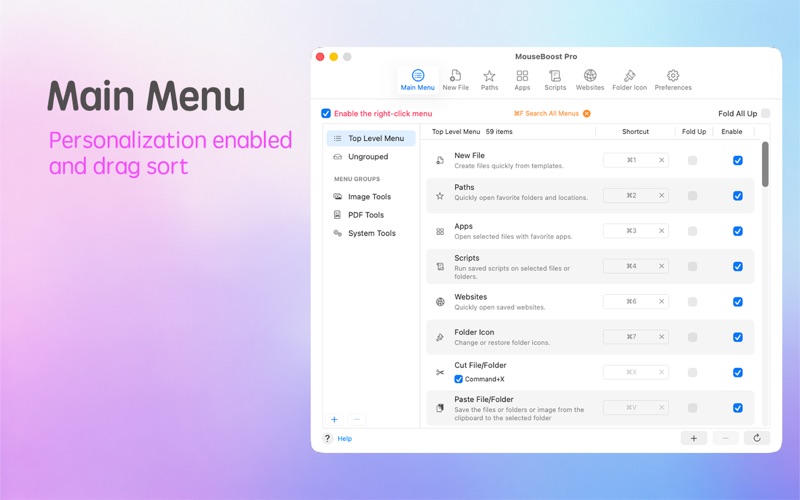
Reorder, disable, or rename any menu item. Pin your most-used actions to the main menu for lightning-fast access. Tailor MouseBoost to your exact needs.
***Important Notes***
- iTerm2 Fix: If iTerm2 opens two windows, set Preferences > General > Startup > Window restoration policy to Only Restore Hotkey Window.
Reach us at gmshrekhelp@outlook.com for support.
By using this app, you agree to our Terms of Use, governed by the standard Apple End User License Agreement (EULA). https://www.apple.com/legal/internet-services/itunes/dev/stdeula/
Quoi de neuf dans la dernière version ?
- Added image editing.
- Fixed known issues and improved performance and stability.