Folder Organizer
macOS / Utilitaires
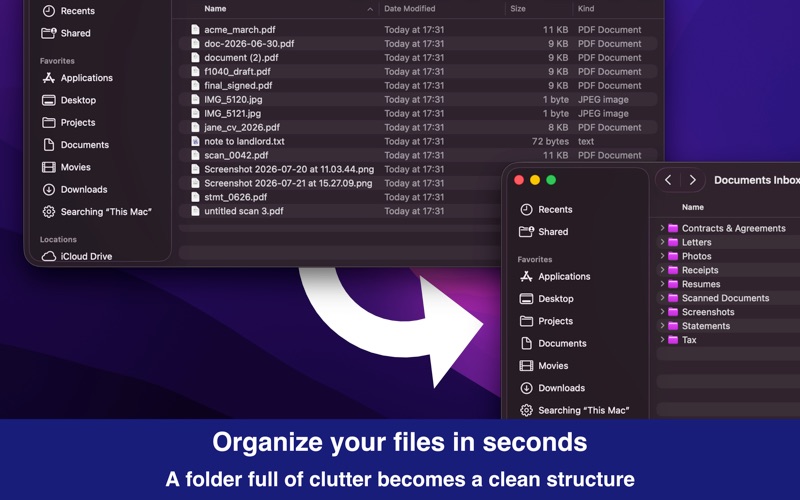
Folder Organizer turns a messy folder into a tidy one.
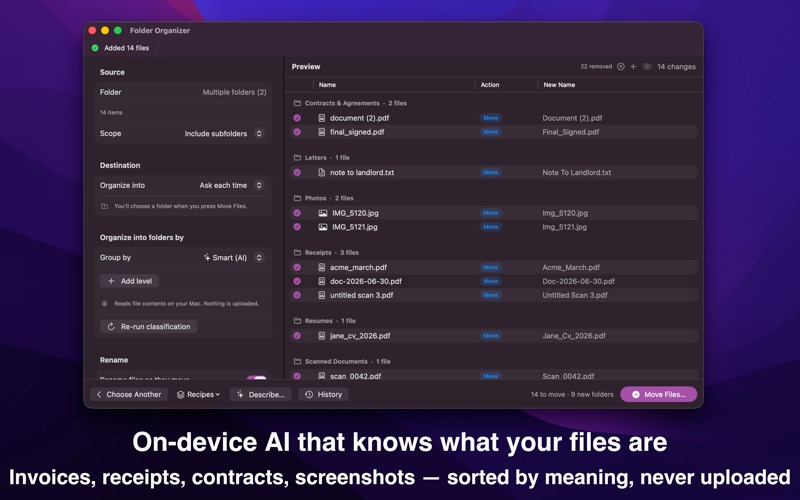
Point it at your Downloads, your Desktop, or a folder full of scans. Pick how
you want things grouped. You then get a full list of what will happen — every
file and exactly where it's going — before anything moves.
NOTHING MOVES WITHOUT YOUR SAY-SO
Every run starts as a plan. See each file and its destination, uncheck the ones
you'd rather leave alone, remove files from the list, or send one somewhere
else. Nothing touches your disk until you press the button.
UNDO, EVEN LATER
Every run is recorded. Undo the one you just did, or open the history and
reverse a run from last week. Undo still works after you quit and reopen.
SORT THE WAY YOU WANT
• By kind — images, video, audio, PDFs, documents, archives, installers
• By date — year, quarter, month, week or day, in several formats
• By file extension, Finder tag, first letter, or size
• Or combine them: by kind, then by year, for nested folders
SORT BY WHAT'S INSIDE THE FILE
Choose Smart and the app reads your files — the text in a PDF, the words in a
scan — and files them by what they are: invoices, receipts, contracts, bank
statements, tax forms, screenshots, photos and more. If it gets one wrong,
correct it in the list before you apply. Your files are read on your Mac and
never leave it.
RENAME AS YOU GO
Build new names from the original name, a date, a counter, the parent folder or
the file type. You see an example as you type.
LET IT RUN BY ITSELF
Set a folder to watch — Downloads is the usual one — and new files get sorted
as they arrive. Prefer to stay in control? Turn on Ask First and a small alert
appears in the corner showing what's about to move, with a button to approve
it. Automatic runs are undoable too.
SAY IT IN YOUR OWN WORDS
Type something like "sort invoices and receipts into their own folders" and the
app sets it up for you to check before running.
BUILT LIKE A MAC APP SHOULD BE
• Drag files or folders straight onto the window
• Press Space for Quick Look, just like in Finder
• Save the setups you use often and reuse them
• Lives in the menu bar so watch folders keep working
• Shortcuts actions for your own automations
PRIVATE BY DEFAULT
Folder Organizer has no network access at all. Your files, what's in them, and
what you do with them stay on your Mac.
Quoi de neuf dans la dernière version ?
Folder Organizer has been rebuilt from the ground up — faster, fully native, and
a lot more careful with your files.
PREVIEW BEFORE ANYTHING MOVES
Every run now starts as a plan: every file, and exactly where it's going.
Uncheck what you'd rather skip, remove files from the list, or send one
somewhere else. Nothing happens on disk until you press the button.
UNDO
Every run is recorded and reversible — including automatic ones, and including
after you quit and reopen the app.
SORTING BY WHAT'S INSIDE YOUR FILES
A new Smart option reads your PDFs and scans and files them by what they are:
invoices, receipts, contracts, bank statements, tax documents, screenshots,
photos and more. If it gets one wrong, correct it before you apply. Files are
read on your Mac and never leave it.
WATCH FOLDERS
Point a rule at Downloads and new files get sorted as they arrive — either
automatically, or only after you approve them in a small alert that appears in
the corner of the screen.
RENAME WHILE YOU SORT
Build new names from the original name, a date, a counter, the parent folder or
the file type, with a live example as you type.
MORE WAYS TO GROUP
Dates by year, quarter, month, week or day in several formats. Nested grouping,
such as by kind and then by year. Plus extension, Finder tag, first letter and
size.
SET IT UP BY TYPING WHAT YOU WANT
Type something like "sort invoices and receipts into their own folders" and the
app builds the setup for you to check first.
ALSO NEW
Saved setups you can reuse, a run history window, Quick Look with the Space bar,
drag and drop onto the window, Shortcuts actions, and an option to run quietly
from the menu bar with no Dock icon.
TWO THINGS TO KNOW
This version needs macOS 14 or later.
The file list table and its Excel/CSV export are no longer part of the app.
Thanks for using Folder Organizer. If something doesn't work the way you expect,
get in touch — I read every message.