iPhoneAddict Apps
  • Actualités
  • Accueil Apps
  • iPhone
  • iPad
  • Universelles
  • Mac
  • Apple TV
KG KultureGeek
App
iPhone / iPad Télécharger iAddict v5 Mac Télécharger iAddict Mac
  • Actualités
  • Accueil Apps
  • iPhone
  • iPad
  • Universelles
  • Mac
  • Apple TV
  • Archives keynotes
  • Firmwares & iTunes
  • Contactez-nous
  • Comparateur de prix
  • KultureGeek
Accueil » Liste des Apps » Apps Mac » Utilitaires » Floating Date and Time
3.0.0 macOS €5,99€ Jordi Cruzado 0 0 Floating Clock keeps the date and time — plus world clocks and task timers — in a small, always-visible window on your Mac desktop. Then it quietly steps out of the way. Perfect for when you hide the menu bar or work in full screen. Lightweight,...
Floating Date and Time

Floating Date and Time

macOS / Utilitaires

5,99€
Acheter sur l'App Store
Facebook X E-mail

Floating Clock keeps the date and time — plus world clocks and task timers — in a small, always-visible window on your Mac desktop. Then it quietly steps out of the way.
Perfect for when you hide the menu bar or work in full screen. Lightweight, highly configurable, and it lives in the menu bar.

• Always-visible date and time in a frosted, non-obtrusive window
• Up to three world clocks with labels and day-offset indicators
• Task countdowns plus an unlimited number of timers, from one second to many hours, with notifications
• Nine preset positions, free dragging, three custom positions, and full multi-monitor support
• Fully customizable — date and time formats, locale, font size, colors and opacity
• Configurable global hotkeys for the clock, timers, drag mode and adding tasks
• Caps Lock indicator with an optional popup on change
• Quietly hides when your pointer gets close

En voir plus...

Quoi de neuf dans la dernière version ?

• International clocks — show up to three time zones under the main clock, each with its own label and a day-offset indicator.
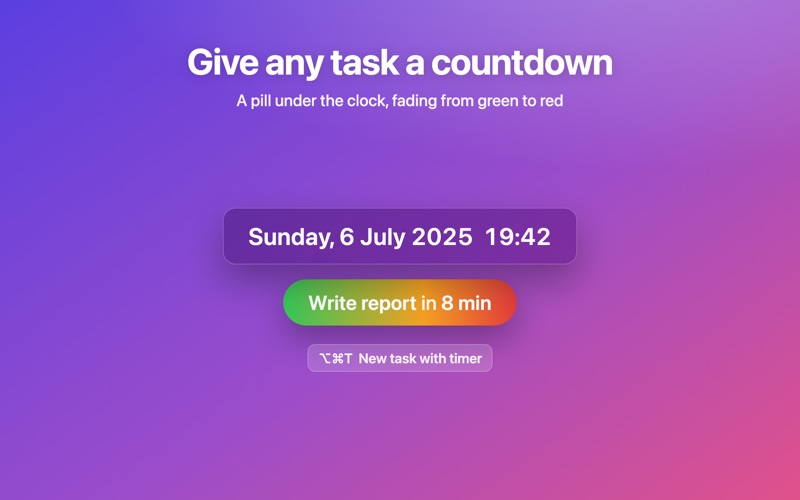
• Tasks with a timer — give any task a countdown with a global shortcut; a pill under the clock shows the one finishing soonest, fading from green to red.
• Works everywhere — the clock, its pills and your timers now follow you across every Space and stay visible over full-screen apps.
• A refreshed, native macOS interface throughout.

  • Screenshot #1 pour Floating Date and Time
  • Screenshot #2 pour Floating Date and Time
  • Screenshot #3 pour Floating Date and Time

Note

(0 note)

Détails sur l'application

Version
3.0.0
Taille
0.6 Mo
Version minimum de macOS
12.0
Dernière mise à jour
29/07/2026
Publié par
Jordi Cruzado

Newsletter App Store

Recevez chaque jour les meilleures promos

Actualité Apple

Image App Store : l’IA générative fait exploser les dépenses et les jeux reculent
App Store : l’IA générative fait exploser les dépenses et les jeux reculent
Image Las Azules saison 2 : le premier épisode est disponible aujourd’hui sur Apple TV
Las Azules saison 2 : le premier épisode est disponible aujourd’hui sur Apple TV
Image Apple vs Epic Games : la justice refuse de repousser les discussions sur les nouvelles commissions de l’App Store
Apple vs Epic Games : la justice refuse de repousser les discussions sur les nouvelles commissions de l’App Store
Image Toujours absent en France, Apple prolonge son Back to School 2026
Toujours absent en France, Apple prolonge son Back to School 2026
iPhoneAddict Apps

Le catalogue iPhoneAddict pour suivre les nouveautés, mises à jour et baisses de prix de l’App Store.

Apps

Toutes les apps iOS iPhone iPad Universelles Mac Apple TV

iPhoneAddict

Actualité Apple Archives keynotes Contact À propos KultureGeek

Suivez-nous

©2009-2026 i2CMedia. Tous droits réservés.