Controllers Lite
macOS / Utilitaires
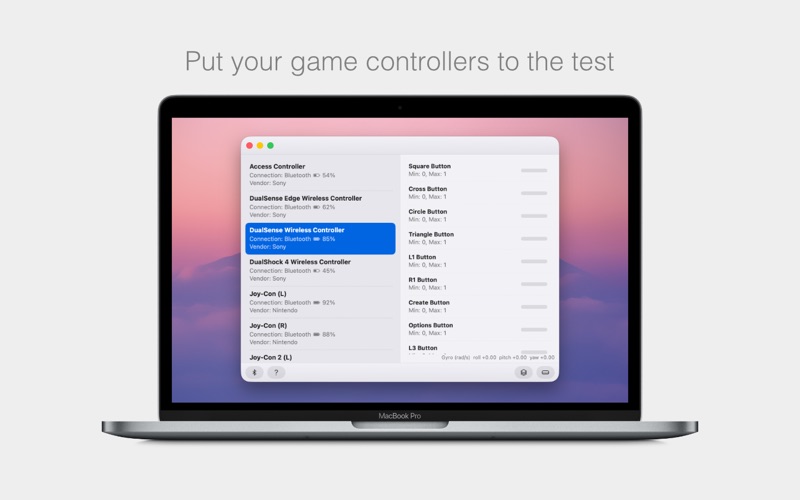
Controllers Lite tells you in seconds whether your game controller actually works on your Mac.
Connect a controller and it appears in the list. Select it and every button, stick, trigger, and sensor is shown live, lighting up the moment you press it. If a controller never shows up at all, you know your Mac isn't seeing it rather than having to guess.
WHAT YOU CAN CHECK
- Every button, D-pad direction, analog stick, and analog trigger
- Stick drift, by watching whether a stick reports movement while you aren't touching it
- Motion sensors, with live roll, pitch, and yaw readouts
- Touchpad input, including multi-finger positions
- Battery level and connection type for each controller
- Whether macOS recognizes the controller in the first place
SUPPORTED CONTROLLERS
- PlayStation: DualSense, DualSense Edge, DualShock 4, Access Controller (including expansion ports), and the PS Move Navigation Controller
- Xbox: Xbox Wireless Controller, Elite Wireless Controller, Adaptive Controller, and Adaptive Joystick
- Nintendo: Switch Pro Controller, Pro Controller 2, Joy-Con, Joy-Con 2, and Joy-Cons docked in the Charging Grip over USB
- Most other USB and Bluetooth gamepads
FEATURES
- Test several controllers at once and switch between them instantly
- Buttons window that shows the active button and its value at a glance
- Pair controllers over Bluetooth without leaving the app
- Controllers are remembered and reconnect automatically between launches
- Universal app, running natively on both Apple silicon and Intel Macs
- Dark and Light mode
HINTS
- After connecting a PlayStation controller, press the PS button to wake it up.
- Xbox 360 controllers need a third-party driver installed before macOS will see them.
Try the full version of Controllers at controllersapp.com to use your game controllers to play almost any game on Mac, even games that don't have built-in support for controllers.
Quoi de neuf dans la dernière version ?
- Add support for the PlayStation DualSense and DualSense Edge controllers
- Add support for the PlayStation Access Controller, including expansion ports
- Add support for the PS Move Navigation Controller
- Add support for the Xbox Elite Wireless Controller
- Add support for the Xbox Adaptive Controller
- Add support for the Xbox Adaptive Joystick
- Add support for the Switch Pro Controller 2 and Joy-Con 2
- Add support for Switch 2 controllers over Bluetooth, including motion controls
- Add support for Joy-Cons docked in the Charging Grip over USB
- Add support for both Intel and Apple silicon chips
- Add a Buttons window for live visualization of buttons as you press them
- Add live motion and touchpad readouts for controllers that have them
- Add battery status for wireless controllers
- Add in-app Bluetooth pairing for connecting controllers without leaving the app
- Add a Bluetooth settings shortcut to the bottom bar
- Add automatic reconnection so controllers are remembered between launches
- Add Dark and Light mode for app appearance
- Improve support for Xbox controllers connected via USB
- Improve the main window with empty-state icons, a balanced split view, and refreshed icons
- Improve Settings with a redesigned layout and remembered window positions
- Improve controller naming so reconnecting never shows blank or duplicate rows
- Improve the Input Monitoring permission prompt with a persistent banner
- Fix numerous controller-specific input quirks across connection types and reconnects