Archiv
macOS / Utilitaires
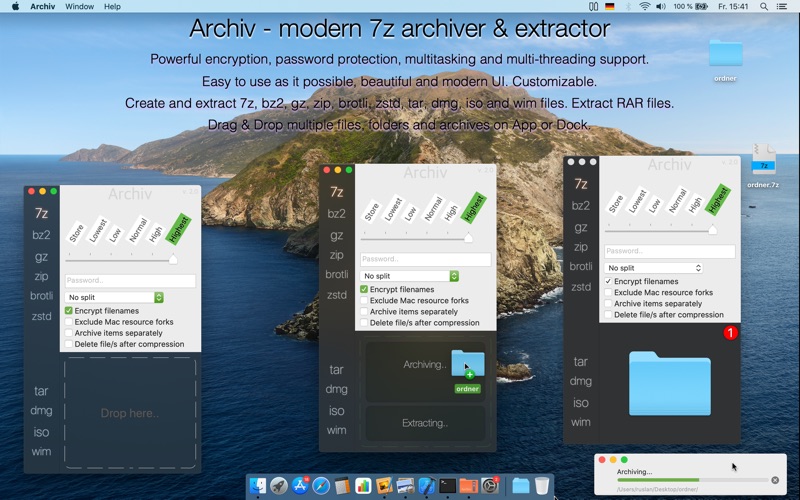
Archiv - is a brand new and modern 7z archiver, easy to use as it possible.
With Archiv your can create archives in different popular formats and extract them easily.
- Create and extract 7z, bz2, gz, zip, brotli, zstd, tar, dmg, iso (+udf) and wim files. Extract RAR files.
- Supporting multi-volume archives, archiving and extracting.
- Powerful encryption, password protection, multitasking and multi-threading support.
- Easy to use as it possible, intuitive user experience, beautiful and modern UI. Customizable.
- Intelligent and convenient Drag & Drop support. Drag & Drop multiple files, folders and archives on App or Dock.
- Integration in Finder.
- Professional translation and from native speakers : English, Deutsch, Français, 中文, 日本語, 한국어, Español, Português, Italiano, Svenska, Nederlands, Dansk, Norsk, Suomi, Polski, Русский
SUPPORT
I would like to hear from you how could I improve my app! Please review my app on Mac App Store, and write your comments about improvements and requested new features.
Contact me: appssalon.de/contact.
----------------------------------------
Take a look also at another my apps:
Duplikate - modern duplicate file finder.
BookmarkApp - bookmarks duplicate cleaner and management software for Safari.
Tresor - password manager with highest level of security and privacy.
Quoi de neuf dans la dernière version ?
Dear customers, I have worked hard last months to deliver you the fastest and the best modern archiving tool for macOS. I have completely rewritten whole app from the ground, to make it much better for further improvements and development, it was very necceserelly. I have tried many possible solutions until I found good one. Thats why it took so much time. Much of time (hundreds of hours) was spent on testing all functions and integration testing.
WHAT‘S NEW:
- Compiled for brand new Apple Silicon®(M1.. M2, M2 Max.. chips)
- Upgraded to brand new 7z ver. 25.07
- Added brand new latest version of Brotli (developed by Google®) compression algorithm, archiving and extracting
- Added brand new latest version of ZStandard (zstd, developed by Facebook®) compression algorithm, archiving and extracting
- Added wim (Windows®) images, archiving and extracting
- Improved support for 7z multiparted archives (splitting)
- Added zip multiparted support, archiving and extracting
- Added rar multiparted support, archiving and extracting
- Miltiparted archiving and split options menu were moved from main menu to main window as drop-down menu
- Improved multithreading and multiprocess functionality, now you can select how many operations should be executed semultinously
- Upgraded to brand new unrar 6.10 utility
- Added dark mode
- Added accent color of macOS (highlight color) now you can see changes in app
- Additional performance improvements
- Added Settings window, many new settings were added, customization added, more settings comming soon
- New icons for archive types were created, you will see it in Finder, hope you like it
- Added more languages: Czech, Croation, Catalan, Slovak, Ukrainian, Greek, Romanian, Hungarian, Chinese Traditional, Latvian, Hebrew, Slovenian, if you use these langs as user interface language of macOS you will see changes in app. It was translated using Google Translate, bear in mind, i am a solo developer. If you can help me to improve these langs i will be appreciate.
FIXED:
- Improved UI, fixed bug when some labels are flickering
- Fixed rare bugs of extraction of multiparted archives
- Fixed bug of extractions in special cases
NOTES:
What will be implemented in next updates:
- More settings and features, for example file access control, and more UI customization
- Old or other file formats
- More finder integration (like finder submenus)
- Icons in operations list
- You can send me your desings of file icons as CC0 and I can include it to programm, and appreciate your name in app.
Unfortunately it was not possible to add xz (https://tukaani.org/xz, developed by Tukaani) compression algorithm, because this tool use GPLv2+ libraries, thats why I cannot include it in commercial product, because I want to be honest, and not violate law. But maybe I will find solution soon. But 7z compression algorithm is superior and much better than xz, thats why you dont need it at all, you can extract xz files using free apps like Unarchiver. Also xz is outdated, but 7zip allways updating.
Archiv 2.0 was developed with love, hope you like it and will review app with 5 stars!!) If you have some issues or another problems please let me know asap!