iPhoneAddict Apps
  • Actualités
  • Accueil Apps
  • iPhone
  • iPad
  • Universelles
  • Mac
  • Apple TV
KG KultureGeek
App
iPhone / iPad Télécharger iAddict v5 Mac Télécharger iAddict Mac
  • Actualités
  • Accueil Apps
  • iPhone
  • iPad
  • Universelles
  • Mac
  • Apple TV
  • Archives keynotes
  • Firmwares & iTunes
  • Contactez-nous
  • Comparateur de prix
  • KultureGeek
Accueil » Liste des Apps » Apps Mac » Utilitaires » 3D Virtual Simulator By Carpets Inter
L'application n'est plus disponible sur l'App Store français
1.64 macOS €Gratuit Carpets International Thailand Public Co.,Ltd 0 0 Create your own flooring design. Flooring plays a significant role in the design of a room. Selecting the right carpet is the key to success. At Carpets Inter, we continually search for ways to increase the efficiency of the carpet tile design...
3D Virtual Simulator By Carpets Inter

3D Virtual Simulator By Carpets Inter

macOS / Utilitaires

Gratuit
Obtenir sur l'App Store
Facebook X E-mail

Create your own flooring design.
Flooring plays a significant role in the design of a room. Selecting the right carpet is the key to success.
At Carpets Inter, we continually search for ways to increase the efficiency of the carpet tile design process. For that reason we developed the Carpets Inter 3D Virtual Simulator.
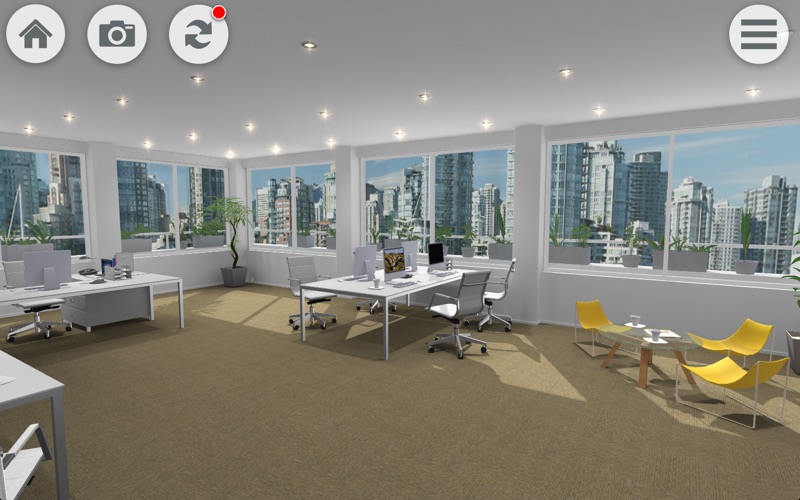
With the 3D Virtual Simulator for the iPad and iPhone you can visually experience our comprehensive carpet tile catalogue. Automatically updated by our inhouse design team, this app ensures that you are up-to-date on our latest offerings.
Create your own floor design with just a touch of your finger. The tool will enable you to select the desired room scene, design, and color. By changing the carpet installation within the room, you can see how your selected design looks in the room. Other functions include:
1.Zoom In/Out - Use two fingers and pinch in to zoom in or out.
2.Tap and Hold - You can tap on the carpet floor and hold to see the detail of our product such as fiber type, pile weight, item code and color.
3.Double Tap – Tap twice to walk along the path or corridor.
4.Single Tap – Tap once to select and pick up the desired item.
5.Drag – Press and drag to rotate the room or look around the room scene.

For more information, please contact our team at info@carpetsinter.com
En voir plus...

  • Screenshot #1 pour 3D Virtual Simulator By Carpets Inter
  • Screenshot #2 pour 3D Virtual Simulator By Carpets Inter
  • Screenshot #3 pour 3D Virtual Simulator By Carpets Inter

Note

(0 note)

Détails sur l'application

Version
1.64
Taille
182 Mo
Version minimum de macOS
10.6.6
Dernière mise à jour
11/01/2015
Publié par
Carpets International Thailand Public Co.,Ltd

Newsletter App Store

Recevez chaque jour les meilleures promos

Actualité Apple

Image Apple Fitness+ pourrait bientôt proposer des séances d’entrainement diffusées en direct
Apple Fitness+ pourrait bientôt proposer des séances d’entrainement diffusées en direct
Image Brevet : Apple prépare un HomePod avec caméra capable de « comprendre » ce que l’utilisateur regarde
Brevet : Apple prépare un HomePod avec caméra capable de « comprendre » ce que l’utilisateur regarde
Image iOS 27 et macOS 27 : Apple étend Continuity à Siri AI et au Vision Pro
iOS 27 et macOS 27 : Apple étend Continuity à Siri AI et au Vision Pro
Image Foxconn : l’iPhone représente 29 % du chiffre d’affaires, contre la moitié auparavant
Foxconn : l’iPhone représente 29 % du chiffre d’affaires, contre la moitié auparavant
iPhoneAddict Apps

Le catalogue iPhoneAddict pour suivre les nouveautés, mises à jour et baisses de prix de l’App Store.

Apps

Toutes les apps iOS iPhone iPad Universelles Mac Apple TV

iPhoneAddict

Actualité Apple Archives keynotes Contact À propos KultureGeek

Suivez-nous

©2009-2026 i2CMedia. Tous droits réservés.