• KultureGeek
  • Comparateur de prix
       
iPhoneAddict
 iAddictv5Notre Application iPhone/iPad
  • Accueil Apps
  • Actualité Apple
  • Keynote Apple
  • Firmwares & iTunes
  • Contactez-nous
Accueil » Liste des Apps » Apps Mac » Productivité » Windows Grid
L'application n'est plus disponible sur l'App Store français
1.6.0 macOS €1,99€ Denk Alexandru 0 0 Move and resize windows with ease. With Windows Grid you can organise your workspace the way you want it. Put windows side by side, tile, stack, compare and multitask. Select from predefined layouts, use keyboard shortcuts or transform windows by...
Windows Grid

Windows Grid

macOS / Productivité

1,99€ au lieu de 2,49€
Acheter sur l'App Store

Move and resize windows with ease.

With Windows Grid you can organise your workspace the way you want it. Put windows side by side, tile, stack, compare and multitask. Select from predefined layouts, use keyboard shortcuts or transform windows by dragging them to one of the screen's edges.

Note: By default, Windows Grid supports your favourite productivity apps only, but with a helper that you can download for free (from: http://alexdenk.eu/windowsgrid) you can transform any window from any app.
Supported out of the box:
• Browsers: Safari and Chrome
• iWork: Pages, Numbers, Keynote, Notes, TextEdit
• Microsoft Office: Word, Excel, PowerPoint, Outlook
If you download a free helper, Windows Grid can transform any window from any app (from: http://alexdenk.eu/windowsgrid)

HOW TO USE IT
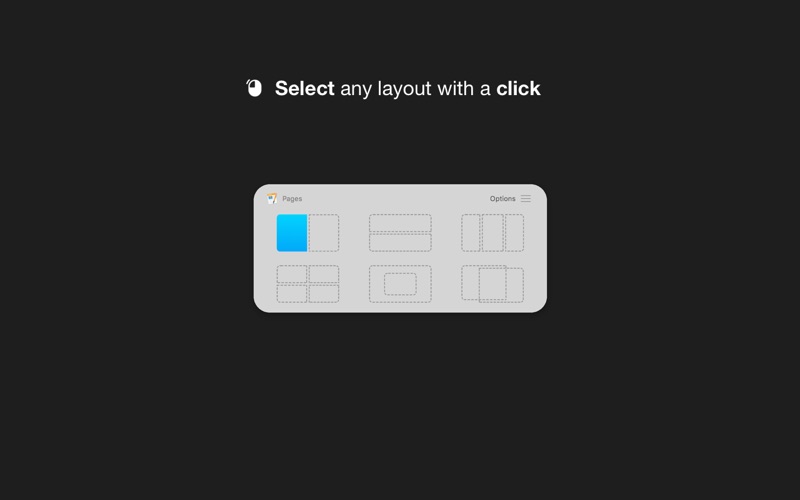
• Use a keyboard shortcut or press the menubar icon to show the possible layouts on your screen or in the Touch Bar. Clicking on any option will move and resize your front window
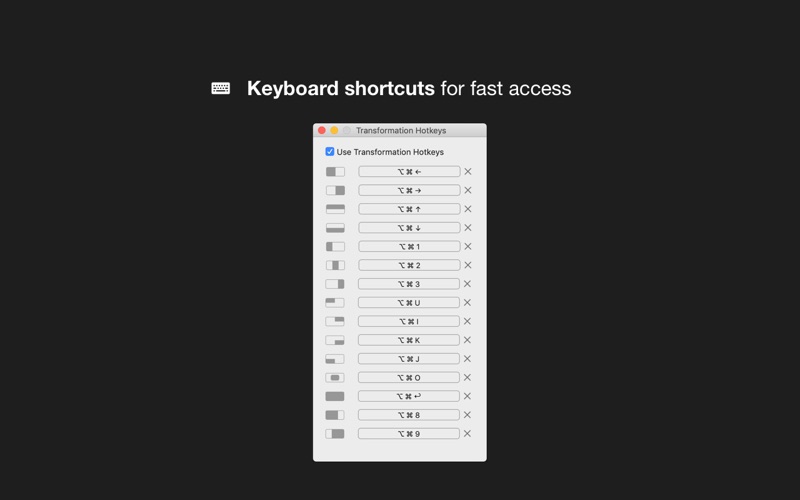
• You can also transform windows with a keyboard shortcut directly
• Or you can drag any window to one of the screen's edges to resize and snap it fast

FEATURES
• Make multitasking easier and faster
• Show all the possible layouts with a keyboard shortcut (Alt + Enter by default and customisable) or by clicking the menubar icon
• Transform windows with keyboard shortcuts
• Full Touch Bar support
• Drag windows to any screen edge or corner and snap it half screen
• Put windows side by side, tile, stack, move and resize
• Easy to use and access, quick and elegant, no complicated options

SUPPORT
We read your support emails every day, day by day.
Write with confidence any question, feedback or complaint and you will receive an answer in a very short period of time.

En voir plus...

Quoi de neuf dans la dernière version ?

• Drag to corners (place windows in the corner of the screen)
• Dark mode full support
• Bug fixes

  • Screenshot #1 pour Windows Grid
  • Screenshot #2 pour Windows Grid
  • Screenshot #3 pour Windows Grid

D'autres applications du développeur

BlogTouch pour Blogger
/ iOS Universel
BlogTouch for Wordpress.com
/ iOS Universel
Zip Doctor • Repair archives
/ macOS
AppLocker • Passcode lock apps
/ iOS Universel
Focus - Highlight front window
/ macOS
NightTone - Filtre Anti-Bleu
/ macOS
Voir toutes les apps

Note

(0 note)

Détails sur l'application

Version
1.6.0
Taille
8.8 Mo
Version minimum de macOS
10.11
Dernière mise à jour
21/09/2019
Publié par
Denk Alexandru

Newsletter App Store

Recevez chaque jour les meilleures promos

Actualité Apple

Image Apple va « changer à nouveau le monde », promet le nouveau patron John Ternus
Apple va « changer à nouveau le monde », promet le nouveau patron John Ternus
Image Tim Cook dit être en bonne santé et sera le président d’Apple pour longtemps
Tim Cook dit être en bonne santé et sera le président d’Apple pour longtemps
Image iOS 27 et macOS 27 : Apple annonce durcir ses règles de sécurité réseau
iOS 27 et macOS 27 : Apple annonce durcir ses règles de sécurité réseau
Image iOS 26.5 et macOS 26.5 : la 3e bêta publique est disponible
iOS 26.5 et macOS 26.5 : la 3e bêta publique est disponible
Partenaires : Actualité iPhone - Culture Geek
©2009-2026 i2CMedia | A propos |