• KultureGeek
  • Comparateur de prix
       
iPhoneAddict
 iAddictv5Notre Application iPhone/iPad
  • Accueil Apps
  • Actualité Apple
  • Keynote Apple
  • Firmwares & iTunes
  • Contactez-nous
Accueil » Liste des Apps » Apps Mac » Productivité » Recordia
2.11.0 macOS €Gratuit Sindre Sorhus 0 0 Recordia lets you record audio directly from the menu bar or with a global keyboard shortcut. This can be useful for recording voice memos, song ideas, meetings, lectures, interviews, phone calls, voice-overs, and more. ■ Features - Record...
Recordia

Recordia

macOS / Productivité

Gratuit au lieu de 2,99€
Obtenir sur l'App Store

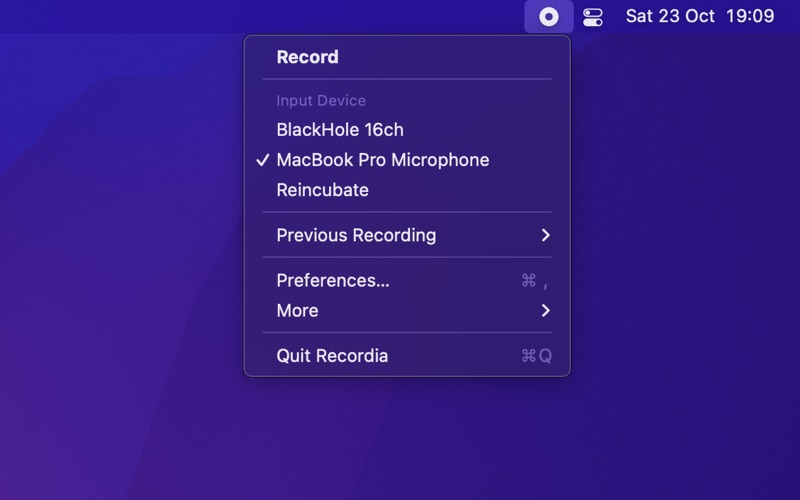
Recordia lets you record audio directly from the menu bar or with a global keyboard shortcut.

This can be useful for recording voice memos, song ideas, meetings, lectures, interviews, phone calls, voice-overs, and more.


■ Features

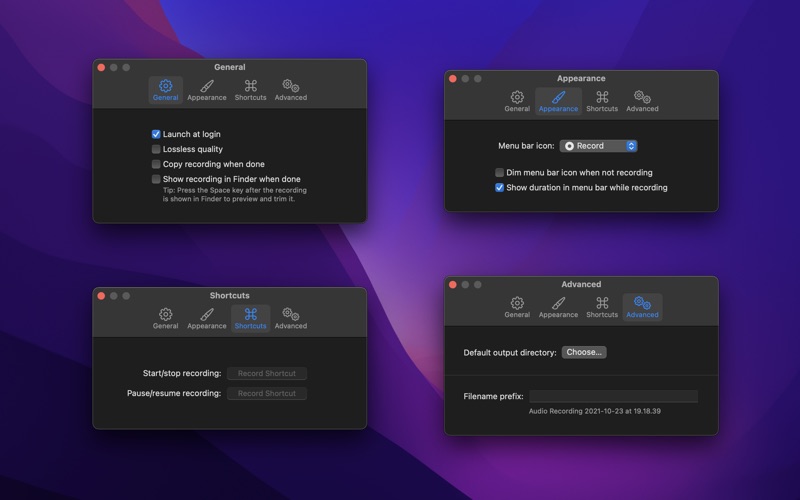
- Record compressed or lossless audio
- Customizable keyboard shortcuts to start/stop and pause/resume recording
- Change input device
- Unlimited recording duration
- Stereo
- Input monitoring
- Set default output directory
- Optionally show the recording in Finder when done
- Easily copy and share the previous recording
- Launch at login preference
- Choose between multiple menu bar icons
- Record system audio (See FAQ below)
- Shortcuts support


Technical details: It records at 48 kHz to either M4A (AAC, 256 kbps, compressed) or WAV (PCM, 16-bit, uncompressed). The recording is stereo if the input device supports it, otherwise mono.


■ FAQ

‣ How can I record system audio?

Click “Record System Audio” in Recordia and follow the instructions.

‣ How can I preview the recording when done?

First, ensure the “Show recording in Finder after saving” preference is enabled. When the recording is shown in Finder, press the Space key to preview it.

‣ How can I trim the recording when done?

Preview the recording as described above and then click the trim button.

‣ How can I sync recordings to iCloud?

Choose “iCloud Drive” as the output directory.

‣ Why 48 kHz and not 44.1 kHz?

48 kHz is the standard for audio in today's video production. It's also the internal production standard for many audio production companies. 44.1 kHz was popularized by music CDs.


■ Support

Click the feedback button in the app.

En voir plus...

Quoi de neuf dans la dernière version ?

- The app now requires macOS 26. You can get the last macOS 15 compatible version from the app's website.

  • Screenshot #1 pour Recordia
  • Screenshot #2 pour Recordia
  • Screenshot #3 pour Recordia

D'autres applications du développeur

Blear
Blear
/ iOS Universel
Battery Indicator
Battery Indicator
/ macOS
Lungo
Lungo
/ macOS
HEIC Converter
HEIC Converter
/ macOS
Black Out
Black Out
/ macOS
Gifski
Gifski
/ macOS
Voir toutes les apps

Note

(0 note)

Détails sur l'application

Version
2.11.0
Taille
4.8 Mo
Version minimum de macOS
26.0
Dernière mise à jour
01/02/2026
Publié par
Sindre Sorhus

Newsletter App Store

Recevez chaque jour les meilleures promos

Actualité Apple

Image iPhone : Apple domine comme jamais le marché indien en valeur
iPhone : Apple domine comme jamais le marché indien en valeur
Image Apple TV renouvelle Vrais voisins, Faux amis pour une saison 3 avant même la diffusion de la saison 2 (+ trailer)
Apple TV renouvelle Vrais voisins, Faux amis pour une saison 3 avant même la diffusion de la saison 2 (+ trailer)
Image Affaire Epstein : le nom de Tim Cook apparaît dans des emails liés à d’anciens dirigeants de la tech (oui mais …)
Affaire Epstein : le nom de Tim Cook apparaît dans des emails liés à d’anciens dirigeants de la tech (oui mais …)
Image Apple accélère la génération vocale par IA sans altérer la qualité
Apple accélère la génération vocale par IA sans altérer la qualité
Partenaires : Actualité iPhone - Culture Geek
©2009-2026 i2CMedia | A propos |