iPhoneAddict Apps
  • Actualités
  • Accueil Apps
  • iPhone
  • iPad
  • Universelles
  • Mac
  • Apple TV
KG KultureGeek
App
iPhone / iPad Télécharger iAddict v5 Mac Télécharger iAddict Mac
  • Actualités
  • Accueil Apps
  • iPhone
  • iPad
  • Universelles
  • Mac
  • Apple TV
  • Archives keynotes
  • Firmwares & iTunes
  • Contactez-nous
  • Comparateur de prix
  • KultureGeek
Accueil » Liste des Apps » Apps Mac » Productivité » Quick Launcher - Easy Launch
1.1 macOS €Gratuit 经纬 宛 0 0 Are you upset about the messy icons on the Dock? Quick Launcher can solve this problem very well. Place a floating window on your desktop, add "applications, system preferences, directories, and files" to it, and then simply double-click the icon to...
Quick Launcher - Easy Launch

Quick Launcher - Easy Launch

macOS / Productivité

Gratuit
Obtenir sur l'App Store
Facebook X E-mail

Are you upset about the messy icons on the Dock? Quick Launcher can solve this problem very well.

Place a floating window on your desktop, add "applications, system preferences, directories, and files" to it, and then simply double-click the icon to quickly launch these items. Is it very convenient. The window can be collapsed or expanded to the top without occupying the place; and the color and transparency can be adjusted without affecting the current operation.

Here are the main features of Quick Launcher:
● Open window with shortcut key , "option + space" by default
● Pin/Unpin, collapse/expand the window, adjust its color and transparency
● Add "Applications, System Preferences, Directories, and Files." You can then double-click to launch these items, preview item or reveal it in the Finder.

Tip: You may need to authorize directory access when previewing or opening a file. Click "Allow" to continue.

Q: Which category can be previewed and selected in Finder?

A: All the categories can be selected in Finder, and the "Files" and be previewed.


Q: What kinds of items can be queried with Quick Launcher?

A: Quick Launcher can query "Applications", "System Preferences Panel", "Text Files","Folders","Images" and "Documents".

If you have any comments or suggestions during the process, please send an email to imthekingofmac@gmail.com

En voir plus...

Quoi de neuf dans la dernière version ?

Bug fixed.
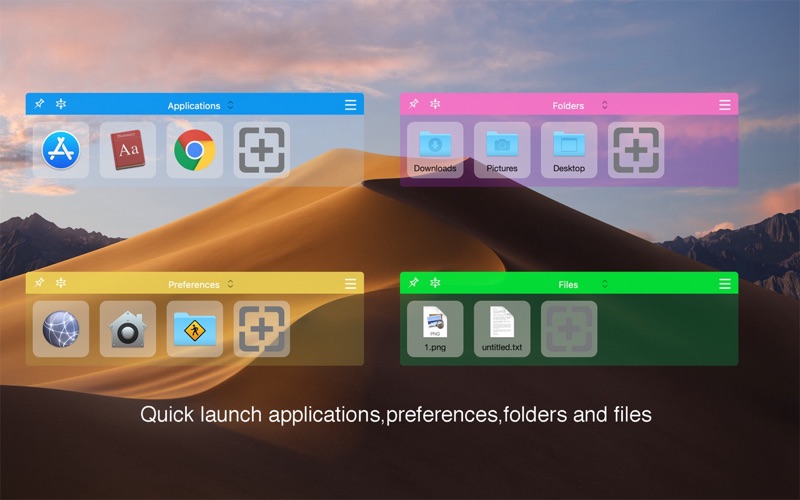
  • Screenshot #1 pour Quick Launcher - Easy Launch

D'autres applications du développeur

The App Locker -Best Lock AppsThe App Locker -Best Lock AppsmacOSNew File Quick MenuNew File Quick MenumacOSShow Desktop ProShow Desktop PromacOSZoom Me - Desktop MagnifierZoom Me - Desktop MagnifiermacOSLive Score: Watch game at workLive Score: Watch game at workmacOSQuick Search - Find Any ItemQuick Search - Find Any ItemmacOSVoir toutes les apps

Note

(0 note)

Détails sur l'application

Version
1.1
Taille
5.4 Mo
Version minimum de macOS
10.12
Dernière mise à jour
17/11/2018
Publié par
经纬 宛

Newsletter App Store

Recevez chaque jour les meilleures promos

Actualité Apple

Image Apple ouvre son Advanced Manufacturing Center à Houston
Apple ouvre son Advanced Manufacturing Center à Houston
Image Les Apple Watch continuent de largement dominer les ventes de montres connectées
Les Apple Watch continuent de largement dominer les ventes de montres connectées
Image App Store : Apple laisse passer des fraudes pour les applications
App Store : Apple laisse passer des fraudes pour les applications
Image iPhone 18 : 12 Go de RAM et Dynamic Island réduite ?
iPhone 18 : 12 Go de RAM et Dynamic Island réduite ?
iPhoneAddict Apps

Le catalogue iPhoneAddict pour suivre les nouveautés, mises à jour et baisses de prix de l’App Store.

Apps

Toutes les apps iOS iPhone iPad Universelles Mac Apple TV

iPhoneAddict

Actualité Apple Archives keynotes Contact À propos KultureGeek

Suivez-nous

©2009-2026 i2CMedia. Tous droits réservés.