Learn - Snow Leopard Edition
macOS / Productivité
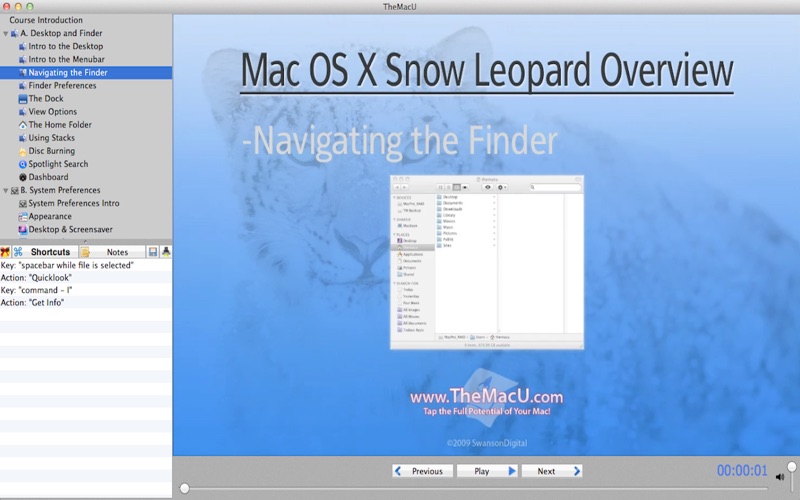
Get the most out of your Mac with our Mac OS X 10.6 Snow Leopard video training course App! Great for anyone new to the Mac or new to Snow Leopard.
•Three Hours of HD Mac OS X Tutorual Videos!
•Learn the Mac finder, system customization and applications such as Mail, iCal, Safari, Preview, iTunes and more!
•Simple interface that makes is easy to navigate through the videos.
•The videos guide the viewer with zooms, pans and highlights of what is being discussed.
•The keyboard shortcuts associated with each lesson are listed in the sidebar.
•Use the notes pane to jot down things to remember from each lesson, then output all your notes in a single PDF document!
•Each time a keyboard shortcut is used it is displayed in large print within the video.
With seventy seven HD tutorial videos this course covers all the basics of Mac OS X Snow Leopard along with some more advanced content. Anyone new to the Mac or new to Snow Leopard will benefit from these lessons. Discover the best ways to perform basic file and folder navigation to how to best use applications like iCal, Mail, Safari and Address Book. Each video is presented in HD 1152x720 resolution.
Course Outline…
Section A: Desktop and Finder
1. Intro to the Desktop
2. Intro to the Menubar
3. Navigating the Finder
4. Finder Preferences
5. The Dock
6. View Options
7. The Home Folder
8. Using Stacks
9. Disc Burning
10. Spotlight Search
11. Dashboard
Section B: System Preferences
1. System Preferences Introduction
2. Appearance
3. Desktop & Screensaver
4. Dock Preferences
5. Expose & Spaces
6. Language & Text
7. Security
8. Spotlight
9. CDs & DVDs
10. Displays
11. Energy Saver
12. Keyboard & Mouse
13. Print & Fax
14. Sound
15. MobileMe
16. Network
17. Bluetooth
18. Sharing
19. Accounts
20. Date & Time
21. Parental Controls
22. Software Update
23. Speech
24. Startup Disk
25. Time Machine
26. Other
Section C: Applications
•Safari
1. Safari Intro
2. Bookmarks
3. Tabbed Browsing
4. Saving Web Pages
5. Printing Web Pages
6. Viewing PDFs
•Mail
1. Account Setup
2. Read Mail
3. Compose Mail
4. Junk Mail
5. Mailboxes & Rules
6. Notes & ToDos
•AddressBook
1. Creating & Editing Cards
2. Editing Fields & Photos
3. View Options, Groups, Search
•iCal
1. The iCal Interface
2. Creating Calendars & Events
3. ToDos & Notifications
4. Publish & Subscribe
5. Printing Calendars
•iTunes
1. iTunes Interface part 1
2. iTunes Interface part 2
3. Import from a CD
4. Create Playlists & Burn CDs
5. Using the iTunes Store
•Preview
1. Opening & Editing Images
2. Opening and Editing PDFs
3. Annotate PDFs
4. Taking Screenshots & Printing
•Text Edit
1. Tabs & Indents
2. Text Styles
3. Lists & Tables
4. Saving & Printing
•Time Machine
1. Recover Files
2. Put Back
•Dictionary
1. Using the OS X Dictionary
2. Spell Check
•Quicktime X
1. Play Videos
2. Trim & Share
3. Record your Display
Section D: Basic Troubleshooting
1. Organization, Trash, Updates
2. Force Quit, Restart, plist Files
3. Disk Utility
Quoi de neuf dans la dernière version ?
Bug Fixes