Floating: Picture in Picture
macOS / Productivité
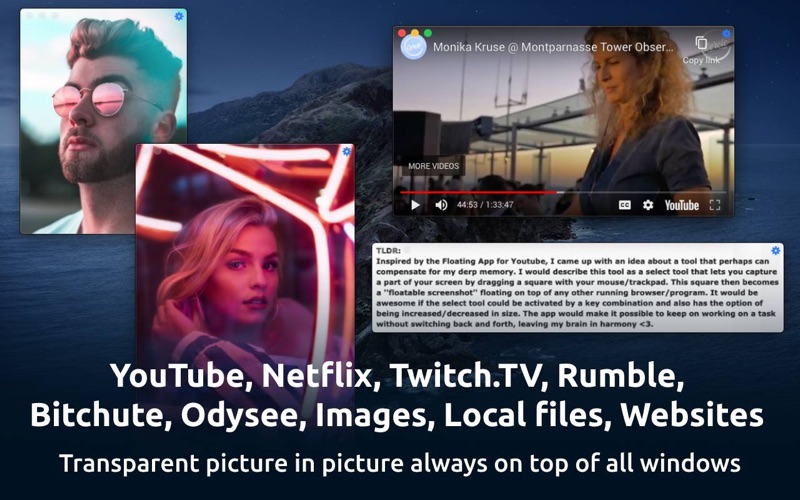
Floating is a very simple yet powerful app which lets you picture in picture (pin/stick/float) as many videos, photos, and websites on top of everything.
Websites, YouTube, YouTube playlists, Netflix, Vimeo, Dailymotion, Twitch.TV, Bitchute, Rumble, Odysee, local photos, videos, PDF are supported.
Note that Floating is a menubar only app and runs only in the menubar (top right of screen).
How to use:
Simply right click the menu bar icon to float from front browser
Control, Shift, Command, 9 to float from front browser tab
Control, Shift, Command, 8 to close & float from front browser
Control, Shift, Command, 7 to float from clipboard
You can also drag website/video links or images into menu bar icon
Scroll up or down on top edge of window to change transparency
Control, Shift, Command, m to hide/minimize/maximize
Control, Shift, Command, Left Arrow for previous image
Control, Shift, Command, Right Arrow for next image
Control, Shift, Command, + to zoom in
Control, Shift, Command, - to zoom out
Control, Shift, Command, 0 to reset zoom
Pinch gesture on floating window to resize window
You can also execute custom javascript on a floating website. Please click the menubar button for the app, then read the tutorial in "How to execute javascript on floating sites".
Note that browser method relies on AppleScript to work and only supports Safari, Chrome, Brave and Opera. Firefox doesn't have proper AppleScript support. First time using this shortcut, MacOS will ask for permission to read browser's URL for privacy and security reasons. All this happens locally and is not logged anywhere from the app.
------
I offer an ad and analytics free and simple app for the absolute best experience for my users. If you are finding my app useful, please leave me a positive rating on the app store as that helps get the word out to others!
If you have any feedback or feature requests or any other video platform which you would like to be added, please email Pran at:
pran@pranapps.com
The idea for this app was inspired by this Reddit post:
https://www.reddit.com/r/AppIdeas/comments/g1usmh/screen_select_tool_floating_and_adjustable_in_size/
Quoi de neuf dans la dernière version ?
- Updated the app icon a little bit.
I am a solo indie developer and need your help keep the lights on. I offer an ad and analytics free and simple app for the absolute best experience for my users. If you are finding my app useful, please support me by purchasing the one time only in app purchase. You can also leave me a positive rating on the app store as that helps get the word out to others!
I improve my apps based on user feedback. If you have any feedback or feature requests or any other video platform which you would like to be added, please email me at:
pran@pranapps.com
---
Previous update:
This update should help users who use external displays which can cause windows to go off screen when displays are disconnected.
- Added a new option in menu bar button to bring all windows to front and center.
- Added an automatic handler for when external displays are disconnected and if a floating window is off screen. It should cause those windows to automatically animate to front and center.