iPhoneAddict Apps
  • Actualités
  • Accueil Apps
  • iPhone
  • iPad
  • Universelles
  • Mac
  • Apple TV
KG KultureGeek
App
iPhone / iPad Télécharger iAddict v5 Mac Télécharger iAddict Mac
  • Actualités
  • Accueil Apps
  • iPhone
  • iPad
  • Universelles
  • Mac
  • Apple TV
  • Archives keynotes
  • Firmwares & iTunes
  • Contactez-nous
  • Comparateur de prix
  • KultureGeek
Accueil » Liste des Apps » Apps Mac » Productivité » Clipitto: Fast files sharing
L'application n'est plus disponible sur l'App Store français
1.4.2 macOS €Gratuit Apps Dev Team s.r.o. 0 0 Take a screenshot or drop any file on the menubar icon. Clipitto will automatically upload it to your Dropbox account and instantly place a link into your clipboard for quick sharing. Just give it a go. FEATURES: Easy drag'n'drop file sharing Drag...
Clipitto: Fast files sharing

Clipitto: Fast files sharing

macOS / Productivité

Gratuit
Obtenir sur l'App Store
Facebook X E-mail

Take a screenshot or drop any file on the menubar icon. Clipitto will automatically upload it to your Dropbox account and instantly place a link into your clipboard for quick sharing. Just give it a go.

FEATURES:

Easy drag'n'drop file sharing

Drag and drop any file to the Clipitto icon in menu bar and share the link with your family, friends, colleagues or whoever you want.


Instant link availability

Don't wait until the upload is complete. Clipitto places the link in your clipboard instantly after you take the screenshot or drop a file on the menu bar.


Automatic screenshots uploading

You can set Clipitto to automatically upload screenshots for you and, if you like, it will also clean up the original files.


Privacy

Clipitto is allowed to access only a dedicated folder in your Dropbox account. Enjoy the freedom of a full control over the files you upload.


Intelligent links grouping

Clipitto intelligently groups the links in your clipboard as you sequentially upload more files in a user-specified time limit.


Recent files

Clipitto alows you to access five most recently uploaded files, open them up in your browser, or just copy a shortened link to your clipboard.


Quick link retrieval

You can easily retrieve shortened links for files that you have recently uploaded - and without opening a web browser. Just navigate to Clipitto menu and click the clip button.


URL shortener

Not only files, you can also drag and drop URL links directly from your favourite web browser to get a shortened version of the link.


REQUIREMENT:

Dropbox account.

En voir plus...

Quoi de neuf dans la dernière version ?

Sharing improvements.
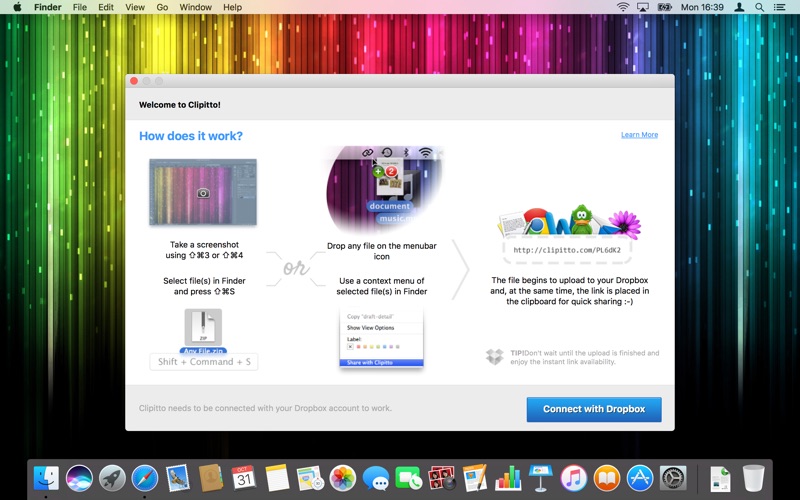
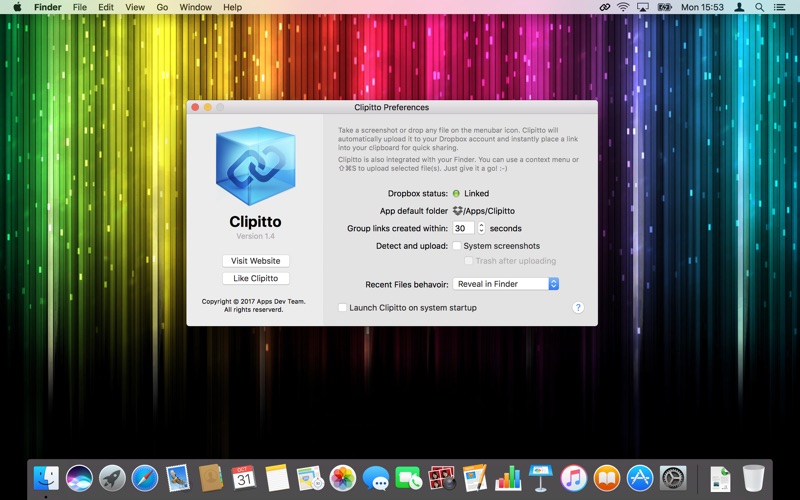
  • Screenshot #1 pour Clipitto: Fast files sharing
  • Screenshot #2 pour Clipitto: Fast files sharing
  • Screenshot #3 pour Clipitto: Fast files sharing

D'autres applications du développeur

GIFr – create animationsGIFr – create animationsiPhonePool RobotPool RobotiPhone

Note

(0 note)

Détails sur l'application

Version
1.4.2
Taille
4.1 Mo
Version minimum de macOS
10.10
Dernière mise à jour
19/10/2017
Publié par
Apps Dev Team s.r.o.

Newsletter App Store

Recevez chaque jour les meilleures promos

Actualité Apple

Image iOS 26.6.1 bouche 29 failles de sécurité, contre 122 pour iOS 18.7.10 et 28 pour macOS 26.6.2
iOS 26.6.1 bouche 29 failles de sécurité, contre 122 pour iOS 18.7.10 et 28 pour macOS 26.6.2
Image iOS 26.6.1 est disponible, avec iOS 18.7.10, macOS 26.6.2 et visionOS 26.6.1
iOS 26.6.1 est disponible, avec iOS 18.7.10, macOS 26.6.2 et visionOS 26.6.1
Image Bêta 6 pour iOS 27, macOS 27 Golden State, watchOS 27, tvOS 27 et visionOS 27
Bêta 6 pour iOS 27, macOS 27 Golden State, watchOS 27, tvOS 27 et visionOS 27
Image L’app Apple Sports se met à jour avec de nouvelles compétitions de foot
L’app Apple Sports se met à jour avec de nouvelles compétitions de foot
iPhoneAddict Apps

Le catalogue iPhoneAddict pour suivre les nouveautés, mises à jour et baisses de prix de l’App Store.

Apps

Toutes les apps iOS iPhone iPad Universelles Mac Apple TV

iPhoneAddict

Actualité Apple Archives keynotes Contact À propos KultureGeek

Suivez-nous

©2009-2026 i2CMedia. Tous droits réservés.