iPhoneAddict Apps
  • Actualités
  • Accueil Apps
  • iPhone
  • iPad
  • Universelles
  • Mac
  • Apple TV
KG KultureGeek
App
iPhone / iPad Télécharger iAddict v5 Mac Télécharger iAddict Mac
  • Actualités
  • Accueil Apps
  • iPhone
  • iPad
  • Universelles
  • Mac
  • Apple TV
  • Archives keynotes
  • Firmwares & iTunes
  • Contactez-nous
  • Comparateur de prix
  • KultureGeek
Accueil » Liste des Apps » Apps Mac » Productivité » App Pier
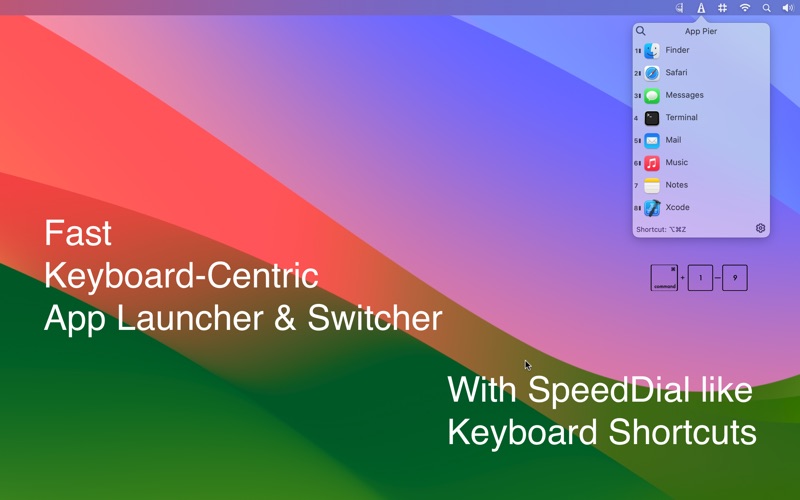
1.9.6 macOS €2,99€ Zafer ARICAN 0 0 App Pier is a keyboard-centric application launcher and switcher with Touch Bar support With App Pier, you can: * launch any app or switch between your favorite and running apps instantly. * save screen space by hiding the MacOS dock. * develop...
App Pier

App Pier

macOS / Productivité

2,99€ au lieu de 3,49€
Acheter sur l'App Store
Facebook X E-mail

App Pier is a keyboard-centric application launcher and switcher with Touch Bar support

With App Pier, you can:

* launch any app or switch between your favorite and running apps instantly.

* save screen space by hiding the MacOS dock.

* develop muscle memory in keyboard when using with Touch Bar as you can pin your favorite apps in App Pier.

* hide/unhide window, hide windows of other apps, or show all windows. A nice companion to the Stage Manager

* concentrate on your app by hiding all other apps’ windows.

* open your favorite folders


Features:

* See and open running apps together with your pinned apps.

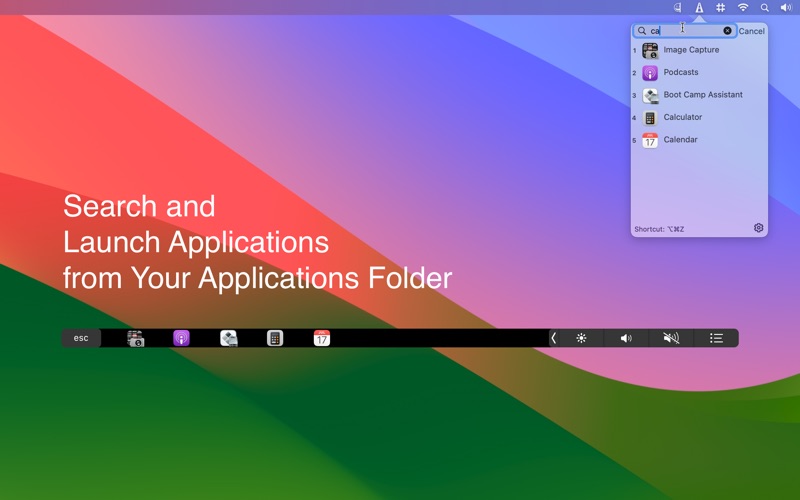
* Search and launch any application from the Application Folder

* Open your favorite folders

* Focus Mode: One app at a time. All other apps are hidden.

* Reach it anytime even another app is in fullscreen mode

* Reach your running and pinned apps from any display in a multi-display setup.

* Keyboard shortcut for rapid launch

* Select an app by simply start typing its name.

* Running apps are denoted with a dash in menu bar window and a brighter button on Touch Bar.

* For Apple Silicon Devices, you can see if the running app is using Rosetta 2 or running natively on M1. (Apps using Rosetta 2 are with faded indicator)

* Available in both normal and dark mode.

Note: You need a MacBook Pro with Touch Bar to view Touch Bar items.

En voir plus...

Quoi de neuf dans la dernière version ?

Bug fixes and improvements for macOS Sequoia

  • Screenshot #1 pour App Pier
  • Screenshot #2 pour App Pier
  • Screenshot #3 pour App Pier

D'autres applications du développeur

SpeedDial - Menu Bar ContactsSpeedDial - Menu Bar ContactsmacOSSimple Battery MonitorSimple Battery MonitormacOSEmojiseEmojisemacOSEmojise LiteEmojise LiteiPadSpeedDial for iPadSpeedDial for iPadiPad

Note

(0 note)

Détails sur l'application

Version
1.9.6
Taille
8.4 Mo
Version minimum de macOS
11.0
Dernière mise à jour
24/09/2024
Publié par
Zafer ARICAN

Newsletter App Store

Recevez chaque jour les meilleures promos

Actualité Apple

Image Les États-Unis ne veulent pas qu’Apple achète de la RAM chinoise
Les États-Unis ne veulent pas qu’Apple achète de la RAM chinoise
Image Apple retire sa pub polémique avec un enfant et un iPhone en Italie
Apple retire sa pub polémique avec un enfant et un iPhone en Italie
Image L’iPhone Ultra pliable va-t-il résoudre les défauts du Galaxy Z Fold 8 ?
L’iPhone Ultra pliable va-t-il résoudre les défauts du Galaxy Z Fold 8 ?
Image Mac : des hackers exploitent la faille du partage d’écran avec un mineur de cryptomonnaie
Mac : des hackers exploitent la faille du partage d’écran avec un mineur de cryptomonnaie
iPhoneAddict Apps

Le catalogue iPhoneAddict pour suivre les nouveautés, mises à jour et baisses de prix de l’App Store.

Apps

Toutes les apps iOS iPhone iPad Universelles Mac Apple TV

iPhoneAddict

Actualité Apple Archives keynotes Contact À propos KultureGeek

Suivez-nous

©2009-2026 i2CMedia. Tous droits réservés.