SnipTag: Crop Scans, Edit EXIF
macOS / Photo et vidéo
**SnipTag — The Essential App When Scanning and Organizing Photos on Mac**
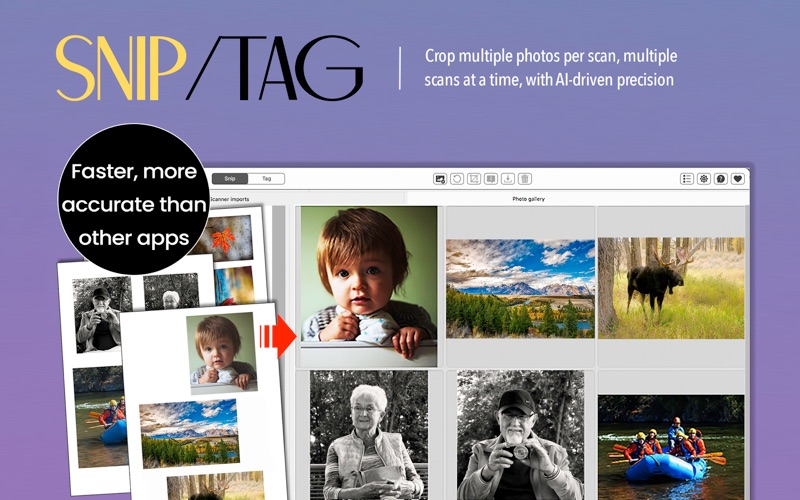
Scanning thousands of old photo prints? Bulk-editing image metadata for easy organization? SnipTag dramatically reduces the time it takes to crop and add metadata for large photo collections. It combines two powerful tools in one streamlined Mac app:
• SNIP: AI-powered batch auto-cropping
• TAG: Easy EXIF / IPTC metadata editing
All processing happens locally on your Mac. Nothing is uploaded to any third-party server. Ever.
When you are digitizing and organizing hundreds (or thousands) of photos, SnipTag can cut down the effort and time into half. Its two powerful tools streamline your workflow: the fastest and most accurate batch cropping engine, and a robust EXIF / IPTC metadata editor. All the processing - including AI - is done on your Mac, assuring total privacy.
**SNIP — Batch Auto-Crop Printed Photos in One Click**
----------
Scanning multiple photos on a flatbed or photographing them with an DSLR camera or your iPhone?
Import an entire folder of scans and SnipTag will:
• Detect individual photos automatically
• Crop multiple photos from each scan
• Straighten and separate them
• Save each as an individual file
• Preserve full image resolution
Crop up to 100 scans at once.
Perfect for:
• Family photo digitization
• Archiving albums
• Genealogy projects
• Historical preservation
Supports JPG, HEIC, TIFF, PNG and BMP.
Maintains original resolution and DPI.
**TAG — Advanced Photo Metadata Editor for macOS**
----------
You also get a powerful metadata editor and viewer for adding image metadata in bulk mode.
Batch-edit:
• Date created
• Capture time
• Titles
• Captions
• Descriptions
• Locations
• Keywords
• File names
• More (25+ EXIF and IPTC fields).
Use it to:
• Restore correct dates to scanned photos
• Add searchable captions
• Organize archives
• Prepare images for Apple Photos, Lightroom or DAM systems
Includes:
• Metadata Viewer
• Photo Finder
• Caption imprinting option (adds text beneath photos)
***
Built for Privacy
Unlike cloud-based tools, SnipTag runs entirely on your Mac.
No uploads. No tracking. No personal data collection.
You stay in full control of your photo library.
A unique, user-friendly utility from the creators of the popular photo scanner apps, Pic Scanner and Pic Scanner Gold.
Quick Feature Summary: Batch crop photos, Auto crop scans. Accurate detection & cropping with AI. Photo metadata editing: Add captions & keywords and IPTC tags. Edit EXIF dates to help organize photos. Local, on-Mac processing for full privacy. Digital archiving of old photos.
Terms of use: www.sniptagapp.com/terms
Contact us: support@sniptagapp.com
Quoi de neuf dans la dernière version ?
Bug-fix in Tag metadata editor