ScreenFloat—Pro Screen Capture
macOS / Photo et vidéo
ScreenFloat 2 is your screenshot and screen recording all-rounder power tool.
From capturing screenshots and recordings over editing, annotating, redacting and running data-detection on them to storing, organizing and syncing them, ScreenFloat is your all-in-one screen capture tool.
“Game-changer for managing screenshots” - Man.Osman
“Outstanding app. Buy this and use it for a week and you will love it” - Chuck's Review
= CAPTURE =
Capture screenshots, timed screenshots and screen recordings with a keyboard shortcut, the menu bar icon, or a widget.
Create Shots from content on your clipboard, or import from your iPhone or iPad.
Effortlessly recapture shots without having to painstakingly reframe the capture area.
“Accountant's Friend! Worth every penny!” - Savyasaci
= FLOAT =
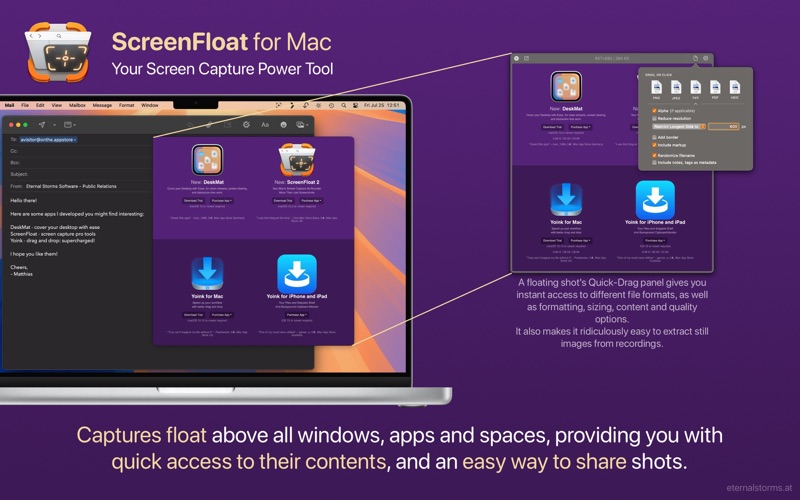
By default, shots you capture float above all apps so you can reference their contents, or use them as a reminder.
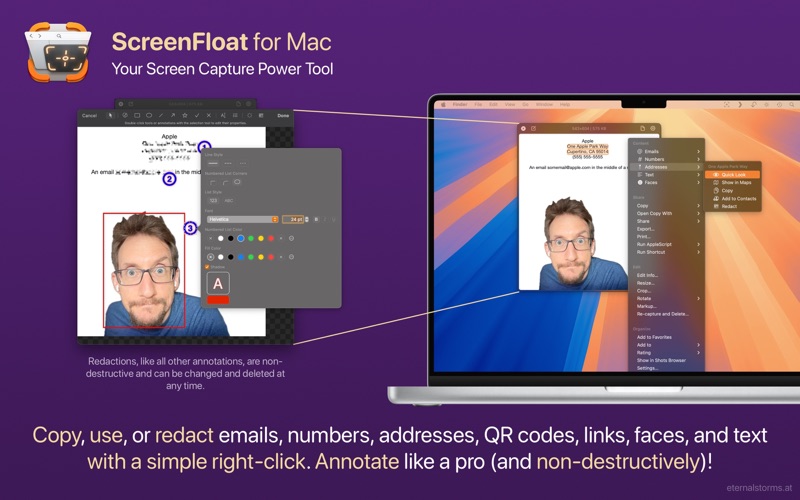
Data-detection allows for quick copying, opening and even quicksmart-redacting of links, emails, phone numbers, addresses and QR codes
Option-right-click to pick colors
Run powerful, custom workflows with Double-Click Actions
“An animator's best friend!” - rengland77
= EDIT =
Crop, "fold", rotate, resize, trim and "de-retinize" shots
Annotate screenshots non-destructively
Trim and cut recordings, with microphone and system audio editable separately
“2 Gems: The app itself and User Support” - A Bostonian Visual Thinker
= SHARE =
Easily share shots to other apps via drag and drop, copy-paste or export from floating shots, or the Shots Browser
Share larger shots as a link via iCloud, ImageKit or Cloudinary
When dragging from a floating shot, adjust the format, quality, and other options on-the-fly
“One of my most used Apps” - paradox2222
= STORE =
ScreenFloat's Shots Browser keeps a library of your captures, where you can name, tag, rate, favorite and organize them.
Collect Shots in folders
Use Smart Folders to intelligently collect Shots by certain criteria, including whether they contain faces, or certain text, or which device you captured them on
Extensive search functionality (with Spotlight indexing)
Sync everything over iCloud
“Its Essential - what else is there to write” - JR123§123§12
= INTEGRATE =
Automate capturing your screen, importing, and managing your floating shots using Siri Shortcuts
Use widgets to get access to ScreenFloat's capture functionality, as well as shots, picked colors, tags, folders, and more
Run your own Siri Shortcuts and Apple Scripts on your shots
“I've used many similar apps over the years, and this is the best” - nodisorder
*** And so much more. ScreenFloat 2: More than just screenshots. ***
= System Requirements =
- macOS 12 Monterey or newer (some features require macOS 13 Ventura or newer)
- An iCloud account if you wish to sync your library over iCloud
= What the Press Says =
“One of the most comprehensive screenshot apps that there are” - Elaine Giles, MacBites After Hours
“Sometimes I'll cover an app that I just have to put in my war-chest of applications that I use every day - ScreenFloat 2 is one such app” - Lee Garrett, ScreenCastsOnline.com
“You may never go back to the Mac's default screenshot system” - MacFormat.com
“I have used numerous screenshot applications. ScreenFloat is the one I use daily” - MacAutomationTips.com
“Trounces most of the competition” - ScottWillsey.com
“Packed with loads of useful, flexible features” - MacStories.net
= What do YOU say? =
All this aside: ultimately, software needs to be tested personally to see if it fits one's needs.
So please download the free, 28-day trial from the website, and feel free to get in touch with me if you have any questions or feedback - I look forward to hearing from you: https://eternalstorms.at/contact
= About In-App Purchases =
The available in-app purchases are completely voluntary tips and do not unlock any additional features.
Your one-time purchase of ScreenFloat gives you its full functionality.
Quoi de neuf dans la dernière version ?
ScreenFloat v2.3.9 (2026.07.21) contains the following new features, improvements and bug fixes:
= NEW FEATURES =
- Adds a “Recapture” Control widget (macOS 26 or newer)
- Adds a setting to automatically copy new shots
- Shadows in window captures can now be removed after capture at any time, or on-the-fly while drag and dropping to other apps, or when exporting
= IMPROVEMENTS =
- Reduces usage of images in menus
- Dates recognized in texts can now be Quick Look'ed
- Improves responsiveness when skimming through videos in floating shots
- Append-copy now works for detected data like email addresses, phone numbers, links, etc.
- The Capture widget now also has a Recapture button
- The “After Capture” parameter in ScreenFloat's Shortcuts now supports “Ignore Mouse Clicks”, which makes the floating shot ignore mouse clicks right after capture, and “Copy”. This also applies to its url scheme.
- Widgets that show Shots can now have different click actions: Float Shot, Copy Shot, and Show in Shots Browser
- Improves the cutting of recordings
- Improves the color fidelity of screen recordings
- A new click highlight during recordings
- Removed “always-on” window capture in favor of a dedicated command in ScreenFloat's menu bar item menu
- Improves capturing windows without shadows, where attached windows (like save or print dialogs) now still retain their shadows
- Improves ScreenFloat's menu bar item's menu
- Adds more options to ScreenFloat's Control Center and Capture Widgets
- Improves the GIF export's performance and reliability
- Large shots taken on a secondary display are no longer moved to the main screen after capture
- Sequential numbers in export filename schemes now get 0-padded when necessary.
- Auto-complete for the file naming scheme now filters out already used ones
= BUG FIXES =
- v2.3.9 fixes a potential crash during export introduced in v2.3.8
- Fixes a bug where copying a still image from a video to the clipboard resulted in the video being copied, not the still image
- Fixes a bug that caused shots shared from other apps to ScreenFloat via its extension to not respect the supplied title
- Fixes a bug where screenshots auto-imported from macOS (if enabled) sometimes would be deleted instead of moved to the Trash, if that option was selected in Settings
- Fixes a bug where additive copying of detected text in floating shots was, in fact, not additive
- Fixes awkward artifacts that could appear around floating shots when there was transparency involved, like shadows from windows
- Fixes a crash when using the color panel
- Shots displayed in ScreenFloat's widgets are now functional and clickable again
- Fixes a bug where sometimes, when folding a shot, “Highlight” annotations would be incorrectly removed instead of adjusted
- Fixes a bug where, during setup, the “Import macOS Captures from Finder” option would not work
- Fixes one memory leak in the “About”-, and one in the “What's New” window
- Fixes a bug where shots in widgets were not clickable under certain circumstances
- Fixes a bug where sometimes some temporary files weren't cleaned up properly
- The “Capture contextual menu” result window is now more easily movable
- Fixes a bug where sometimes the Export dialog's name scheme field would resize itself for longer titles
- Fixes a bug where an export could override a previous export of the same files and naming scheme in the same destination folder, instead of appending -2 (etc) to prevent that
- Improves some strings here and there
Thank you for using ScreenFloat for Mac. I hope you're enjoying the app!
If you have some time and if it's not too much to ask, please consider leaving a rating or review of ScreenFloat on the Mac App Store - it would help me out a lot!
If you'd like to get in touch or connect with me, please visit https://eternalstorms.at/contact for all options.
Yours truly,
Matthias