Screen Record Utility
macOS / Photo et vidéo
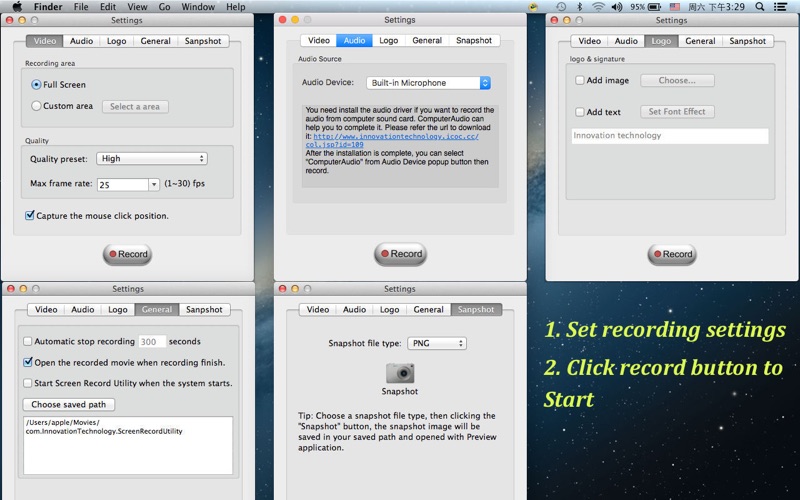
Screen Record Utility is a very professional screen recording tool. It can record high video and audio, and design your logo, and add your logo. With this software you can capture games screen, online videos, PPT, application tutorial, iPhone simulator, your image's slideshow etc. It is very convenient because it may sit in the menu bar.
Main Features:
⁃Capture your videos at full screen or any size.
⁃Record the audio with system build-in microphone, computer sound card or audio input device.
⁃Set video quality by your request.
⁃Start/Stop recording.
⁃Pause/Resume recording.
⁃Add image and text logo.
⁃Design your signature logo.
⁃Set recording time.
⁃Choose the saved path of recording video.
⁃Prevent display sleep when recording.
⁃Making video at a very fast speed.
⁃Record screen no time limit.
⁃Sit in the menu bar.
⁃Snapshot.
⁃Set snapshot image file format.
Here are a few situations you can use it:
⁃You can use it to create demonstration videos for your software products.
⁃You can create video tutorials for school or college class.
⁃You can use it to record a reproduced problem with your computer so you can show it to technical support people.
⁃You can use it to record some new tricks and techniques you discover on your software product.
Screen Record Utility is a very useful video recording tool. With it you can record fullscreen or record selected region to video. It may record the screen as high quality videos, and you may set video quality and choose audio device.
To enjoy all features please download it.
Note: If you have some problems, please tell me (send an email to jimmypeeler369@gmail.com) I will solve these issues as quickly as possible.
Quoi de neuf dans la dernière version ?
1. Support macOS 10.14.
2. Fix some minor bugs.