PhotoResize Pro
macOS / Photo et vidéo
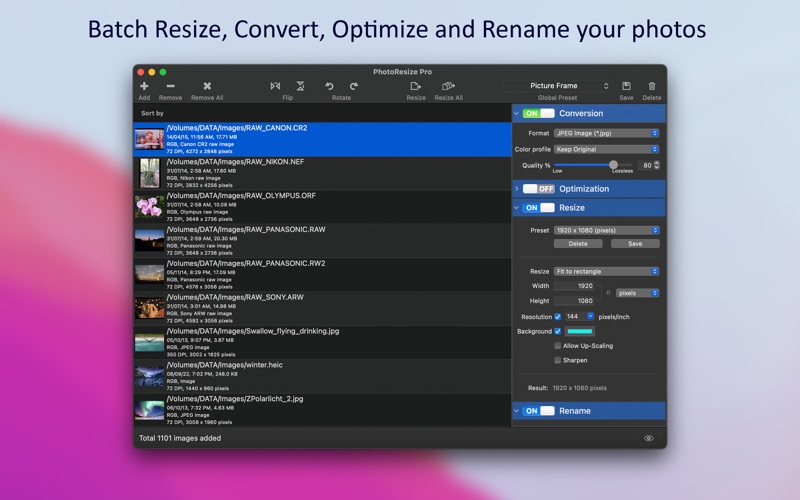
PhotoResize Pro is fantastic tool to resize, convert, optimize and rename thousands of images at amazingly fast speed. It offers features like image format conversion JPG, HEIC, PNG, WebP etc..., JPEG and PNG optimization, Rename tokens to give your photos meaningful names.
In addition, it preserves metadata properties (EXIF, RAW, TIFF, GIF, IPTC, etc.), Creation and modification date and time. It also maintains file-folder structural hierarchy in target folder. Extensive preset management makes PhotoResize Pro very easy-to- use and faster batch image resizing tool.
KEY FEATURES:
• BATCH PROCESSING: Easy steps to resize hundreds & thousands of images at amazingly fast speed.
1) Add or Drop images/folders.
2) Select desire options.
3) Click Resize All and set target folder. Or just drop out images to a folder in Finder.
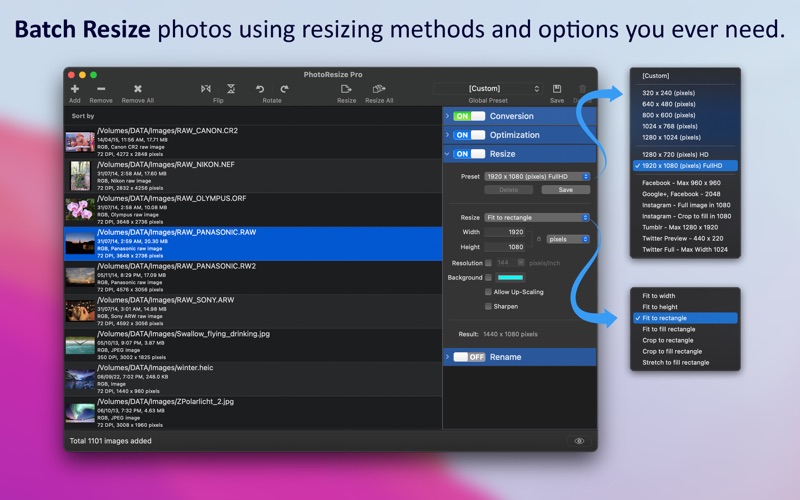
• RESIZE: Resize photos to make it fit into a particular spot, if you need to save disk space or download an image more quickly. Most efficient way resizing by PhotoResize Pro is the best solution to circumvent image dimensions and size limitations.
- Easy resizing methods like Fit to Width, Fit to Height, Fit to Rectangle, Crop to Rectangle, Stretch to fill Rectangle, Fit to fill rectangle, Crop to fill rectangle for different resizing requirement.
- Flexible options to enter resize dimension values in Percent, Pixel, Inch, CM, MM and Points.
- You can retain or set new image resolution.
- Most used default set of resizing presets for different image sizes you will ever need.
- You can customize your favourite resizing options and save as new preset for efficient reusability.
- Sharpen option to apply sharpness while reducing to overcome fading blurriness and preserve hard edges.
- Option to allow or prevent up-scaling images.
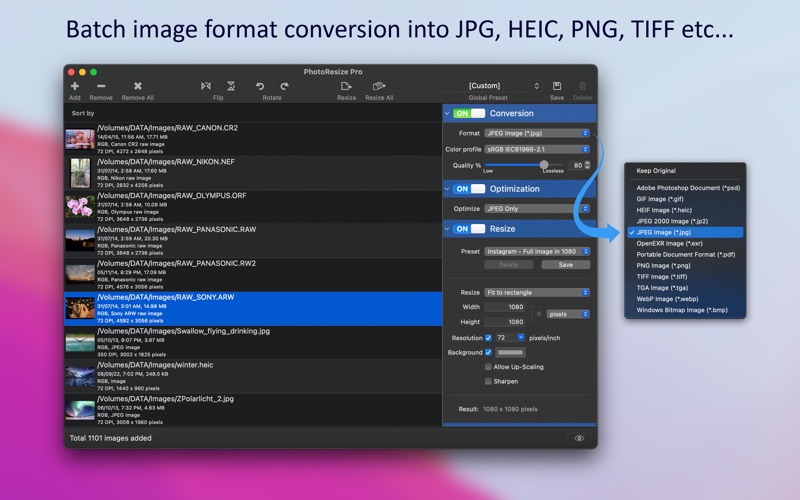
• CONVERSION: Image format conversion from most of all image types including RAW format images into JPEG, HEIC, WebP, PNG, JP2, TIFF, PDF, PSD, GIF, TGA, EXR and BMP.
- Support to adjust quality for JPEG, JPEG2000 and WebP images.
- Support to assign color conversion profile.
- Converts animated WebP to animated GIF and vice versa.
- Converts multi-frame image formats like WebP, GIF and multi-page TIFF into single PDF and animated GIF.
- Converts each frame of multi-frame image format into separate images for other formats.
• RENAME: Give you photos meaningful names. Use predefine preset or create new file name using combination of text and tokens.
- Token tags like index, date, time, metadata properties, image size, EXIF, IPTC and GPS properties helps you generate dynamic name for photo.
- Customize and save your favourite rename options as new preset.
• OPTIMIZATION: Optimize JPEG and PNG image types without losing its quality and format. Smaller the image file size requires less disk space for storage and faster uploads and downloads. You can alter Conversion quality for higher optimization for JPEG images. Keep 100% quality for lossless JPEG optimization.
• Preset backup system to keep a copy of the app presets for easy restoration.
• Source image formats supported are JPEG, WebP, PNG, TIFF, BMP, JP2, GIF, PSD, ICNS, TGA, EXR, ICO, XBM, SGI, PNTG, and RAW image types (like .raw, .nef, .cr2 etc.) from most of all DSLR cameras are supported.
You can refer User Manual from menu "Help -> PhotoResize Pro Help" for any assistance or contact support.
*The free version has limitation to resize only one photo at a time. Get Premium to remove all restrictions and start batch resizing an unlimited number of photos.
Privacy Policy: http://rootrisetech.com/photoresize-pro-privacy-policy
Terms of Use(EULA): https://www.apple.com/legal/internet-services/itunes/dev/stdeula/
Quoi de neuf dans la dernière version ?
• [Fixed] Toolbar icon visibility issue in Dark Mode.
• Other minor bug fixes and improvements.
If PhotoResize Pro useful to you, we would appreciate an App Store review. It will help other people find the app and make them delighted.
Thank you all users for your feedback :)