iPhoneAddict Apps
  • Actualités
  • Accueil Apps
  • iPhone
  • iPad
  • Universelles
  • Mac
  • Apple TV
KG KultureGeek
App
iPhone / iPad Télécharger iAddict v5 Mac Télécharger iAddict Mac
  • Actualités
  • Accueil Apps
  • iPhone
  • iPad
  • Universelles
  • Mac
  • Apple TV
  • Archives keynotes
  • Firmwares & iTunes
  • Contactez-nous
  • Comparateur de prix
  • KultureGeek
Accueil » Liste des Apps » Apps Mac » Photo et vidéo » 1Click - Screen Recorder Lite
4.3.0 macOS €Gratuit SEASOFT LTD. 0 0 1Click - Screen Recorder Lite is an intuitive, light, stable, efficient and easy-to-use screen recording software. With this screen recorder on Mac, you can create a new screen recording. This easy-to-use screen recording app helps you record online...
1Click - Screen Recorder Lite

1Click - Screen Recorder Lite

macOS / Photo et vidéo

Gratuit
Obtenir sur l'App Store
Facebook X E-mail

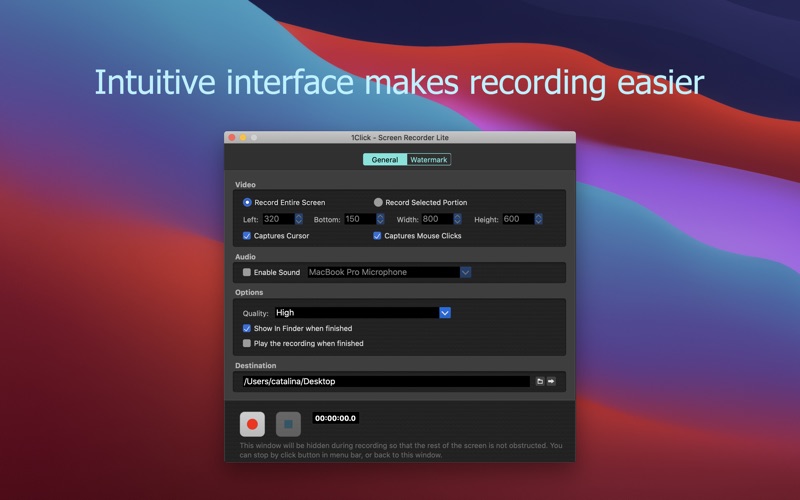
1Click - Screen Recorder Lite is an intuitive, light, stable, efficient and easy-to-use screen recording software. With this screen recorder on Mac, you can create a new screen recording. This easy-to-use screen recording app helps you record online courses, game play tricks, product demos, presentations, online meetings and more. No matter what, it makes you work efficiently and smartly. This screen recording app has extremely high performance, even when recording a 5K screen, your work can go smoothly.

When you are ready to record, there are two ways of screen recording. They are entire-screen record and portion-screen record. No matter which way you choose, you can record audio from built-in microphone or system sound. In addition, the watermark function allows you to add a logo to the recording.

>>>Smart and Efficient Screen Recording
-Record 5K screen efficiently and smoothly
-Record the entire screen or any portion screen
-Start recording with one click
-Capture audio with system built-in microphone or any audio input devices
-Set different quality for screen recording
-Add mouse click effect and cursor for screen recording
-Add text or image logo for screen recording
-Use the most popular video format mp4 to store screen recordings
-Create recording of product demonstrations
-Create recording of presentations
-Create recording of tutorials
-Create recording of game play tricks

1Click - Screen Recorder Lite allows you to record up to 3 minutes length video. You can unlock the time limited through IAP feature.

En voir plus...

Quoi de neuf dans la dernière version ?

-Fixed some bugs
  • Screenshot #1 pour 1Click - Screen Recorder Lite
  • Screenshot #2 pour 1Click - Screen Recorder Lite

D'autres applications du développeur

Screen SnapshotScreen SnapshotmacOS1Click - Screen Recorder1Click - Screen RecordermacOSDiskeeperDiskeepermacOSMP3 Audio RecorderMP3 Audio RecordermacOSAudioCraft - Convert & CutAudioCraft - Convert & CutmacOSRAW Converter UltimateRAW Converter UltimatemacOSVoir toutes les apps

Note

(0 note)

Détails sur l'application

Version
4.3.0
Taille
2.3 Mo
Version minimum de macOS
10.10
Dernière mise à jour
10/05/2022
Publié par
SEASOFT LTD.

Newsletter App Store

Recevez chaque jour les meilleures promos

Actualité Apple

Image L’iPhone Ultra pliable va-t-il résoudre les défauts du Galaxy Z Fold 8 ?
L’iPhone Ultra pliable va-t-il résoudre les défauts du Galaxy Z Fold 8 ?
Image Mac : des hackers exploitent la faille du partage d’écran avec un mineur de cryptomonnaie
Mac : des hackers exploitent la faille du partage d’écran avec un mineur de cryptomonnaie
Image Publicités sur Apple Plans : les annonceurs peuvent réserver leurs espaces
Publicités sur Apple Plans : les annonceurs peuvent réserver leurs espaces
Image iPhone 18 Pro : Apple fait baisser les prix pour les écrans OLED
iPhone 18 Pro : Apple fait baisser les prix pour les écrans OLED
iPhoneAddict Apps

Le catalogue iPhoneAddict pour suivre les nouveautés, mises à jour et baisses de prix de l’App Store.

Apps

Toutes les apps iOS iPhone iPad Universelles Mac Apple TV

iPhoneAddict

Actualité Apple Archives keynotes Contact À propos KultureGeek

Suivez-nous

©2009-2026 i2CMedia. Tous droits réservés.