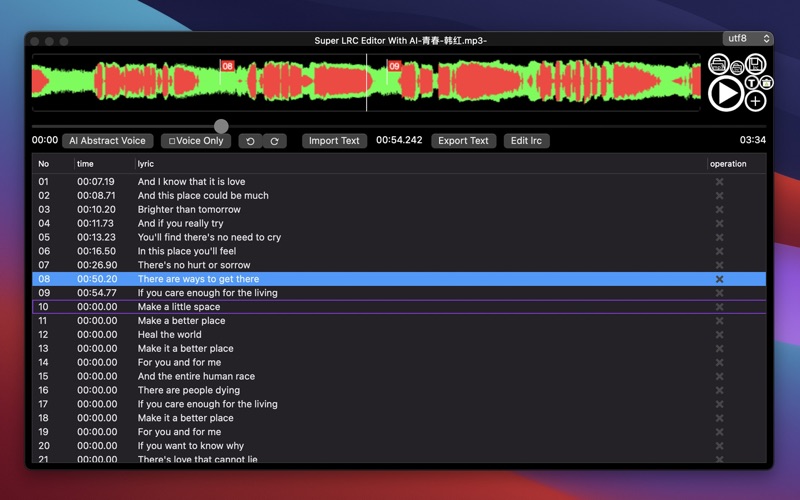
Super LRC Editor With AI
macOS / Musique
Basic Operation steps:
1. Click the open mp3 button to open a mp3 file;
2. Click the play button to play;
3. Click the plus button to add a lyric on the right time;
4. After finished the lyric editing, click the save button to save the lrc file.
You can also open a .lrc file to load the old lyric contents.
You can also open a .lrc file (pure lyric file without time label) to load.
You can paste pure lyrics text (without time labels) in 'Import text' window.
You can edit last lrc contents (with time labels) in 'Edit lrc' window.
Suggested operation steps:
1.Open 'Import Text' window, listen to a mp3 and write the lyrics in pure text mode, then click 'Import';
2.Click 'time' column of first row to select the first row;
3.Click ‘Play’;
4.press [Command]+[T] or click 'Tag' button while the voice of the first lyric need being shown;
5.then, press [Command]+[T] or click 'Tag' button while the voice of the selected lyric need being shown;
6.At last, click Save button to save the lrc file.
This version:
1. Added the function of two finger scrolling Wave Form (or use middle scroll key of mouse to scroll Wave Form);
2. Added function of click and drag red flag;
4. Add Function: Import Pure Lyric Text;
5. Add Function: Export pure lyrics from the editor.
6. Add access key for main operations:
Tag[Command+T],
Play[Command+P],
open mp3[Command+3],
open Lrc[Command+L],
Add lyric[Command+A],
Insert lyric[Command+I],
Delete current lyric[Command+Delete],
Clear lyrics[Command+0],
Save lyrics[Command+S],
play previous lyric[Command+Left arrow],
play next lyric[Command+Right arrow],
move current tagging lyric to previous lyric[Command+Up arrow],
move current tagging lyric to next lyric[Command+Down arrow],
Undo[Command+Z],
Redo[Command+Shift+Z],
[Command+Enter] enter current tagging lyric to editing mode;
[right arrow] in non-editing mode to forward 1 second;
[left arrow] in non-editing mode to backward 1 second.
7.Two line light display: lightblue one is for current playing lyric, the purple border one is for tagging lyric.
Attention:
All .lrc files copied from windows system may using GBK or other local encoding charset. You can use kinds of charsets to adapt by click the right-top Pop-Up-Button.
Specials:
In this version, you can abstract voice mp3 from the selected mp3 file, and the software will draw the voice wave from in red color. You can obviously see where the voice stoped and where another voice begin.
Quoi de neuf dans la dernière version ?
1. Optimized starting process, update Starting Animation.