iFunia AudioConverter
macOS / Musique
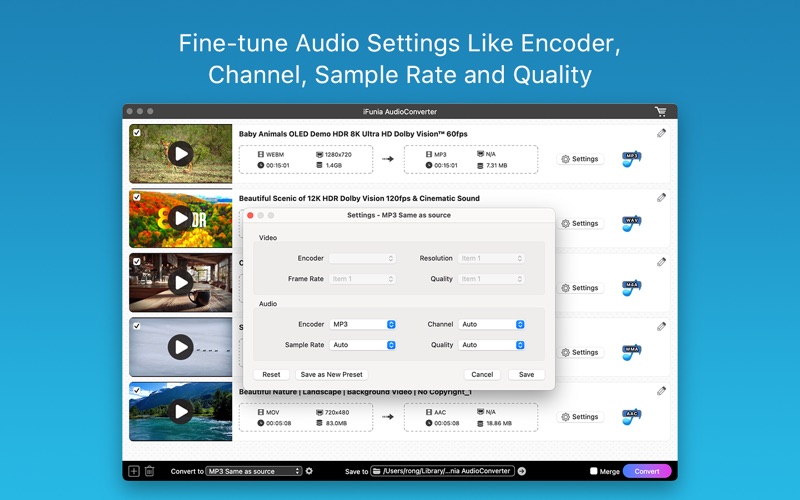
iFunia Audio Converter is an easy-to-use audio conversion tool for Mac that helps you extract audio from videos and convert audio files between virtually all popular formats with high quality and fast speed.
Key Features
- Universal audio converter supporting all popular formats, like MP3, AAC, WAV, FLAC, M4A, AIFF, OGG, WMA, and more.
- Extracts audio from 600+ video formats including MP4, MOV, MKV, AVI, WMV, YouTube videos, and other video formats.
- Batch convert multiple files at once to save time.
- Preserve original audio quality with fast conversion speed
- Adjust sample rate, codec, and other audio settings
- Trim audio clips to keep only the desired segment.
- Control over the volume levels and add fade in/out effects to audio
- Add chapters to make your audios organized.
- Simple and intuitive interface optimized for macOS.
- Supports drag-and-drop workflow for quick importing.
Input Formats
- Standard Definition Videos:
3GP, 3GP2, ASF, AVI, AMV, AVR, AVS, CDG, CDXL, Digital Video (DV, DIV), Flash Video (FLV, F4V), GDV, MKV, DVR, MJPEG Video (MJPG, MJPEG), MPG Video (MPG, MPEG, M2V, MPA), MP4, MPV, MTV, MV, MXF, NUT, NSV, Quick Time Video (MOV, QT), Raw Video (H261, H263, H264), Real Video (RM, RMVB), AU, (S) VCD Video (DAT), Video Transport Stream (TS, T2, M2T), WMV, YUV, MOD, TOD, VRO, AMV, IFV, IVF, JV, MLV, DIVX, OGV
-High Definition Videos:
H.264/MPEG4 AVC Video (M2TS, MTS), AVCHD (M2TS, MTS), HD AVI, HD MPEG2 Video (MPG, MPEG), HD MP4, HD TS, HD MOV, HD WMV Video (XWMV)
-Audio Formats:
AA, AAC, AAX, AC3, ACM, ACT, ADTS, ADX, ACF, AIFF, ALAW, ARM, APE, APC, AU, CAF, DSF, DTS, FLAC, MP3, MP2, M4A, OGG, OGA, WAV, WMA, MKA, M4R, M4B
Output Formats
AAC Audio, M4A Audio, AC3 Audio, MP3 Audio, WMA Audio, WAV Audio, OGG Audio, AIFF Audio, FLAC Audio, AMR Audio, MKA Audio, AU Audio, M4B Audio, M4R Audio, APE Audio, MP2 Audio
ABOUT SUBSCRIPTION
Your subscription will auto renew unless you canceled at least 24 hours before the end of the current period.
You can manage and cancel your subscriptions in your account settings of the App Store after purchase.
Privacy Policy: https://www.ifunia.com/privacy-policy.html
Terms Of Use: https://www.ifunia.com/terms-of-use.html
SUPPORT
If you have any questions about iFunia AudioConverter, please feel free to contact us at support@ifunia.com
Quoi de neuf dans la dernière version ?
1. Refreshed and streamlined user interface for a smoother experience.
2. Conversion speed and quality dramatically enhanced.
3. Updated and optimized the output formats.