VectorStyler
macOS / Graphisme et design
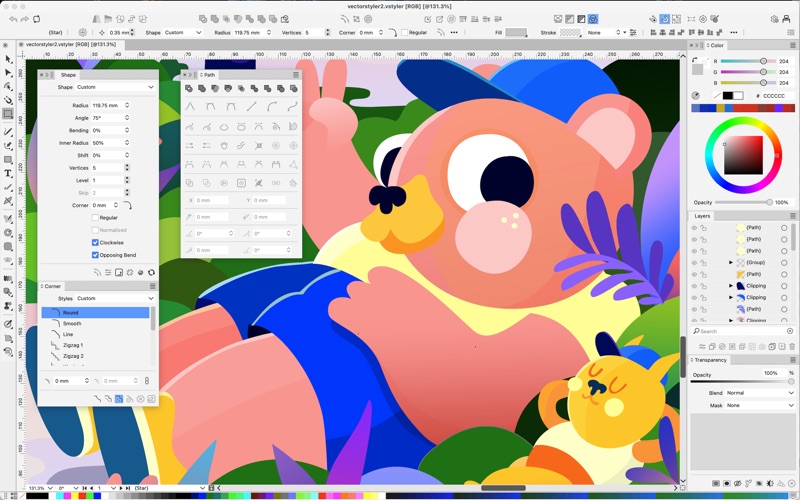
VectorStyler is an advanced illustration and vector graphics software, with a large and new feature set and workflow improvements. VectorStyler is developed with the goal of providing all the capabilities, designers and illustrators are familiar with, while also introducing new innovative features.
## Improved workflow
* Build a hierarchy of multiple canvases, and use unlimited number of artboards in a single document.
* Rotate views to arbitrary angles and draw or edit objects at any viewing angle.
* Non-destructive image and shape effects can be manipulated directly and interactively on the objects.
* Powerful snapping options to align objects and shapes, including collision and formation snapping.
* Create guidelines at any angle, group guidelines and use different colors per guideline group.
* Work seamlessly with multiple documents.
* Multiple views of the same document: edit a symbol in one view, see changes in the other view.
* Link documents and reuse symbols and styles from other documents.
* Real time, direct editing of objects and styles.
* Context dependent Properties panel.
* Import and reuse complex SVG image effect hierarchies.
* Zoom in to over 1.000.000% level.
* Setup objects for batch exporting.
* Batch export multiple artboards.
* Unlimited Undo and Redo hierarchy with alternate histories.
* Save undo and redo history with the document, and browse previous history in a newly opened documents.
* Find and replace objects, styles and text.
## Vector graphics and illustrations
* Import native editable AI files, including tiling patterns, vector brushes, styles and effects available for reuse and adjustment.
* Use real vector brushes, stretching vector graphics along shapes to create brush paint effects.
* Style objects with multiple outlines and fills using arrows, caps, dashes, stripes, variable stroke width, colors, rich gradients or tiling pattern styles.
* Powerful nondestructive vector effects to adjust object shapes.
* Setup gradients along or across a shape.
* Create mesh gradients from any object using the Mesh tool.
* Create adjustment layers using image effects, or use any object as an adjustment area.
* Advanced outline options, including variable width profiles, dashes, stripes, custom caps and arrows.
* Use the *Appearance* panel to create, edit or remove fill and stroke styles of an object.
* Create and reuse symbols from any object.
* Override selected styles locally for a Symbol.
* Align objects along a path.
* Use color filters to adjust the colors of a vector artwork.
* Convert images to vector art using the Image Trace panel.
* Use the *Shape Builder* tool to create complex shapes.
## Advanced typography
* Powerful text on path features: interactive positioning of text along a path.
* Easy adjustment of the vector text baseline, to create a text on path effect.
* Interactively move and transform individual characters of a text shape.
* Flow text in multiple frames across multiple artboards and canvases.
* Balance multiple columns of text flow inside a frame.
* Enable and use advanced East-Asian typography features.
* Use OpenType color and variable fonts.
* Apply automatic optical kerning to glyphs.
## Powerful vector tools
* Use the sketch tool to create complex shapes by sketching simple strokes.
* Shape operations: Combine, Intersect, Union, Exclude, Cut Out, Inside, Outside, Remove Overlaps, Exclude Back, Divide, Trim and Merge.
* Use the shape effects panel creates and manages multiple shape effects applied to the selected object.
* Distort groups of objects, using mesh or envelope distortions.
* Bend groups of objects along arbitrary, freely editable shapes.
* Warp objects into predefined shapes.
* Apply the *Elastic Warp* effect to distort objects freely.
* Use true vector brushes, with variable width and pressure sensitivity.
* Advanced masking and clipping options to create complex artworks.
Quoi de neuf dans la dernière version ?
- Improved up/down key handling in number fields inside the list viewing mode of effect lists
- Improved spot color importing from PDF files
- Improved performance of Merge operation
- Added shape preset selection dropdown to context panel for text shapes
- Added separate Overprint Fill and Overprint Stroke to the Object Options
- Added an option to block overprinting by white colors
- Added an selection action to select objects with white color and overprint enabled
- Automatically insert nodes to the distorted path in the Shape Bump effect
- Show current brush in Brush panel when no object is selected
- Keep vector content position fixed when adjusting clipping with the crop tool
- Double click opening of a text should not pan the view
- Highlight first font when searching for font names
- Default drop shadow effect to allow direct shape scaling
- Allow larger ranges in the Overlay shape effect
- Fixed an issue with overlay shape effect on closed shapes
- Fixed sa bug in the Expanded Stroke adjustment effect
- Fixed a bug in expanding repeaters with number variables
- Fixed a font scanning bug on Windows
- Fixed a bug in the crop tool
- Fixed a bug in grading loading from Adobe Illustrator files
- Fixed a bug in expanding spot colors on multiple selection
- Fixed a text frame issue with custom shaped frames
- Fixed a bug in snapping to recently moved object shapes
- Fixed a bug in the Extract Parts shape effect editor
- Fixed a bug with the Send into Current Layer command
- Fixed a bug in exporting stroke width opacity to PDF
- Fixed a bug that occurred when dragging images from one document to an other
- Added a combine option to the Overlay effect
- Click through select into other layers also
- Indicate current insertion layer in the Layers panel
- Fixed a crash that occurred in GPU rendering mode
- Fixed a crash with Overpring preview
- Fixed a node selection bug
- Fixed a bug in expanding repeaters containing text shapes
- Fixed a bug in refreshing changes while dragging objects inside clipped groups
- Fixed a bug in holding Shift after pressing the mouse with the Knife tool
- Fixed a problem with the Place Inside commands selected from the Layers panel context menu
- Fixed EM/EN space issues in fonts missing these character codes